# Precious metals
Source: https://docs.settlemint.com/docs/business/use-cases/precious-metals
Issue gold, silver, platinum, and palladium tokens in DALP with metal type, purity, unit-of-account pricing, vault storage context, and holder eligibility controls.
**Who should read this:** Precious metals dealers, vault operators, and custodians exploring tokenized commodity offerings. Asset managers evaluating physical commodity tokens will also find this relevant.
**Business value:** Use DALP to create a governed token record for a precious metal program: metal classification, weight terms, valuation input, custody context, holder visibility, and compliance-aware transfer controls.
The asset record stores the public token configuration and optional custody context. Approve the metal backing from source records such as assay certificates, storage receipts, chain-of-custody records, and insurance certificates before you issue supply. Attach those files to the token record with [token document uploads](/docs/api-reference/tokens/token-documents) when reviewers need a visible evidence trail. Use [collateral backing](/docs/operators/compliance/collateral) when minting must depend on an attested backing claim. For the architecture boundary behind that mint check, see [Supply cap and collateral](/docs/compliance-security/compliance/supply-cap-collateral). For the detailed operator flow, see [Create an asset with the Asset Designer](/docs/operators/asset-creation/create-asset) and pick the [`system-precious-metal` template](/docs/operators/asset-creation/system-templates#real-assets-asset-class-real-assets).
## Business challenge [#business-challenge]
A precious metals program requires a clear operational link between the token investors hold and the metal program it represents. When you issue a precious metal token, you must track the metal type, unit of account, pricing basis, storage context, and the compliance rules that determine who can hold or transfer the token.
### Traditional approach [#traditional-approach]
## How to issue a precious metal asset [#how-to-issue-a-precious-metal-asset]
Use Asset Designer when the precious metals program is ready to model a tokenized
asset. The public template path is the [`system-precious-metal` template](/docs/operators/asset-creation/system-templates#real-assets-asset-class-real-assets),
which belongs to the real-assets class, deploys the `precious-metal` base asset
type, and attaches historical balances and permit features. The details collected
after template selection describe the metal programme: metal type, optional
purity, storage context, weight-per-token terms, and valuation input.
Before minting supply, prepare the evidence that proves the metal programme is
ready to back the issued tokens. The asset record can show metal classification,
weight terms, valuation input, storage location, and custodian context. It does
not verify the physical metal by itself. Keep assay certificates, vault or
storage receipts, chain-of-custody records, insurance certificates, and reserve
reconciliation in the operator evidence pack. For uploaded token documents, use
precious-metal evidence types such as `assay_certificate`, `storage_receipt`,
`chain_of_custody`, and `insurance_certificate` so reviewers can distinguish
metal evidence from generic legal or compliance files. When minting must depend
on that review, configure the collateral requirement so the mint check uses an
approved backing claim rather than free-form token metadata.
### Evidence flow before minting [#evidence-flow-before-minting]
Precious metal issuance needs two separate records before supply is increased:
the asset metadata that describes the programme, and the approved backing claim
that the mint check can validate. DALP keeps those records connected without
turning uploaded files into automatic reserve proof.
| Step | Operator step | DALP record |
| ---- | ----------------------------------------------------------------------------------------------- | ---------------------------------------------------- |
| 1 | Review assay, storage, custody, insurance, and reconciliation evidence outside DALP. | Operator evidence pack and reviewer decision |
| 2 | Attach the relevant files to the token record as token documents. | Visible document records classified by evidence type |
| 3 | Have the trusted issuer record the approved collateral or backing claim for the asset identity. | Claim used by the collateral requirement module |
| 4 | Mint only after the configured compliance and collateral checks pass. | Supply-changing transaction and event history |
For the mint-control setup, use [Collateral requirement](/docs/operators/compliance/collateral).
For API-based evidence uploads, use [Token documents](/docs/api-reference/tokens/token-documents).
1. Open Asset Designer and choose the real-world asset class.
2. Select the precious metal instrument template, then enter the asset name,
symbol, decimals, and jurisdiction.
3. On the instrument details step, select the metal type. DALP supports gold,
silver, platinum, and palladium. Add the purity grade, vault location, and
custodian when the program should expose those fields.
4. On the pricing and valuation step, choose grams, troy ounces, or kilograms as
the weight unit, enter the weight represented by each token, and enter the
current spot price per unit in the selected price currency.
5. Configure any compliance modules needed for the issuance rules, review the
summary, and create the asset with PIN or OTP wallet verification.
6. After creation, use the asset workspace to inspect the metal metadata, holder
balances, transfer activity, and available token operations. New assets are
paused by default; unpause the asset when the operating approvals are
complete.
For the operator walkthrough, see [Create asset](/docs/operators/asset-creation/create-asset)
and pick the [`system-precious-metal` template](/docs/operators/asset-creation/system-templates#real-assets-asset-class-real-assets).
### Metal classification [#metal-classification]
A precious metal asset records the metal type as gold, silver, platinum, or
palladium. You can also record a purity grade when your product requires
that level of classification.
### Weight-based token terms [#weight-based-token-terms]
The asset can define the unit used for the metal program, such as grams, troy
ounces, or kilograms. It also records how much metal each token represents and
the price currency and spot price per unit used for valuation.
### Custody context [#custody-context]

You can add storage context to the asset, including a vault location and a
custodian or vault operator name. DALP surfaces this context on the asset detail
view when it is present, so holders can inspect the public-facing custody fields
attached to the token. Those fields show which metal program the token
represents, but they do not replace vault operations, inventory
reconciliation, insurance, or independent audit procedures.
### Compliance-aware transfers [#compliance-aware-transfers]
Precious metal assets can be created with compliance modules. Those controls can
limit who may receive or transfer the token according to the rules configured
for the issuance program.
### Holder and balance visibility [#holder-and-balance-visibility]
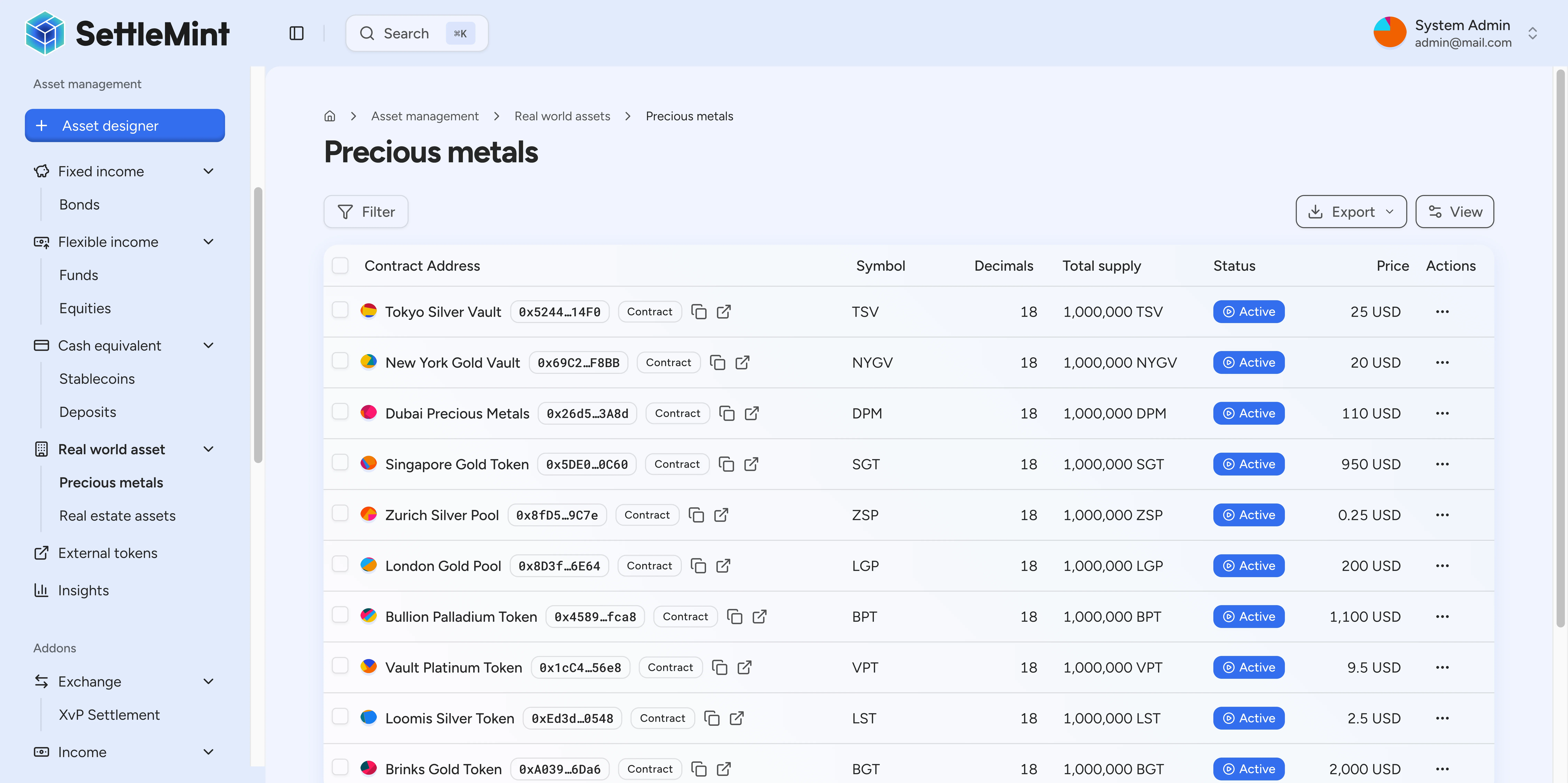
DALP shows token details and holder information through the asset workspace.
You can inspect the metal classification and purity, together with weight-per-token terms.
Storage location, custodian, current supply, and transfer activity are also visible where those fields and pages are available for the asset.
## Key capabilities [#key-capabilities]
| Capability | What DALP records or enforces |
| -------------------- | -------------------------------------------------------------- |
| Metal classification | Gold, silver, platinum, or palladium |
| Purity metadata | Optional purity grade for the metal program |
| Weight terms | Unit of account and weight per token |
| Valuation input | Price currency and spot price per unit |
| Custody context | Optional storage location and custodian or vault operator name |
| Compliance controls | Configured transfer rules applied to token operations |
| Holder visibility | Token holder and transfer views in the asset workspace |
## Example structure [#example-structure]
A gold-backed product can be modeled with:
1. gold as the metal type
2. an optional purity grade, such as 999.9
3. a weight unit, such as troy ounces or grams
4. a weight-per-token value
5. a price currency and spot price per unit
6. optional vault location and custodian fields
7. compliance modules selected for the target issuance rules
The same structure applies to silver, platinum, and palladium programs. Configure the appropriate metadata and compliance rules for each metal type.
## Compliance considerations [#compliance-considerations]
Precious metals programs require legal review and custody arrangements before launch. Your organisation must confirm investor eligibility rules and analyse market operations before you go live. DALP provides configurable asset and compliance controls. You remain responsible for selecting the rules, operating the off-chain custody process, and confirming the legal treatment of the product in each jurisdiction.
For detailed compliance architecture, see
[Compliance & Security](/docs/business/compliance-security).
## Implementation checklist [#implementation-checklist]
1. Define the metal programme, target jurisdictions, and whether the token uses a
pooled backing model rather than bar-level token tracking.
2. Choose the metal type and optional purity grade.
3. Set the weight unit, weight per token, price currency, and spot price input.
4. Decide which storage location and custodian fields should be visible on the
asset detail view.
5. Define how assay certificates, storage receipts, chain-of-custody records, or
insurance evidence will be reviewed and attached to the token record.
6. Decide whether minting should depend on an attested backing claim through the
collateral requirement module.
7. Select compliance modules for holder and transfer eligibility.
8. Assign issuer, custodian, emergency, governance, and supply-management roles
as the operating model requires.
9. Create the token. Inspect the detail, holder, and transfer views before
making it available to users.
## Limitations and considerations [#limitations-and-considerations]
* **Custody operations:** DALP can show custody context fields. The issuer and custodian remain responsible for off-chain vault operations, inventory reconciliation, insurance coverage, and independent audit procedures.
* **Pricing inputs:** Valuation depends on the price currency and spot price
inputs configured for the asset. Operators should define how those values are
maintained and reviewed.
* **Physical delivery:** Any physical metal delivery or redemption workflow must run outside the token metadata unless a deployment adds a verified redemption process.
* **Regulatory scope:** Commodity classification, securities law, and AML/KYC obligations vary by jurisdiction. Confirm the applicable rules before launch.
## Next steps [#next-steps]
* [Compliance & Security](/docs/business/compliance-security): embedded compliance controls for precious metal programs.
* [Token document uploads](/docs/api-reference/tokens/token-documents): attach assay certificates, storage receipts, chain-of-custody records, and insurance certificates to the token record.
* [Supply cap and collateral controls](/docs/compliance-security/compliance/supply-cap-collateral): the attested backing checks the platform uses before minting.
* [Asset contracts](/docs/architects/components/asset-contracts): how instrument profiles and configurable assets fit together.
* [Developer Documentation](/docs/developers): integration and operations guidance.