# Precious metals
Source: https://docs.settlemint.com/docs/executive-overview/use-cases/precious-metals
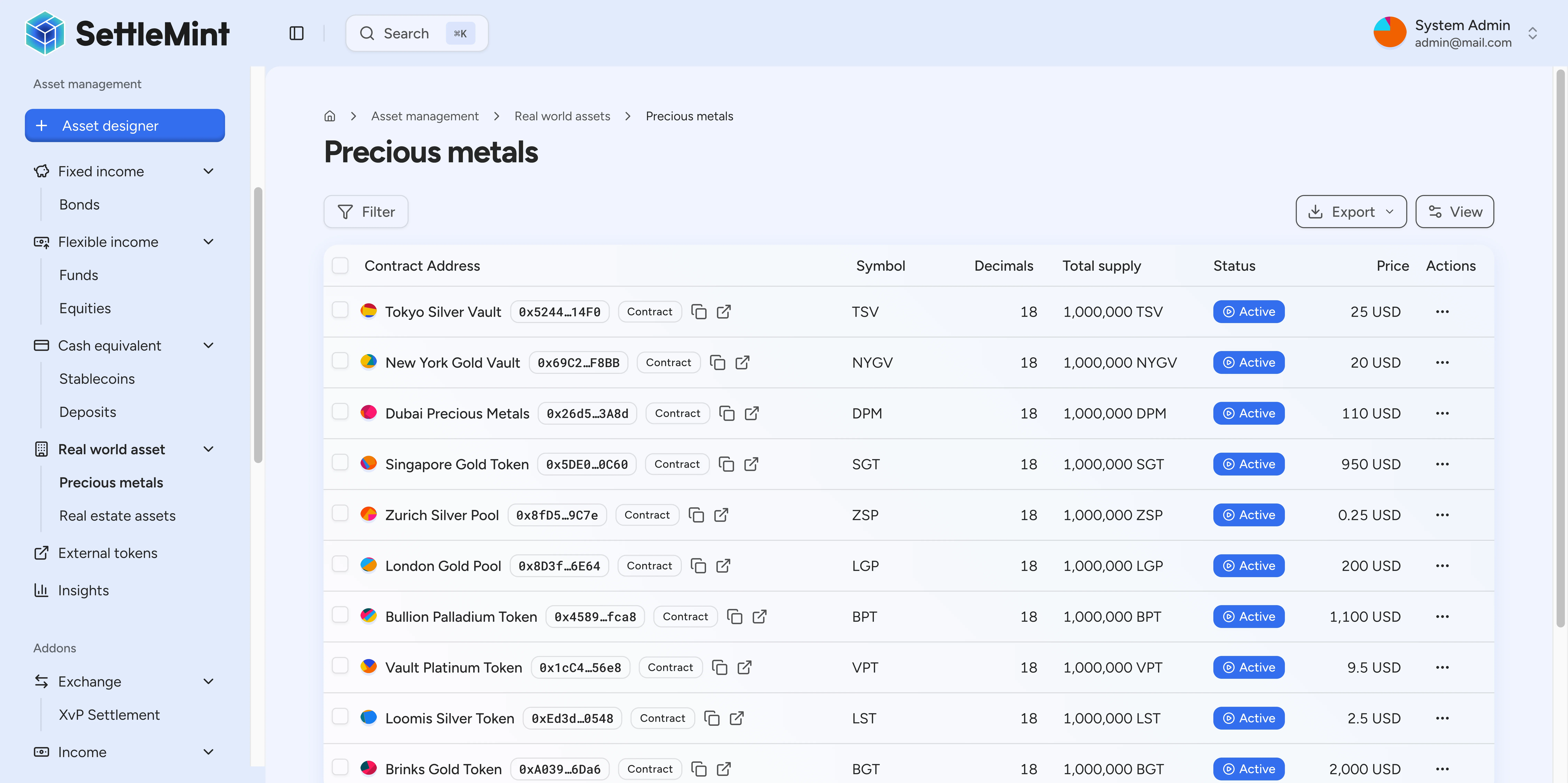
Precious metals tokenization through DALP helps model gold, silver, platinum, and palladium assets with metal metadata, weight-based pricing, custody context, and compliance controls.
**Who should read this:** Precious metals dealers, vault operators, custodians,
and asset managers exploring tokenized commodity offerings.
**Business value:** Create a governed token record for a precious metal program:
metal classification, weight terms, valuation input, custody context, holder
visibility, and compliance-aware transfer controls.
## Business challenge [#business-challenge]
Precious metals programs need a clear operational link between the token that
investors hold and the metal program it represents. Operators must track the
metal type, unit of account, pricing basis, storage context, and the compliance
rules that determine who can hold or transfer the token.
### Traditional approach [#traditional-approach]
## How to issue a precious metal asset [#how-to-issue-a-precious-metal-asset]
Use Asset Designer when the precious metals program is ready to model a tokenized
asset. The wizard can start from a dedicated precious metal asset type or from an
[instrument template](/docs/user-guides/asset-creation/instrument-templates)
that preselects the asset class, deployable asset type, token features, defaults,
and metadata fields for the issuance program.
1. Open Asset Designer and choose the real-world asset class.
2. Select the precious metal instrument template, then enter the asset name,
symbol, decimals, and jurisdiction.
3. On the instrument details step, select the metal type. DALP supports gold,
silver, platinum, and palladium. Add the purity grade, vault location, and
custodian when the program should expose those fields.
4. On the pricing and valuation step, choose the weight unit, enter the weight
per token, and enter the current spot price per unit in the selected price
currency.
5. Configure any compliance modules needed for the issuance rules, review the
summary, and create the asset with PIN or OTP wallet verification.
6. After creation, use the asset workspace to inspect the metal metadata, holder
balances, transfer activity, and available token actions. New assets are
paused by default; unpause the asset when the operating approvals are
complete.
For the operator walkthrough, see
[Create a precious metal asset](/docs/user-guides/asset-creation/create-precious-metal-asset).
For the generic wizard flow, see [Create asset](/docs/user-guides/asset-creation/create-asset).
### Metal classification [#metal-classification]
A precious metal asset records the metal type as gold, silver, platinum, or
palladium. Operators can also record a purity grade when the product requires
that level of classification.
### Weight-based token terms [#weight-based-token-terms]
The asset can define the unit used for the metal program, such as grams, troy
ounces, or kilograms. It also records how much metal each token represents and
the price currency and spot price per unit used for valuation.
### Custody context [#custody-context]

Operators can add storage context to the asset, including a vault location and a
custodian or vault operator name. DALP surfaces this context on the asset detail
view when it is present, so users can inspect the public-facing custody fields
attached to the token. Those fields help users see which metal program the token
is meant to represent, but they do not replace vault operations, inventory
reconciliation, insurance, or independent audit procedures.
### Compliance-aware transfers [#compliance-aware-transfers]
Precious metal assets can be created with compliance modules. Those controls can
limit who may receive or transfer the token according to the rules configured
for the issuance program.
### Holder and operational views [#holder-and-operational-views]
DALP shows token details and holder information through the asset workspace.
Users can inspect the metal classification, purity, weight-per-token terms,
storage location, custodian, supply, holders, and transfer activity where those
fields and views are available for the asset.
## Key capabilities [#key-capabilities]
| Capability | What DALP records or enforces |
| -------------------- | -------------------------------------------------------------- |
| Metal classification | Gold, silver, platinum, or palladium |
| Purity metadata | Optional purity grade for the metal program |
| Weight terms | Unit of account and weight per token |
| Valuation input | Price currency and spot price per unit |
| Custody context | Optional storage location and custodian or vault operator name |
| Compliance controls | Configured transfer rules applied to token operations |
| Holder visibility | Token holder and transfer views in the asset workspace |
## Example structure [#example-structure]
A gold-backed product can be modeled with:
1. gold as the metal type
2. an optional purity grade, such as 999.9
3. a weight unit, such as troy ounces or grams
4. a weight-per-token value
5. a price currency and spot price per unit
6. optional vault location and custodian fields
7. compliance modules selected for the target issuance rules
The same model also supports silver, platinum, and palladium programs when the
operator configures the appropriate metadata and compliance rules.
## Compliance considerations [#compliance-considerations]
Precious metals programs usually need legal, custody, investor-eligibility, and
market-operations review before launch. DALP provides configurable asset and
compliance controls, but the issuer remains responsible for selecting the rules,
operating the off-chain custody process, and validating the legal treatment of
the product in each jurisdiction.
For detailed compliance architecture, see
[Compliance & Security](/docs/executive-overview/compliance-security).
## Implementation checklist [#implementation-checklist]
1. Define the metal program and target jurisdictions
2. Choose the metal type and optional purity grade
3. Set the weight unit, weight per token, price currency, and spot price input
4. Decide which storage location and custodian fields should be visible
5. Define how assay certificates, storage receipts, chain-of-custody records, or
insurance evidence will be stored and reviewed outside the token metadata
6. Select compliance modules for holder and transfer eligibility
7. Configure issuer, custodian, emergency, governance, and supply-management
responsibilities as needed for the operating model
8. Create the token and review the detail, holder, and transfer views before
making it available to users
## Limitations and considerations [#limitations-and-considerations]
* **Custody operations:** DALP can show custody context fields, but off-chain
vault operations, inventory reconciliation, insurance, and audit procedures
remain issuer and custodian responsibilities.
* **Pricing inputs:** Valuation depends on the price currency and spot price
inputs configured for the asset. Operators should define how those values are
maintained and reviewed.
* **Physical delivery:** Any physical metal delivery or redemption workflow must
be operated outside the token metadata unless a deployment adds a verified
redemption process.
* **Regulatory scope:** Commodity, securities, and AML/KYC requirements vary by
jurisdiction. Issuers should confirm the applicable rules before launch.
## Next steps [#next-steps]
* Review [Compliance & Security](/docs/executive-overview/compliance-security)
to understand embedded compliance controls
* Review [Asset contracts](/docs/architecture/components/asset-contracts) to
understand how instrument profiles and configurable assets fit together
* Explore [Developer Documentation](/docs/developer-guides) for integration and
operations guidance