# Change asset admin roles
Source: https://docs.settlemint.com/docs/operators/asset-servicing/change-asset-admin-roles
Grant, revoke, and review token-level administrator roles for one asset in the DALP web interface.
Asset administrator roles control who can operate one token after issuance. Use the asset Permissions tab to grant, remove, or review token-level access for custodians, supply managers, emergency responders, governance operators, and asset administrators.
## Prerequisites [#prerequisites]
* Permission manager role on the target asset. The UI labels this the token-level `admin` role, which grants or changes roles for that token.
* Access to the asset detail workspace for the token you want to update.
* A wallet authentication method configured for transaction signing, such as PIN code, secret code, or OTP when your platform requires it.
* A clear reason for the role change, especially when granting custody, emergency, or supply permissions.
## About asset admin roles [#about-asset-admin-roles]
Each asset has its own access-control set. Roles apply to the selected token only.
| Role | What it controls | Common use cases |
| ------------------ | -------------------------------------------- | ------------------------------------------------------------------------- |
| Permission manager | Permission management for the selected asset | Add administrators and grant or revoke token-level roles |
| Custodian | Custody and intervention | Freeze addresses, force transfers, and recovery operations |
| Emergency | Emergency operations | Pause, unpause, and recovery functions |
| Supply Management | Asset supply control | Mint and burn token supply; withdraw denomination assets where applicable |
| Governance | Asset policy and configuration | Update verification, compliance, and governance parameters |
Custodian and Emergency are both high-impact roles. They cover different operating moments.
Custodian is the holder-level intervention role. Use it for account or balance operations: address freezes, partial freezes, forced transfers, and wallet recovery.
Emergency is the asset-wide stop-and-recover role. Use it for asset-level pause decisions, external ERC20 recovery, and early maturity on assets with maturity-redemption controls.
| Control decision | Role to assign | What the operator can do |
| ------------------------------- | ------------------ | ---------------------------------------------------------------------------------------------------------------- |
| Freeze one holder address | Custodian | Block or unblock the selected address for the asset when the asset supports holder freeze controls. |
| Freeze part of a holder balance | Custodian | Hold or release a specific token amount for one holder, including batch freeze and unfreeze operations. |
| Move holder tokens by exception | Custodian | Execute forced transfer or wallet-recovery operations for approved recovery, legal, or compliance cases. |
| Stop movement for the asset | Emergency | Pause or unpause the asset-level movement state for maintenance, investigation, or incident response. |
| Trigger early maturity | Emergency | Mark a maturity-redemption asset as matured before its scheduled maturity date when that feature is configured. |
| Recover external ERC20 tokens | Emergency | Move non-asset ERC20 tokens accidentally held by the asset contract to the approved destination. |
| Change who holds these roles | Permission manager | Grant or revoke Custodian, Emergency, Supply Management, Governance, or Permission manager access for the asset. |
Do not grant both Custodian and Emergency by default. Assign them together only when the same operating team is approved to handle both holder-level interventions and asset-wide emergency decisions.
Asset roles apply to one token. Platform roles, such as `tokenManager`, control whether an operator can access
platform-wide token-management areas in the web interface. A row can show a warning when an account has token roles
but lacks the platform role needed for UI access. API access can still be allowed by the token-level role.
## Changing asset admin roles [#changing-asset-admin-roles]
### Access asset management [#access-asset-management]
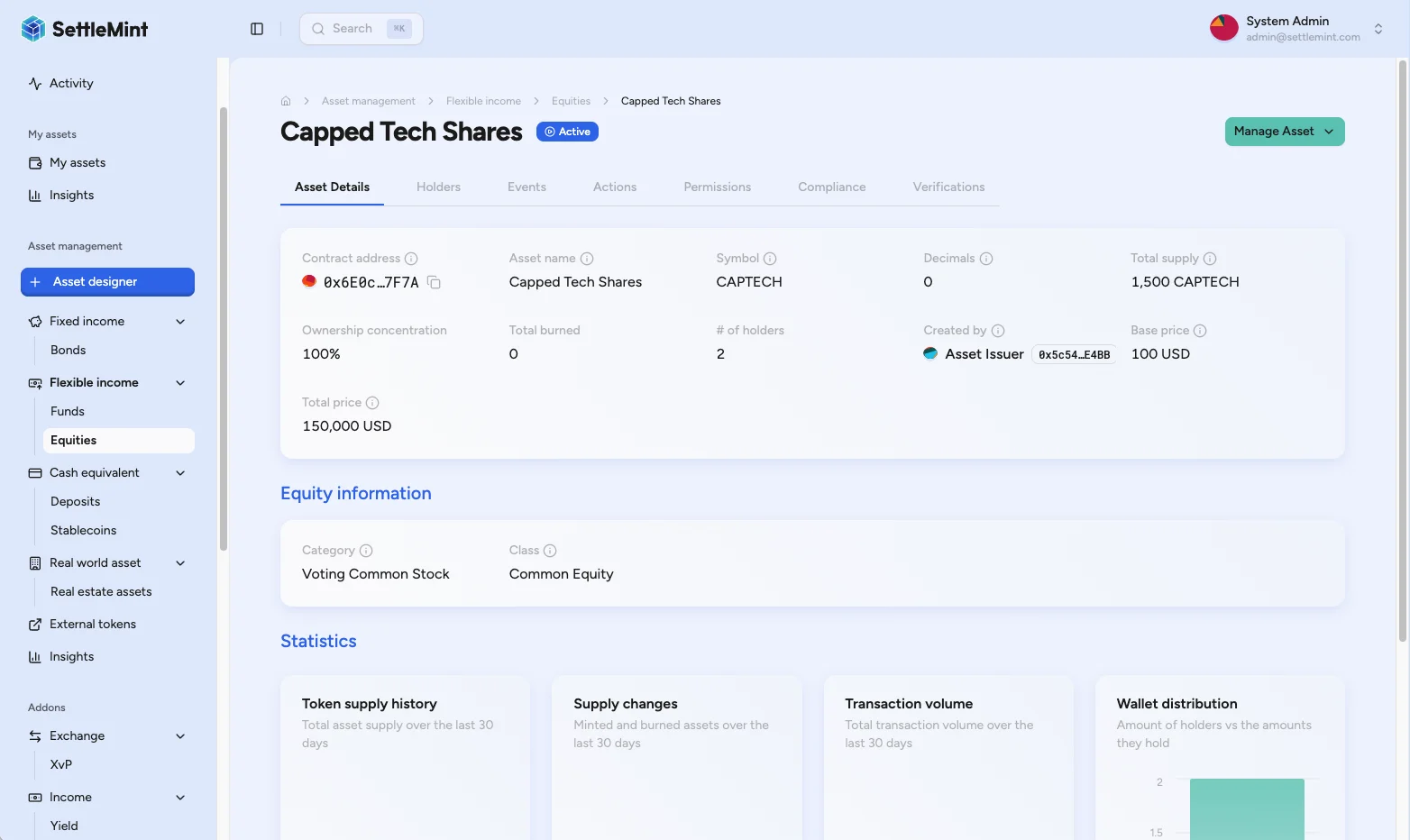
Navigate to Asset Management, then select the asset type (Equity, Bond, Fund, or similar) and click on the asset you want to modify.
### Access permissions [#access-permissions]
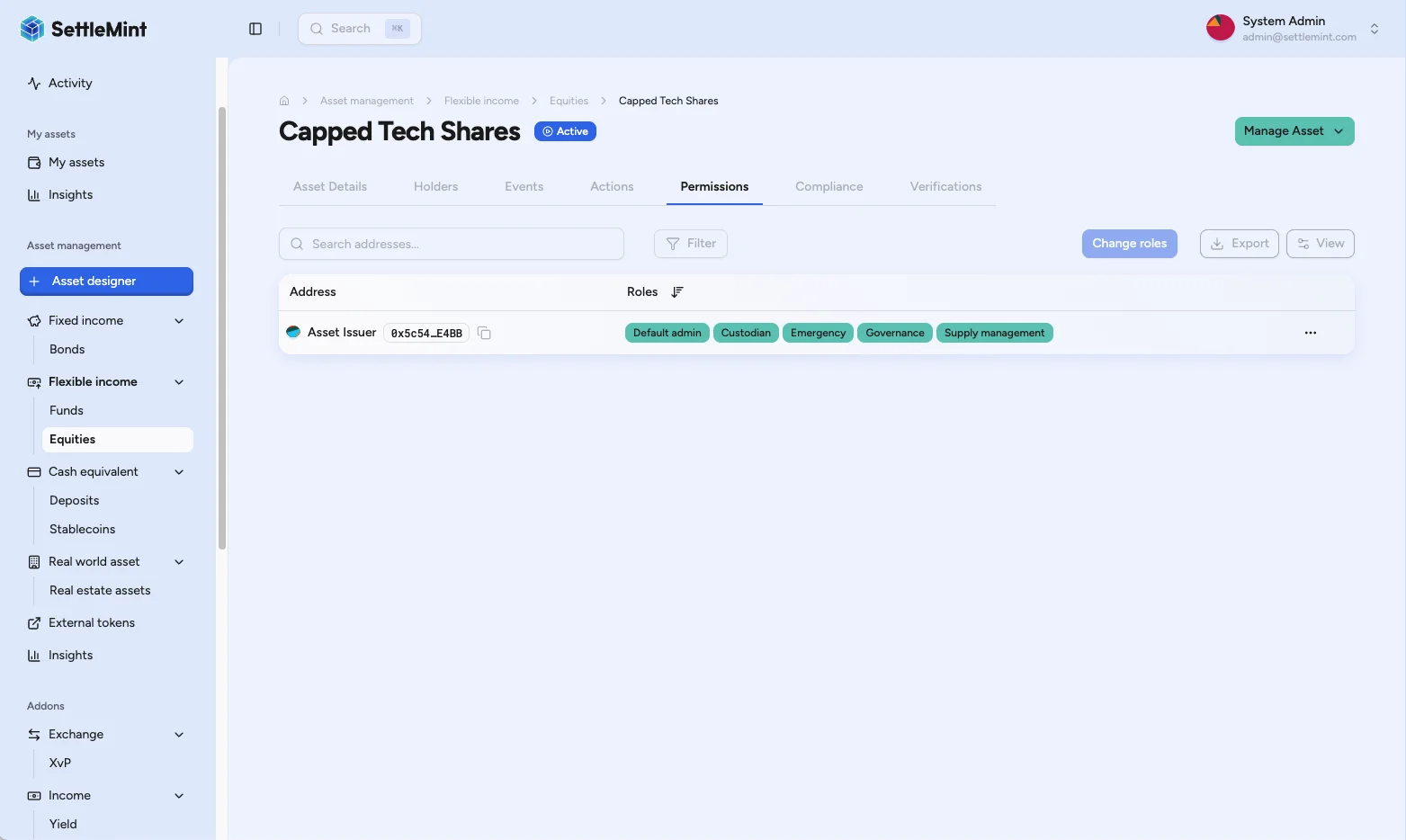
Click the Permissions tab to view administrator addresses, participant names when advanced accounts is enabled, current role assignments, warnings, and the row menu.
### Initiate role change [#initiate-role-change]
Find the administrator whose roles you want to modify and open the row menu. Select **Change roles** to open the role-management sheet. To grant roles to a new administrator, use Add admin above the permissions table.
### Configure roles [#configure-roles]
Select only the roles the operator needs: Permission manager, Custodian, Emergency, Supply Management, or Governance. Clearing an existing role revokes that role when you save the change. If the row warns that a participant is out of sync, use Sync permissions so the participant's operations address receives the missing token roles.
### Review and authenticate [#review-and-authenticate]
Click **Continue** to review the role-change summary, then click **Save**. Complete the wallet authentication prompt. DALP submits the grant or revoke transaction and refreshes the asset permissions after confirmation.
## Review the result [#review-the-result]
After the transaction confirms, check the Permissions table again. The updated row should show the expected role set and no unexpected warnings. If advanced accounts is enabled, review the participant row rather than treating the signing and operations addresses as separate operators.
## Operating guidance [#operating-guidance]
* Grant the smallest role set that lets the operator perform the task.
* Keep at least one trusted Admin on the asset so permissions remain manageable.
* Separate Custodian, Emergency, Supply Management, and Governance duties when your operating model requires independent approvals.
* Record why each high-impact role was granted or removed.
* Remove roles when an operator changes team, leaves the programme, or no longer needs access.
## Troubleshooting [#troubleshooting]
| Issue | Solution |
| ------------------------------------- | ------------------------------------------------------------------------------------------------------------------------------------------------------------------------------------------------------------------------------------------------------------------------------------------------------------------------------------------------------ |
| Cannot see Permissions tab | Check that you are on the correct asset detail page and that the asset is deployed. |
| Add admin or Change roles is disabled | Your account lacks Permission manager access for this token. Ask a current asset permission manager to update the role. |
| Warning says not a token manager | The account has token-level roles but does not have the platform role needed for token-permission access in the UI. Ask a platform administrator to review platform access if UI access is required. |
| Row says out of sync | Use Sync permissions so the participant's operations address receives the token roles held by the signing address. If the token shows a banner that several participants' roles are not migrated to smart accounts, see [Complete token role migration](/docs/operators/platform-setup/complete-token-role-migration) to migrate them all in one step. |
| Role changes do not appear | Wait for blockchain confirmation, refresh the asset page, and check that the transaction succeeded. |
## Related guides [#related-guides]
* [Change asset administrator roles via API](/docs/developers/asset-servicing/change-asset-admin-roles) - Automate grant and revoke requests.
* [Change platform admin roles](/docs/operators/platform-setup/change-admin-roles) - Manage platform-wide roles.
* [Add administrators](/docs/operators/platform-setup/add-admins) - Add platform administrators before assigning token responsibilities.
* [Asset detail workspace](/docs/operators/asset-servicing/asset-detail-workspace) - Navigate the asset tabs used for servicing work.