# Collateral requirement
Source: https://docs.settlemint.com/docs/operators/compliance/collateral
Configure the collateral compliance module so DALP checks the asset identity for
a valid collateral claim before minting more supply.
The collateral compliance module checks minting. When you enable the module for an asset, DALP looks for a valid collateral claim on the asset identity before allowing new supply. That claim must come from a trusted issuer, must be unexpired, and must cover the required amount after the mint.
The module does not screen normal wallet-to-wallet transfers. DALP also does not prove that money, securities, commodities, or other off-chain reserves exist. Reserve custody and attestations stay in the operator's evidence process.
For reserve-backed stablecoin programmes, pair this guide with [Stablecoin operating responsibilities](/docs/compliance-security/security/stablecoin-architecture-trust-boundaries) before configuring your asset.
For reserve-backed, certificate-backed, or physical-asset-backed assets, also use the [reserve and backing evidence model](/docs/compliance-security/source-verification/overview#reserve-and-backing-evidence) before approving a supply change. That review connects DALP token documents, file hashes, document types, lifecycle events, and supply reads to the reserve reports or custody records the operator keeps outside DALP. DALP records the on-chain claim and enforces the configured minting check.
## How collateral validation works [#how-collateral-validation-works]
When you mint an asset with the module enabled, DALP applies this sequence.
The required amount is calculated from the post-mint total supply and the configured ratio in basis points. A 10,000 bps ratio means 100% backing. A 15,000 bps ratio means the claim must cover 150% of the post-mint supply.
## Roles and responsibilities [#roles-and-responsibilities]
| Role | Responsibilities |
| -------------- | -------------------------------------------------------------------------------------------------------------- |
| Asset issuer | Configures the module during asset creation, including the collateral ratio and trusted issuer setup. |
| Trusted issuer | Issues and manages the collateral claim on the asset identity after reviewing the operator's reserve evidence. |
The asset issuer configures how DALP checks collateral during minting. The trusted issuer records the claim that DALP
can validate on-chain. The documents and approvals behind that claim remain part of the operator's reserve process.
## Configuration parameters [#configuration-parameters]
| Parameter | Description | Valid values | Example |
| -------------------------- | -------------------------------------------------------------------------------------------------------------------------------------------- | ------------------------ | ----------------------------------- |
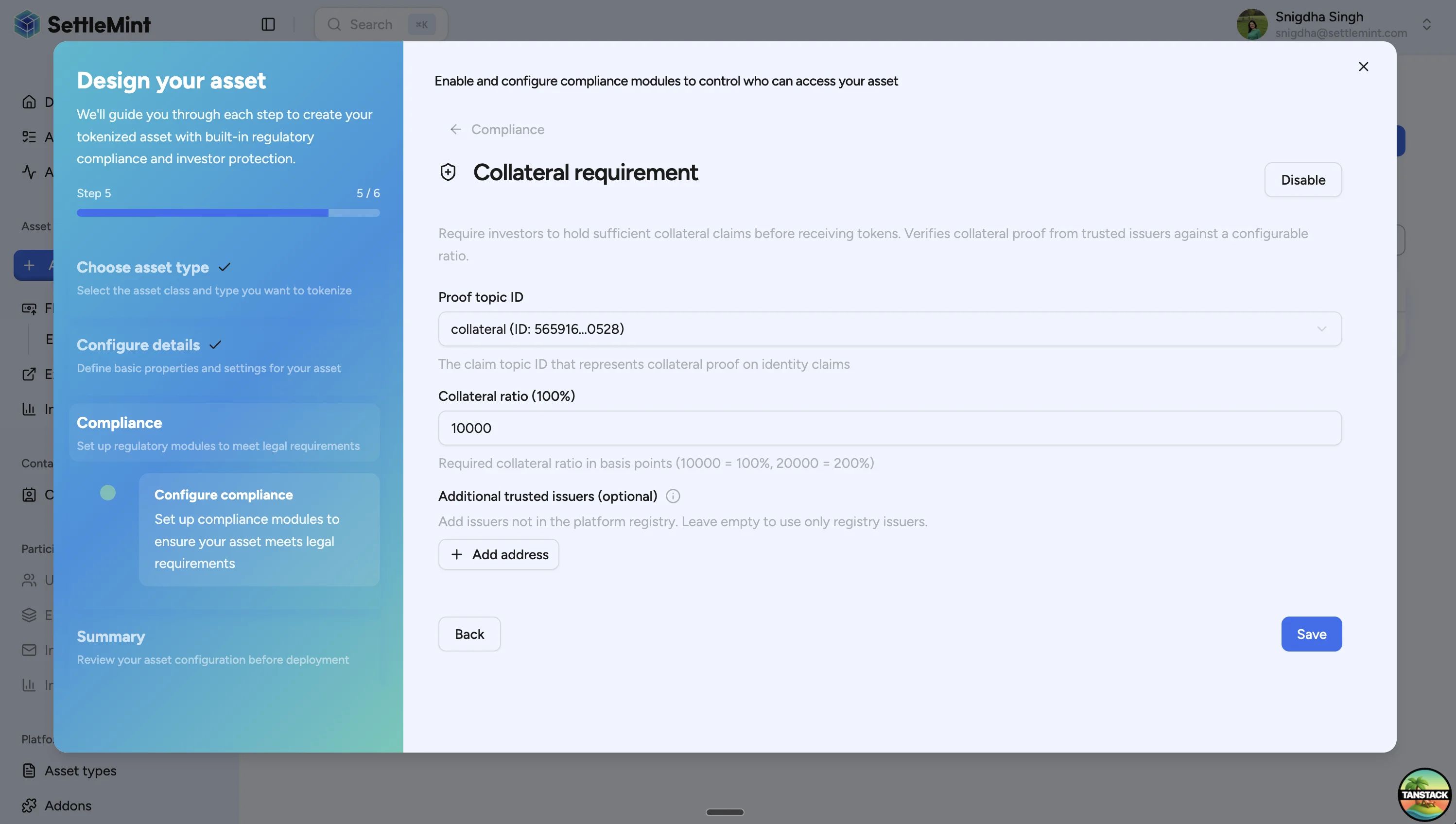
| Proof topic ID | Verification topic DALP checks for the collateral claim. The platform provides the default collateral topic. | System-provided topic ID | `collateral (ID: 565916...0528)` |
| Collateral ratio | Required backing ratio in basis points. | `0` to `20000` | `10000` for 100%, `15000` for 150% |
| Additional trusted issuers | Issuer addresses accepted in addition to the platform registry. Use only when the issuer is not already registered for the collateral topic. | Wallet addresses | Leave empty to use registry issuers |
`0` disables the minting check. `10000` requires 100% backing, so 1,000 minted units require a claim for at least
1,000. `20000` is the maximum ratio and requires 200% backing.
## Configure collateral during asset creation [#configure-collateral-during-asset-creation]
### Open the asset designer [#open-the-asset-designer]
Navigate to Asset management > Asset designer in the sidebar. The wizard guides you through each configuration step before deployment.
### Complete asset setup [#complete-asset-setup]
Follow the wizard through asset class, type, and basic configuration. See [Create asset](/docs/operators/asset-creation/create-asset) for the full asset creation flow.
### Enable the module [#enable-the-module]
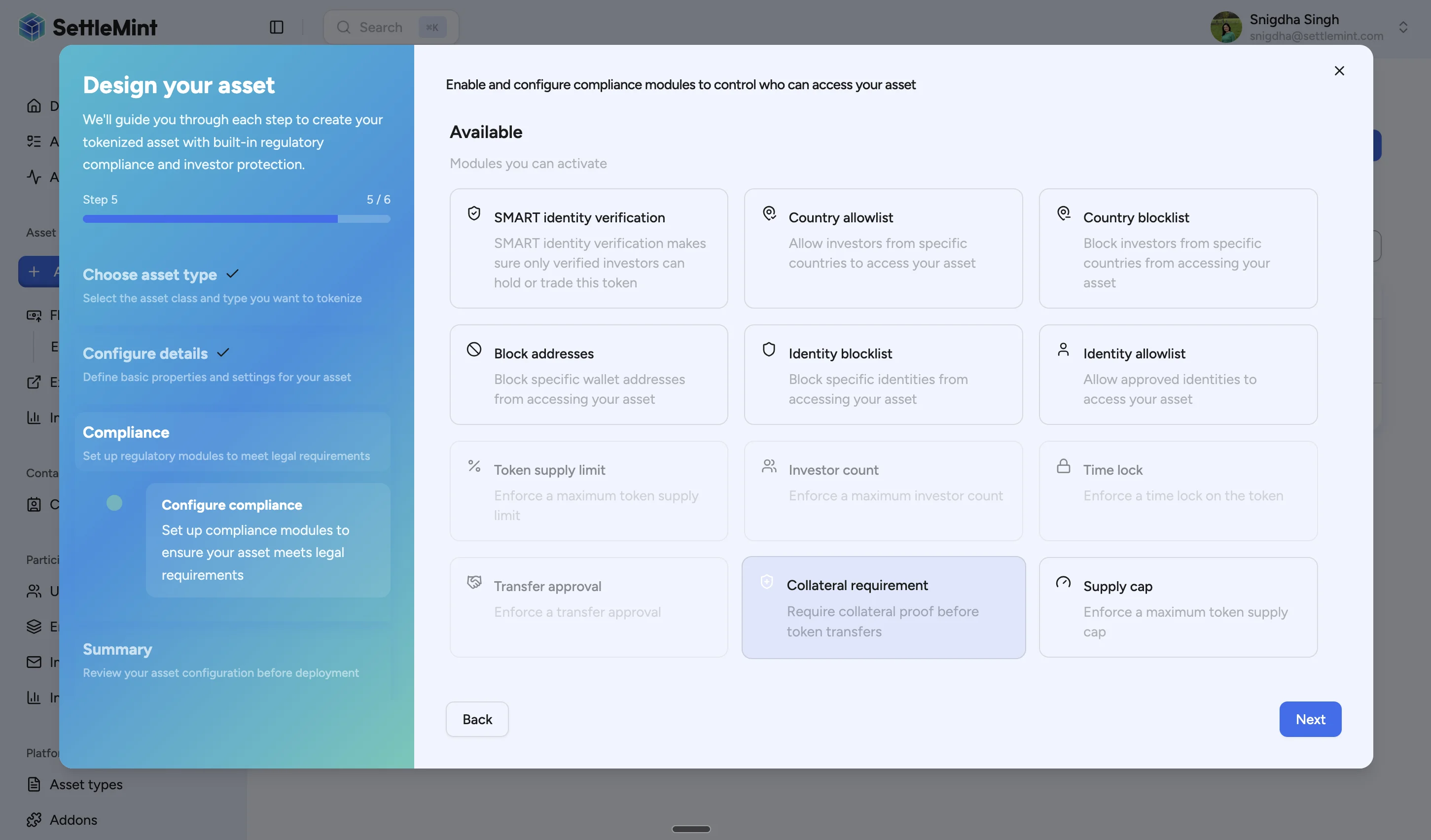
On the compliance modules step, select Collateral requirement. This adds the minting check to the asset.
### Configure the settings [#configure-the-settings]
Set the collateral topic, ratio, and any additional trusted issuers. The platform pre-fills the proof topic ID; enter the ratio in basis points and add issuer addresses only if needed.
### Complete deployment [#complete-deployment]
Review the configuration and deploy the asset. The module is active after deployment.
## Issue a collateral verification [#issue-a-collateral-verification]
After deployment, a trusted issuer must add a collateral claim to the asset identity before minting can pass the module check. Issue the claim using one of these permissions:
* trusted issuer authority for the collateral topic
* governance authority on the asset
### Claim fields [#claim-fields]
| Field | Description | Format |
| ------ | ---------------------------------------------------------------------------------------------------- | -------------------- |
| Amount | Total value covered by the claim. Use the same unit basis as the asset supply for the minting check. | Asset amount |
| Expiry | Timestamp after which DALP stops treating the claim as valid. | Future date and time |
### Navigate to Entities [#navigate-to-entities]
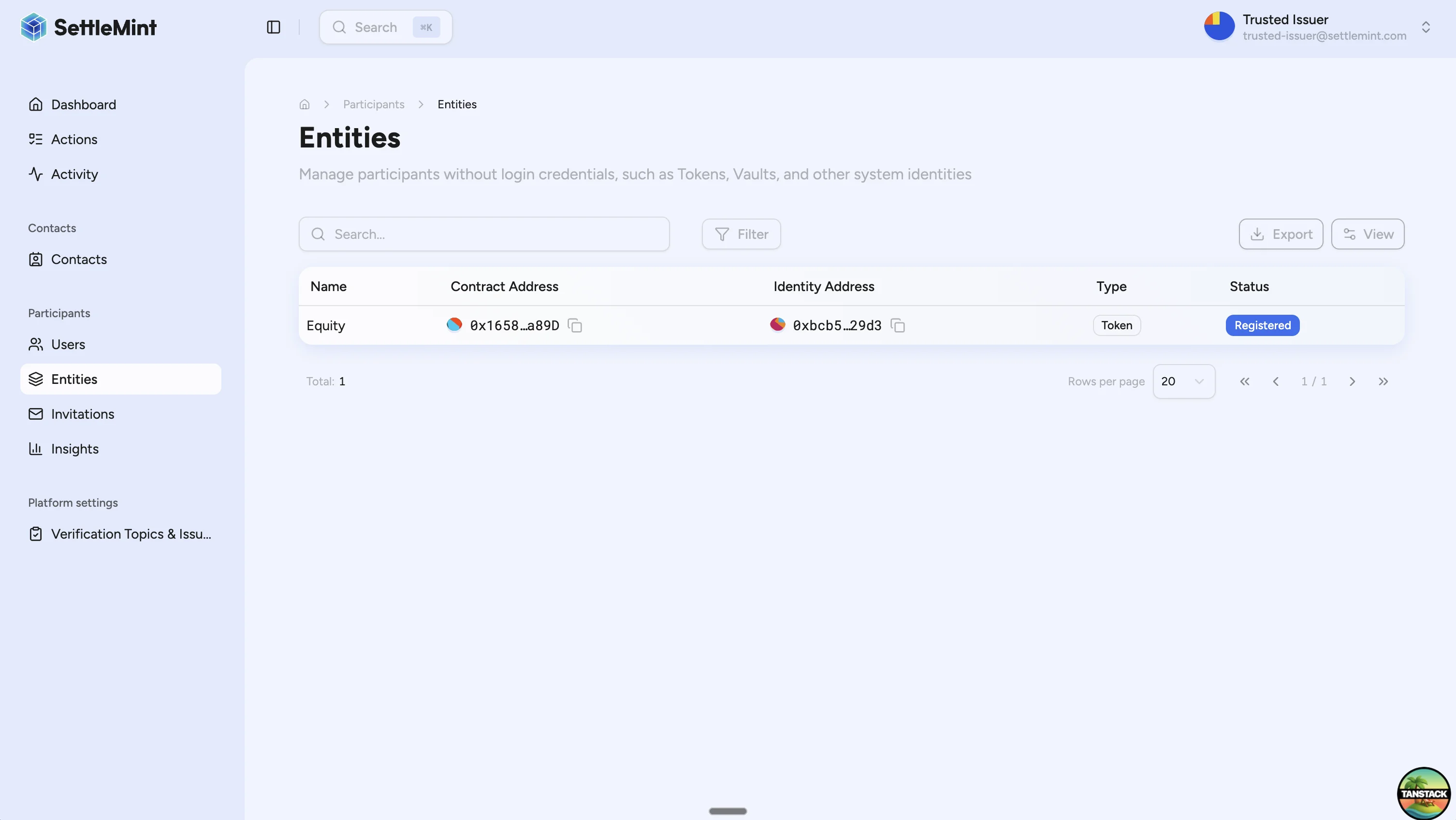
Go to Participants > Entities. Assets appear here because each deployed asset has an on-chain identity. Entity addresses use the Web3 display format, so saved names and avatars can appear beside addresses.
### Select the asset [#select-the-asset]
Open the asset that needs the collateral claim. The asset appears in the entities list because each deployed asset has an on-chain identity.
### Open verification management [#open-verification-management]
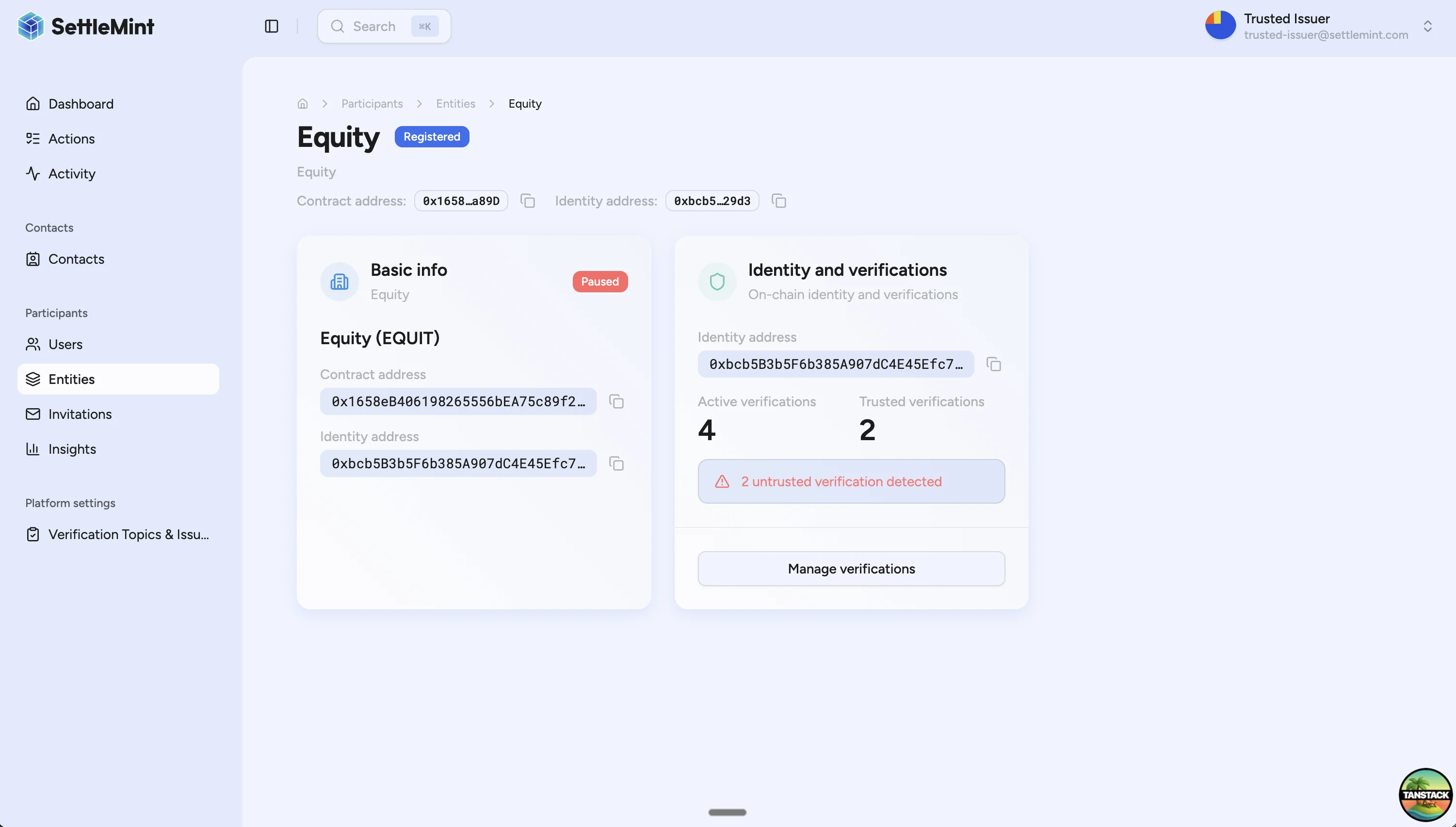
On the entity detail page, locate the Identity and verifications tile. Click Manage verifications.
### Add the claim [#add-the-claim]
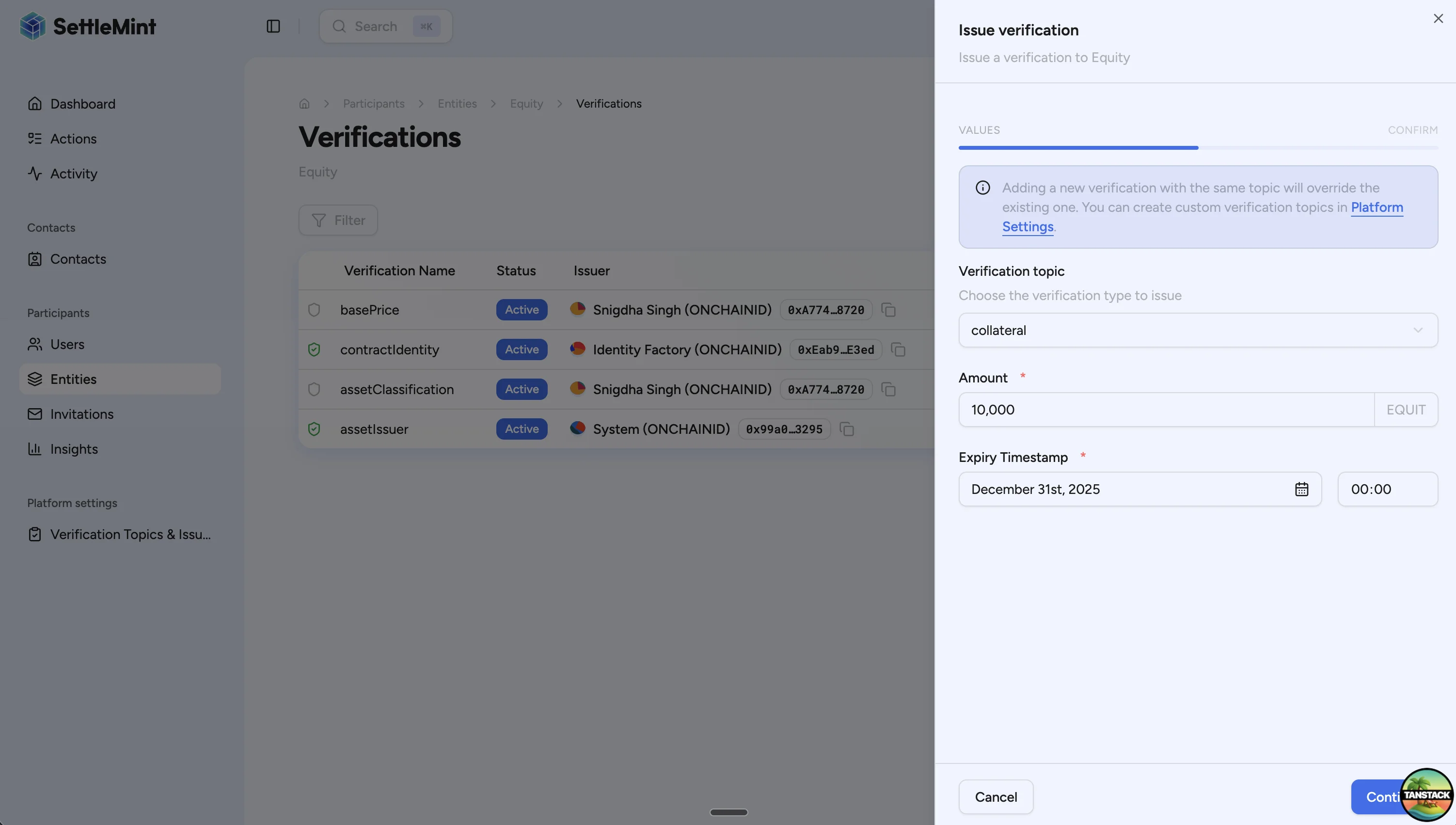
Click Add verification, then enter:
1. **Verification topic**: `collateral`
2. **Amount**: total covered amount, such as `10000`
3. **Expiry Timestamp**: a future expiry date and time
### Submit the transaction [#submit-the-transaction]
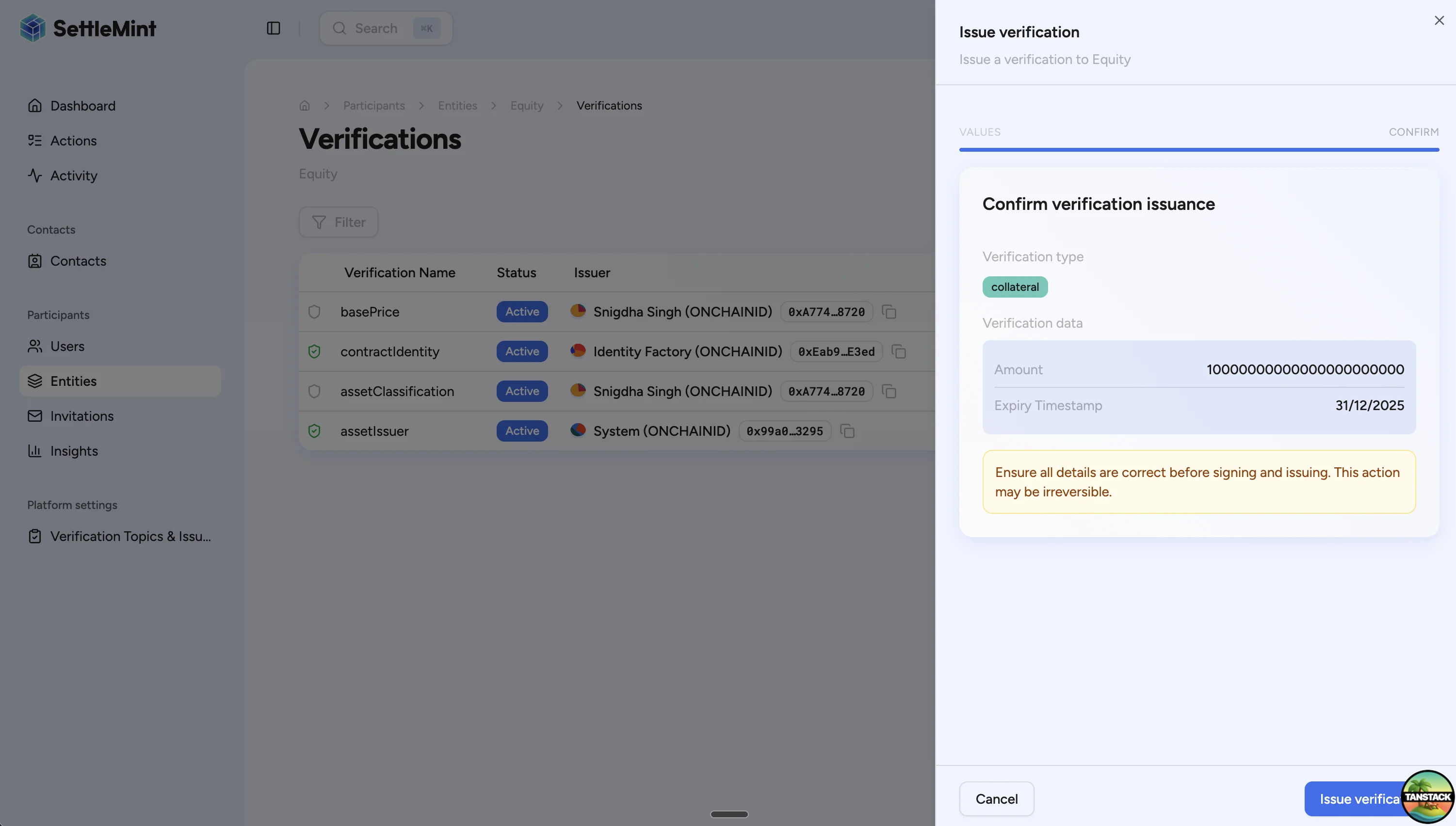
Review the confirmation screen, then click Issue verification.
Expired collateral claims block future minting. Renew the claim before the expiry timestamp if the asset still needs
to mint new supply.
## Monitor collateral before minting [#monitor-collateral-before-minting]
Before a large mint, check the indexed collateral-ratio stats for the asset. The stats show the active collateral amount, the required amount for the current supply, the maximum supply supported by the current collateral claim, utilization, the configured ratio, and whether the indexer has high confidence in the claim data.
Use `parity_confidence: "degraded"` as an operations warning. DALP can still return the stats, but the operator should review the asset identity claim, trusted issuer setup, or legacy claim metadata before using the ratio for a minting decision. For API response fields and an example request, see [Token collateral statistics API](/docs/api-reference/tokens/token-collateral-statistics).
## Example calculation [#example-calculation]
The following table shows how DALP applies a 150% collateral ratio against a valid claim for 15,000 units.
| Operation | Current supply | Mint amount | Post-mint supply | Required collateral | Available claim | Result |
| ------------ | -------------: | ----------: | ---------------: | ------------------: | --------------: | ------- |
| Initial mint | 0 | 5,000 | 5,000 | 7,500 | 15,000 | Allowed |
| Second mint | 5,000 | 3,000 | 8,000 | 12,000 | 15,000 | Allowed |
| Third mint | 8,000 | 5,000 | 13,000 | 19,500 | 15,000 | Blocked |
The third mint fails because the post-mint supply would be 13,000 units. At a 150% ratio, required collateral is `13,000 × 1.5 = 19,500`. The current claim only covers 15,000, so the trusted issuer must issue a higher claim before the mint can be retried.
## Troubleshooting [#troubleshooting]
| Issue | Cause | Fix |
| ---------------------------------------------------- | ------------------------------------------------------------------------------------------------------- | ---------------------------------------------------------------------------------------------------- |
| Minting is blocked with "Insufficient collateral" | The claim amount is lower than the required amount. | Ask the trusted issuer to issue a higher claim, then retry the mint. |
| Minting is blocked with "No collateral verification" | The asset identity has no valid collateral claim. | Ask the trusted issuer to add the claim on the asset identity. |
| Minting is blocked with "Verification expired" | The claim expiry timestamp has passed. | Issue a new claim with a future expiry. |
| You cannot issue the claim | Your account is not a trusted issuer for the topic and does not have governance authority on the asset. | Ask an administrator to grant the required authority or have the designated issuer submit the claim. |
## Next steps [#next-steps]
* [Reserve and backing evidence](/docs/compliance-security/source-verification/overview#reserve-and-backing-evidence)
* [Create asset](/docs/operators/asset-creation/create-asset)
* [Mint assets](/docs/operators/asset-servicing/mint-assets)
* [Configure equity collateral with the API](/docs/developers/runbooks/configure-equity-collateral)
* [Trusted issuers registry](/docs/compliance-security/security/identity-compliance)