# Walkthrough
Source: https://docs.settlemint.com/docs/operators/system-addons/xvp-settlement/local/walkthrough
Follow a complete example of a local settlement where a Builder sells
property tokens to a Buyer, with a Notary receiving a fee.
This walkthrough traces a complete local settlement from creation to execution. Follow each step to see how assets move and how the settlement state changes as you progress.
## Scenario [#scenario]
Real estate trade with notary fee: Builder holds 1,000 property tokens (PROP), Buyer wants to purchase them for 100,000 EURD (Euro Deposit), and a Notary facilitated the trade and receives a 500 EURD fee. All assets exist on the same blockchain, so this qualifies as a local settlement.
### Starting balances [#starting-balances]
No assets are in escrow at the start. The XvP contract holds nothing until senders approve.
| Participant | PROP | EURD |
| ------------ | ----- | ------- |
| Builder | 1,000 | 0 |
| Buyer | 0 | 100,500 |
| Notary | 0 | 0 |
| XvP Contract | 0 | 0 |
### Settlement structure [#settlement-structure]
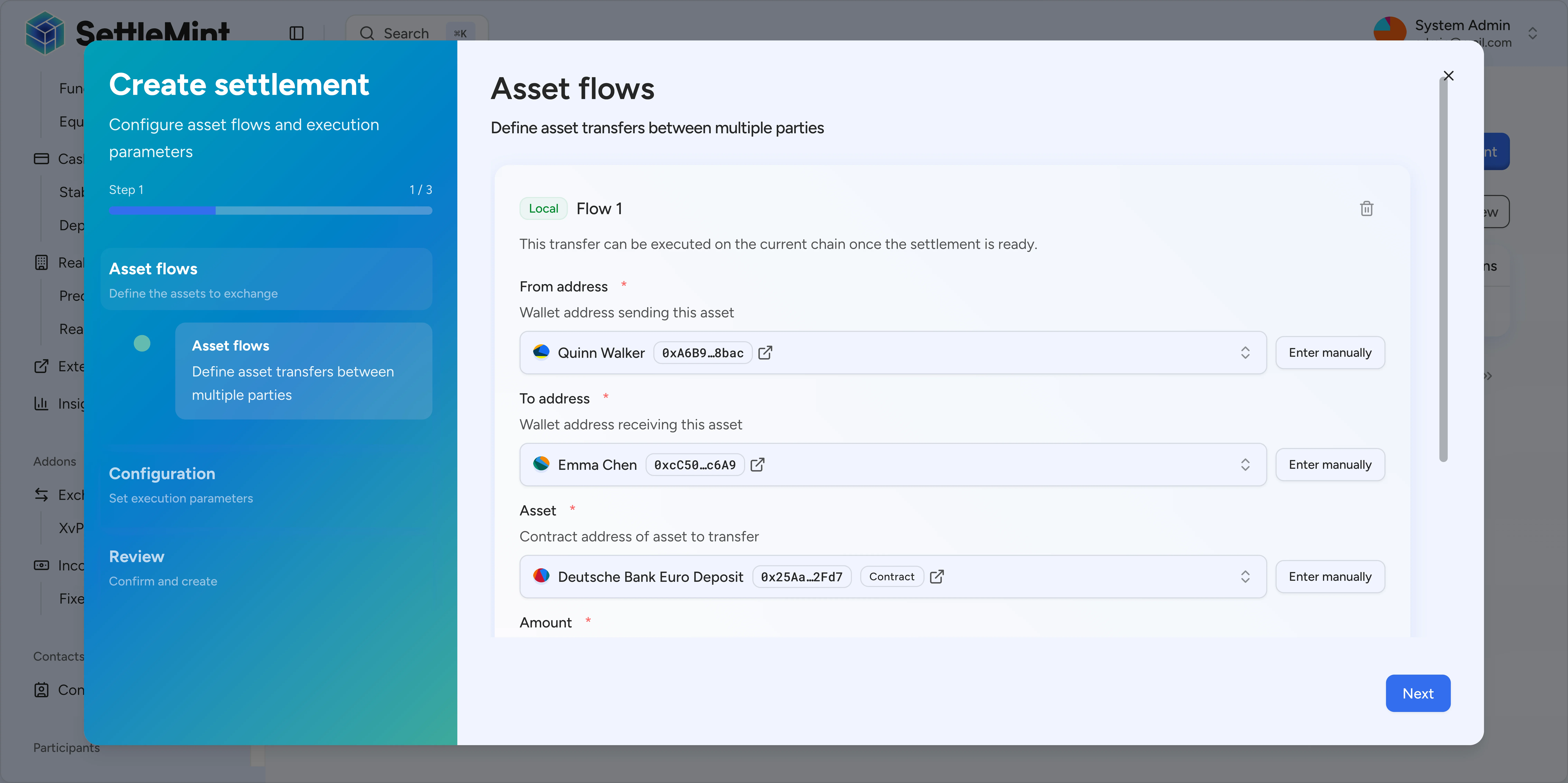
Three flows make up the settlement. The cutoff is 24 hours from setup and auto-execute is enabled, so the contract executes as soon as both senders approve:
1. Builder → Buyer: 1,000 PROP
2. Buyer → Builder: 100,000 EURD
3. Buyer → Notary: 500 EURD
## Step-by-step walkthrough [#step-by-step-walkthrough]
### Notary creates the settlement [#notary-creates-the-settlement]
The Notary opens the settlement wizard, sets a 24-hour cutoff, and enables auto-execute. Three flows cover the exchange.
* Flow 1: Builder sends 1,000 PROP to Buyer
* Flow 2: Buyer sends 100,000 EURD to Builder
* Flow 3: Buyer sends 500 EURD to Notary
Balances after the Notary creates the settlement:
| Participant | PROP | EURD |
| ------------ | ----- | ------- |
| Builder | 1,000 | 0 |
| Buyer | 0 | 100,500 |
| Notary | 0 | 0 |
| XvP Contract | 0 | 0 |
No assets have moved yet. The settlement is in **Pending** state.
### Builder approves [#builder-approves]
The Builder reviews the settlement and clicks Approve. The XvP contract receives their 1,000 PROP as escrow. Balances after Builder approves:
| Participant | PROP | EURD |
| ------------ | ----- | ------- |
| Builder | 0 | 0 |
| Buyer | 0 | 100,500 |
| Notary | 0 | 0 |
| XvP Contract | 1,000 | 0 |
The settlement now shows "1 of 2 approvals" and remains in Pending state. Both senders must approve before the contract can execute.
### Buyer approves [#buyer-approves]
The Buyer receives a notification about the pending settlement. They review all flows, confirm the amounts are correct, and click Approve.
The XvP contract receives their 100,500 EURD (100,000 for the property + 500 notary fee). Because auto-execute is on and this is the final approval, the settlement runs immediately. Balances after Buyer approves and auto-execute triggers:
| Participant | PROP | EURD |
| ------------ | ----- | ------- |
| Builder | 0 | 100,000 |
| Buyer | 1,000 | 0 |
| Notary | 0 | 500 |
| XvP Contract | 0 | 0 |
All three flows settled atomically in a single transaction. The settlement is now in **Executed** state.
## What happens at execution [#what-happens-at-execution]
Once all senders approve, the settlement:
1. Validates all flows: sufficient balances and compliance checks pass
2. Executes all transfers atomically in a single transaction
3. Distributes assets to recipients
4. Records the result on-chain
If any transfer fails due to insufficient balance, a compliance block, or another error, the entire settlement reverts and all assets remain in escrow.
## Alternative scenarios [#alternative-scenarios]
### Manual execution [#manual-execution]
When auto-execute is off, the settlement enters Ready state after all senders approve. Anyone can then click Execute to run the settlement, and all flows execute atomically. Use this option when you want a final review before committing.
### Buyer doesn't approve [#buyer-doesnt-approve]
If the Buyer does not approve before the cutoff date, the settlement enters Expired state when the cutoff passes. The Builder can click Withdraw to reclaim their 1,000 PROP. No one can execute the settlement after expiry.
### Cancellation before execution [#cancellation-before-execution]
If any local participant cancels before the settlement executes, the participant clicks Cancel and the contract returns all locked assets to their original senders. The settlement enters Cancelled state and no assets change hands.
## Summary [#summary]
| Step | What happened | Settlement state | Assets moved |
| ---- | ------------------------- | ---------------- | ---------------------------------- |
| 1 | Notary creates settlement | Pending | None |
| 2 | Builder approves | Pending (1/2) | PROP → XvP |
| 3 | Buyer approves | Executed | EURD → XvP, then atomic settlement |
## Next steps [#next-steps]
Ready to run your own settlement? Start with the creation guide, or explore cross-chain options if your assets span multiple blockchains.
Detailed guide to configuring flows and submitting the settlement wizard.
See how cross-chain settlements work with hash time-locked contracts for assets on different blockchains.