# Equity tokenization in the console
Source: https://docs.settlemint.com/docs/operators/user-guides/runbooks/equity-tokenization
Follow the UI-led ACME Holdings equity tokenization walkthrough, including actor setup, verification, minting, and final token distribution.
This runbook walks operators through the ACME Holdings equity scenario in the DALP console. By the end, ACME Holdings holds 80,000 ACME equity tokens, NovaX Vault holds 20,000, and the setup has applied identity and collateral checks.
Stay on this page when you operate the scenario through DALP screens. Use the [API-led equity tokenization
walkthrough](/docs/developers/developer-guides/runbooks/equity-tokenization) when you need request-oriented steps for
an integration, script, or test.
## Prerequisites [#prerequisites]
Before starting this example, ensure your blockchain network has the core platform contracts deployed:
| Contract | Purpose | Deployed by |
| ------------------------- | ------------------------------------------------------------------------------ | ----------------- |
| **DALP Directory** | Registry and discovery service for all platform instances and their components | Platform deployer |
| **DALP Identity Factory** | Creates on-chain identity contracts for users | Platform deployer |
| **DALP System Factory** | Deploys organization-specific system contracts | Platform deployer |
These contracts are typically deployed during initial platform setup by your implementation team. They provide the
foundation for all organizations to build upon.
**Additional requirements:**
* Access to the platform web interface
* For public chains: ETH or native tokens for transaction gas fees (see gas requirements below)
* Email addresses for all demo participants
**Gas requirements for public chains:**
* **Daniel Admin**: Moderate amount for system deployment and permission management
* **Clara Compliance**: Small amount for user registration and verification issuance
* **Olivia Operator**: Moderate amount for asset creation, permissions, minting, and transfers
* **Colin Collateral**: Small amount for issuing collateral verifications
* **Invited users**: Small amount for identity creation (if using invitation flow)
## Scenario overview [#scenario-overview]
This demonstration tokenizes 100,000 shares of ACME Holdings S.A., a Luxembourg company, using a multi-organization platform operated by Digital Securities S.A.
### Organizations [#organizations]
| Organization | Role | Domain | Jurisdiction |
| ------------------------------------ | ----------------------- | --------------------------- | ------------ |
| **Digital Securities S.A.** | Platform operator | digital-securities.example | Luxembourg |
| **ACME Holdings S.A.** | Issuer (equity owner) | acme-holdings.example | Luxembourg |
| **Guardian Collateral Services Ltd** | Collateral agent | guardian-collateral.example | (generic) |
| **Exchange Ltd** | Exchange/vault provider | exchange.example | (generic) |
### Key personas [#key-personas]
**Platform Operators (Digital Securities S.A.)**
| Persona | Name | Email | Purpose |
| ------------------ | ---------------- | --------------------------------------------------------------------------------------------- | ------------------------------ |
| Platform Admin | Daniel Admin | [admin@digital-securities.example](mailto:admin@digital-securities.example) | System setup and configuration |
| Asset Operator | Olivia Operator | [operator@digital-securities.example](mailto:operator@digital-securities.example) | Asset creation and management |
| Compliance Officer | Clara Compliance | [compliance-kyc@digital-securities.example](mailto:compliance-kyc@digital-securities.example) | KYC and regulatory compliance |
**External Partners**
| Organization | Persona | Name | Email | Purpose |
| ---------------------------- | --------------------- | ---------------- | --------------------------------------------------------------------------------------------------- | ----------------------- |
| ACME Holdings S.A. | Issuer Representative | Ian Issuer | [issuer@acme-holdings.example](mailto:issuer@acme-holdings.example) | Legal equity owner |
| Guardian Collateral Services | Collateral Agent | Colin Collateral | [collateral-agent@guardian-collateral.example](mailto:collateral-agent@guardian-collateral.example) | Collateral verification |
| Exchange Ltd | Vault Provider | NovaX Vault | [vault@exchange.example](mailto:vault@exchange.example) | Token custody |
### ACME equity token specifications [#acme-equity-token-specifications]
**Real-world instrument:**
| Property | Value |
| ---------------------- | ------------------------------- |
| **Issuer** | ACME Holdings S.A. (Luxembourg) |
| **Security type** | Ordinary shares |
| **Total shares** | 100,000 |
| **Reference currency** | EUR |
| **Price per share** | €0.71 |
**On-chain representation:**
| Property | Value |
| ---------------------------------- | ---------------------------------------------- |
| **Token name** | ACME Holdings Equity |
| **Symbol** | ACME |
| **Decimals** | 0 (1 token = 1 share) |
| **Maximum supply** | 100,000 |
| **Asset class** | EQUITY |
| **ISIN** | LU0000ACME01 |
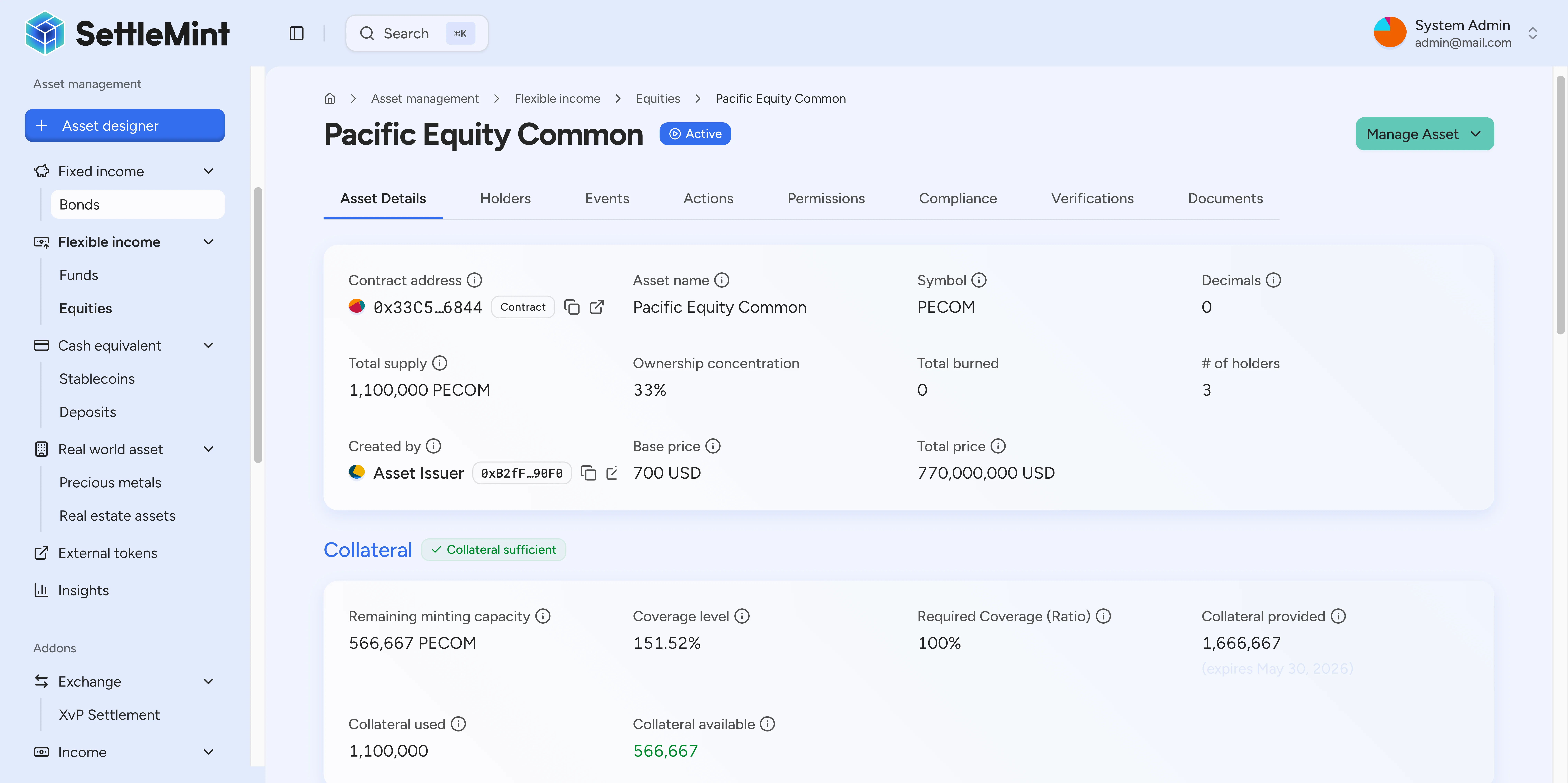
| **Final distribution after setup** | 80,000 held by issuer, 20,000 held by exchange |
## Implementation steps [#implementation-steps]
### Platform initialization [#platform-initialization]
**As the first user (Daniel Admin)**, start by setting up the platform administrator who will initialize the entire system.
**Follow the [First Administrator Setup](/docs/operators/user-guides/platform-setup/first-admin-setup) guide with these specific values:**
* **Email**: [admin@digital-securities.example](mailto:admin@digital-securities.example)
* **Organization name**: Digital Securities S.A.
* **Base currency**: EUR
* **Asset factories to enable**: Equity
For public chains: Ensure Daniel's wallet has sufficient native tokens (ETH, MATIC, etc.) for system deployment
transactions before proceeding.
As the first user, Daniel Admin will deploy all system contracts including identity registry, access manager, and asset factories.
### Grant additional administrative permissions [#grant-additional-administrative-permissions]
**Continue as Daniel Admin.** After platform setup, Daniel Admin has the minimum required roles (Permission manager + System Manager) following the principle of least privilege. For this demo setup, he needs additional roles to configure the system.
**Use the [Change Admin Roles](/docs/operators/user-guides/platform-setup/change-admin-roles) guide to add these roles to Daniel Admin:**
* **Add-on Manager**: Manage platform extensions and modules
* **Identity Manager**: Required to invite other users
Access Platform Settings > Platform Admins, find Daniel Admin, click the three dots, select "Change roles", and add the roles listed above.
### Invite platform team [#invite-platform-team]
**Continue as Daniel Admin.** Add the other platform operators and external partners who will participate in this demo.
**You can use either the [Invite users](/docs/operators/user-guides/user-management/invite-users) guide or the [Create users](/docs/operators/user-guides/user-management/create-users) guide:**
* **Invite users**: Send invitations for users to onboard themselves (more realistic)
* **Create users**: Directly create accounts with random passwords for faster demo setup or if users don't need to access the platform directly
**Platform operators:**
1. **Olivia Operator** ([operator@digital-securities.example](mailto:operator@digital-securities.example))
* **Responsibilities**: Creates tokens, manages corporate actions, handles minting/burning
2. **Clara Compliance** ([compliance-kyc@digital-securities.example](mailto:compliance-kyc@digital-securities.example))
* **Responsibilities**: Manages KYC and AML verification, registers identities, issues verifications
**External organizations:**
3. **Ian Issuer** ([issuer@acme-holdings.example](mailto:issuer@acme-holdings.example))
* **Responsibilities**: Legal owner of equity being tokenized
4. **Colin Collateral** ([collateral-agent@guardian-collateral.example](mailto:collateral-agent@guardian-collateral.example))
* **Responsibilities**: Independent verification of collateral backing
5. **NovaX Vault** ([vault@exchange.example](mailto:vault@exchange.example))
* **Responsibilities**: Institutional vault for token custody
### User onboarding process (if "Invite user" was chosen) [#user-onboarding-process-if-invite-user-was-chosen]
All invited users follow the same onboarding process. See [User Onboarding](/docs/operators/user-guides/user-management/user-onboarding) for the complete flow.
**Each user will:**
1. Accept their invitation
2. Generate blockchain wallet with PIN security
3. Save backup codes
4. Create on-chain identity
5. Complete profile
For public chains: If using the invitation flow, invited users will need native tokens in their wallets to pay for identity creation. If using the create-user flow, the identity manager pays for identity creation.
### Assign platform admins [#assign-platform-admins]
**Continue as Daniel Admin.** After team onboarding, assign specific roles to platform admins.
**Use [Add Administrators](/docs/operators/user-guides/platform-setup/add-admins) to assign:**
**Olivia Operator** needs these roles:
* **Asset Manager** - Create and configure new assets
**Why these roles:** Olivia should be able to manage assets.
**Clara Compliance** needs these roles:
* **Identity Manager** - Manage the users registry, which users are known.
* **Verification Issuer** - Issue KYC and compliance verifications
* **Compliance Manager** - Will be able to manage global compliance rules
* **Verification Policy Manager** - Configure verification topics and trusted issuers
**Why these roles:** Clara manages all regulatory compliance and user verification.
**Colin Collateral** needs these roles:
* **Verification Issuer** - Issue collateral verifications
**Why this role:** Colin's only function is verifying collateral backing.
### Configure trusted issuers [#configure-trusted-issuers]
**Log in as Clara Compliance** to set up the verification framework by designating who can issue which types of verifications.
For public chains: Ensure Clara's wallet has native tokens for trusted issuer configuration transactions.
**Follow [Configure Trusted Issuers](/docs/operators/user-guides/compliance/configure-trusted-issuers) to configure:**
**Clara Compliance as trusted issuer for investor-level verifications:**
* **Know Your Customer (KYC)** - She verifies investor identities
* **Anti-Money Laundering (AML)** - She records source-of-funds verification
* **Accredited Investor** - For US qualified investor status, if the scenario needs it
* **Qualified Institutional Investor** - For institutional investors, if the scenario needs it
**Why Clara issues these:** As Compliance Officer, she's responsible for all investor-related verification.
**Colin Collateral as trusted issuer for collateral verification:**
* **Collateral** - Verifies that sufficient collateral backs the token
**Why Colin issues this:** Guardian Collateral Services is the independent third party verifying collateral.
**Olivia Operator as trusted issuer for asset-level verifications:**
* **Base Price** - Provides reference pricing for the asset
* **Unique Identifier** - Manages ISIN and internal reference numbers
* **Asset Classification** - Confirms asset category and type
* **Asset Location** - Confirms jurisdiction of underlying asset (optional, needed for real-estate)
**Why Olivia issues these:** As Asset Operator, she manages asset metadata and classification.
### Register investors in registry [#register-investors-in-registry]
**Log in as Clara Compliance** and use [Register User](/docs/operators/user-guides/user-management/register-user):
**Register Ian Issuer:**
* Choose **Luxembourg** as jurisdiction
**Register NovaX Vault:**
* Choose **Luxembourg** as jurisdiction
**Result:** Both users now show "Registered" status and can receive KYC verifications.
Platform operators (Daniel, Olivia, Clara) don't need registration unless they'll hold tokens.
### Issue KYC and AML verifications [#issue-kyc-and-aml-verifications]
**Continue as Clara Compliance** and use [Verify KYC](/docs/operators/user-guides/compliance/verify-kyc):
**Verify Ian Issuer:**
* Issue **Know Your Customer** verification
* Issue **Anti-Money Laundering** verification
**Verify NovaX Vault:**
* Issue **Know Your Customer** verification
* Issue **Anti-Money Laundering** verification
**Result:** Both users now have the KYC and AML verifications required by the ACME token.
### Create ACME equity token [#create-acme-equity-token]
Create the equity token using the Asset Designer with full compliance configuration.
For public chains: Ensure Olivia's wallet has native tokens for asset creation and permission management transactions.
**Log in as Olivia Operator and follow [Create Asset](/docs/operators/user-guides/asset-creation/create-asset):**
**Asset Designer Configuration:**
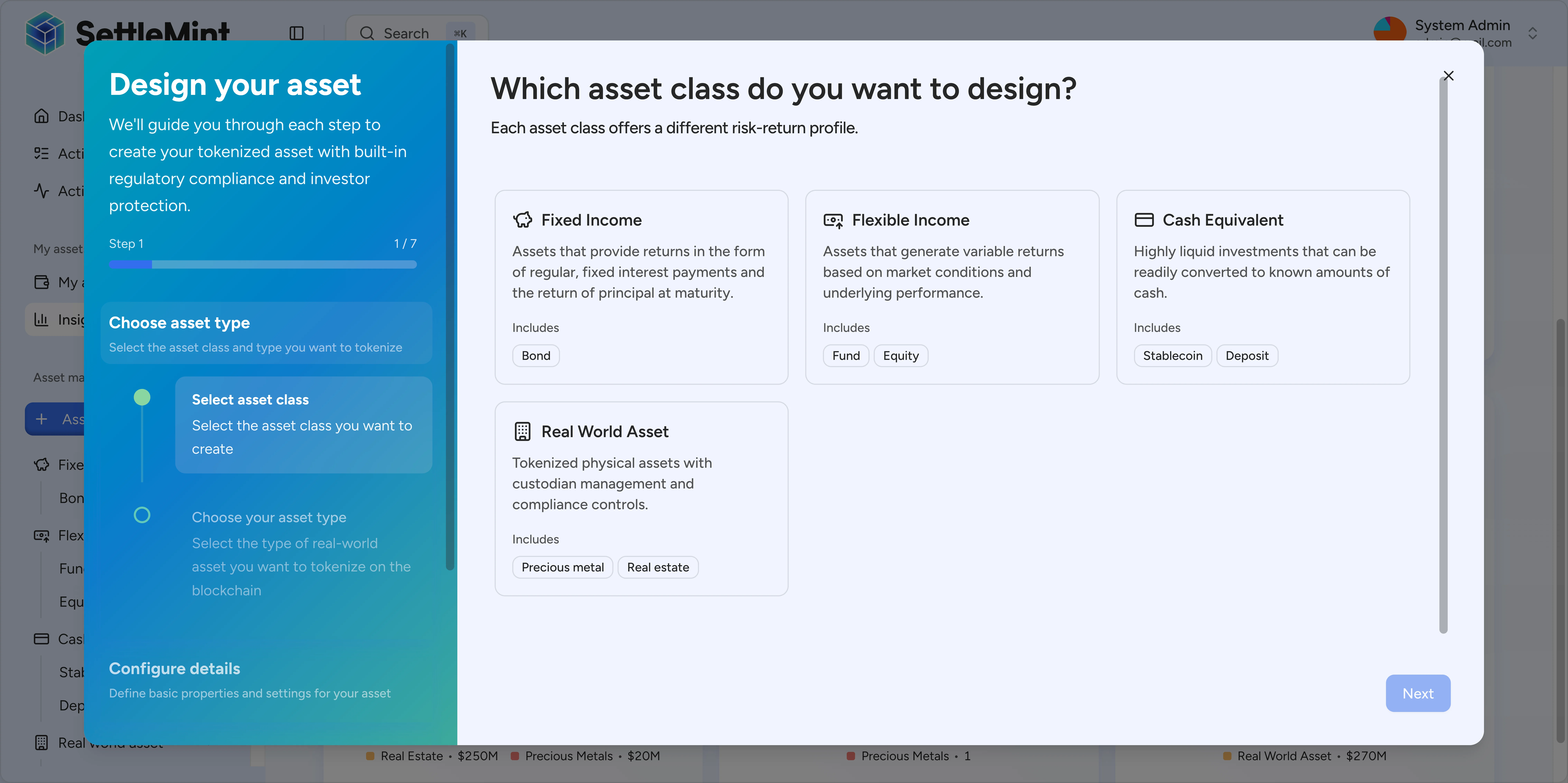
**Step 1: Asset Class**
* Select **Flexible Income** class
* Choose **Equity** type
**Step 2: Basic Details**
* **Name**: ACME Holdings Equity
* **Symbol**: ACME
* **Decimals**: 0 (whole shares only)
* **Jurisdiction**: Luxembourg
**Step 3: Asset Classification**
* **Category**: Common Equity
* **Class**: Common Equity
* **Unique Identifier**: LU0000ACME01 (ISIN format)
* **Internal Reference**: ACME-EQ-001
**Step 4: Pricing**
* **Currency**: EUR
* **Base Price**: 0.71 (€0.71 per share)
**Step 5: Compliance Modules**
Enable **Smart Identity Verification**:
* Required verification expression: AML and KYC
* Purpose: only users with both accepted verifications can receive assets
Enable **Collateral Requirement** (optional):
* Topic: "Collateral"
* Ratio: 100% (full collateral backing)
* Purpose: Ensures backing for tokenized equity
### Configure token permissions [#configure-token-permissions]
After asset creation, Olivia has the minimum required roles (Permission manager + Governance) following the principle of least privilege. For this demo, she needs additional token-specific roles.
**Use [Change Asset Admin Roles](/docs/operators/user-guides/asset-servicing/change-asset-admin-roles) to assign Olivia Operator these additional roles:**
* **Custodian** - Execute transfers and forced transfers
* **Emergency** - Pause/unpause token operations
* **Supply Management** - Mint and burn token supply
### Issue collateral verification [#issue-collateral-verification]
Colin must issue a collateral verification before minting is possible. This is a requirement when collateral modules are enabled.
For public chains: Ensure Colin's wallet has native tokens for issuing collateral verification transactions.
**Log in as Colin Collateral and follow the [Collateral](/docs/operators/user-guides/compliance/collateral) guide to issue verification with these specific details:**
* **Amount**: 100000 (covering full supply)
* **Expiration**: 1 year from now
This confirms Guardian Collateral Services has verified sufficient backing for the full token supply.
### Unpause the token [#unpause-the-token]
**Log in as Olivia Operator** and use the [Pause/Unpause Asset](/docs/operators/user-guides/asset-servicing/pause-unpause-asset) guide to activate the ACME asset.
Collateral verification and token unpausing can be done in any order. Both are needed before minting, but they don't
depend on each other.
**Why Olivia can unpause:** She has the Emergency role on the ACME token, which is required for pause/unpause operations.
### Mint and distribute ACME tokens [#mint-and-distribute-acme-tokens]
**Continue as Olivia Operator** and use [Mint Assets](/docs/operators/user-guides/asset-servicing/mint-assets):
For public chains: Ensure Olivia's wallet has sufficient native tokens for minting transactions, which can be
gas-intensive for large amounts.
**Mint to ACME Holdings:**
* **Recipient**: Ian Issuer (select from contacts or use wallet address)
* **Amount**: 100000 (full token supply)
* **Purpose**: issue the complete supply to the legal issuer before the exchange allocation is moved by forced transfer
### Execute forced transfer to exchange [#execute-forced-transfer-to-exchange]
**Continue as Olivia Operator.** Transfer 20,000 tokens from the issuer to the exchange using forced transfer capability.
For public chains: Ensure Olivia's wallet has native tokens for the forced transfer transaction.
**Use [Forced Transfer](/docs/operators/user-guides/asset-servicing/forced-transfer) with these details:**
**Transfer configuration:**
* **From address**: ACME Holdings (select from contacts)
* **To address**: NovaX Exchange (select from contacts)
* **Amount**: 20000
* **Purpose**: Allocate tokens to exchange for secondary market custody
**Why use forced transfer:** This demonstrates custodian-controlled movement between verified parties after issuance. Final holdings are 80,000 ACME tokens for ACME Holdings and 20,000 for NovaX Vault.
**Why Olivia can execute this:** She has the Custodian role on the ACME token, which is required for forced transfer operations.
## Troubleshooting [#troubleshooting]
| Issue | Solution |
| -------------------------- | --------------------------------------------------------------------------------------------------------------------------------------------------------------------------------------------------------------------------------------- |
| Minting fails | • Ensure collateral verification covers the mint amount when enabled
• Verify each recipient satisfies KYC and AML
• Check the operator has the Supply Management role
• Confirm the wallet has enough native gas tokens |
| User cannot receive assets | • Verify the user is registered in the identity registry
• Ensure the user has KYC and AML verifications
• Check token compliance requirements
• Confirm the wallet address is correct |
| Verifications not trusted | • Verify issuer is configured as trusted for specific topic
• Check verification data format and expiration
• Ensure issuer transaction was confirmed
• Refresh page after configuration changes |
| Role assignment fails | • Confirm you have role management permissions
• Verify target user completed onboarding
• Ensure user belongs to your organization (for internal roles)
• Check transaction has sufficient gas tokens for public chains |
For additional support, consult the individual feature guides or contact your implementation team.