# Create a feed
Source: https://docs.settlemint.com/docs/user-guides/data-feeds/create-feed
Deploy an issuer-signed scalar feed or register a Chainlink-compatible feed for a global, asset, or identity subject.
Create a data feed in the DALP app when a workflow needs reusable market, asset, or identity data. A feed can be **global** for market-wide data, **asset-scoped** for one token, or **identity-scoped** for one identity.
DALP supports two creation paths:
* **Issuer-signed feed** - DALP deploys a scalar feed contract. Trusted issuers later publish signed EIP-712 updates to that feed.
* **Chainlink-compatible feed** - DALP registers an existing external feed address in the Feeds Directory. The external oracle operator still manages the source feed.
## Prerequisites [#prerequisites]
Before you start, make sure you have:
* The **Feeds manager** role assigned in platform access control
* A scalar feed **verification topic** already created, see [Create a topic](/docs/user-guides/data-feeds/create-topic)
* For issuer-signed feeds, a trusted issuer configured for the topic, see [Configure trusted issuers](/docs/user-guides/compliance/configure-trusted-issuers)
* For Chainlink-compatible feeds, the external oracle contract address you want DALP to register
* For asset-scoped feeds, the target asset already deployed
## Creation model [#creation-model]
The scope, subject, and topic identify the data slot. The source type decides whether DALP deploys the feed contract or records an existing Chainlink-compatible address for that same slot.
## Example configuration [#example-configuration]
Use a global issuer-signed feed for a reusable market price that trusted issuers will update inside DALP.
| Field | Example value | Why this value fits |
| ---------------- | ----------------- | ----------------------------------------------------------------------------------- |
| Scope | **Global** | The price applies across the market rather than to one asset or identity |
| Subject address | Zero address | DALP fills this automatically for global feeds |
| Topic name | `BTC/USD` | The scalar topic identifies the value publishers submit |
| Source type | **Issuer-signed** | DALP deploys the feed and validates signed updates from trusted issuers |
| Decimals | `8` | Common precision for USD price feeds |
| Description | `BTC/USD` | Human-readable label stored with the deployed feed |
| History mode | `Bounded` | Keeps a fixed update history instead of only the latest value or all values forever |
| History size | `100` | Stores the latest 100 submitted values |
| Require positive | Enabled | Rejects zero or negative price submissions |
| Drift allowance | `300` seconds | Rejects updates whose observed time is more than five minutes from block time |
After registration, a trusted issuer can publish the first `BTC/USD` value for the same topic. If you already operate a Chainlink-compatible oracle for the price, choose **Chainlink** instead and enter that feed address; DALP registers the address but does not operate the external oracle.
## Steps [#steps]
### Navigate to data feeds [#navigate-to-data-feeds]
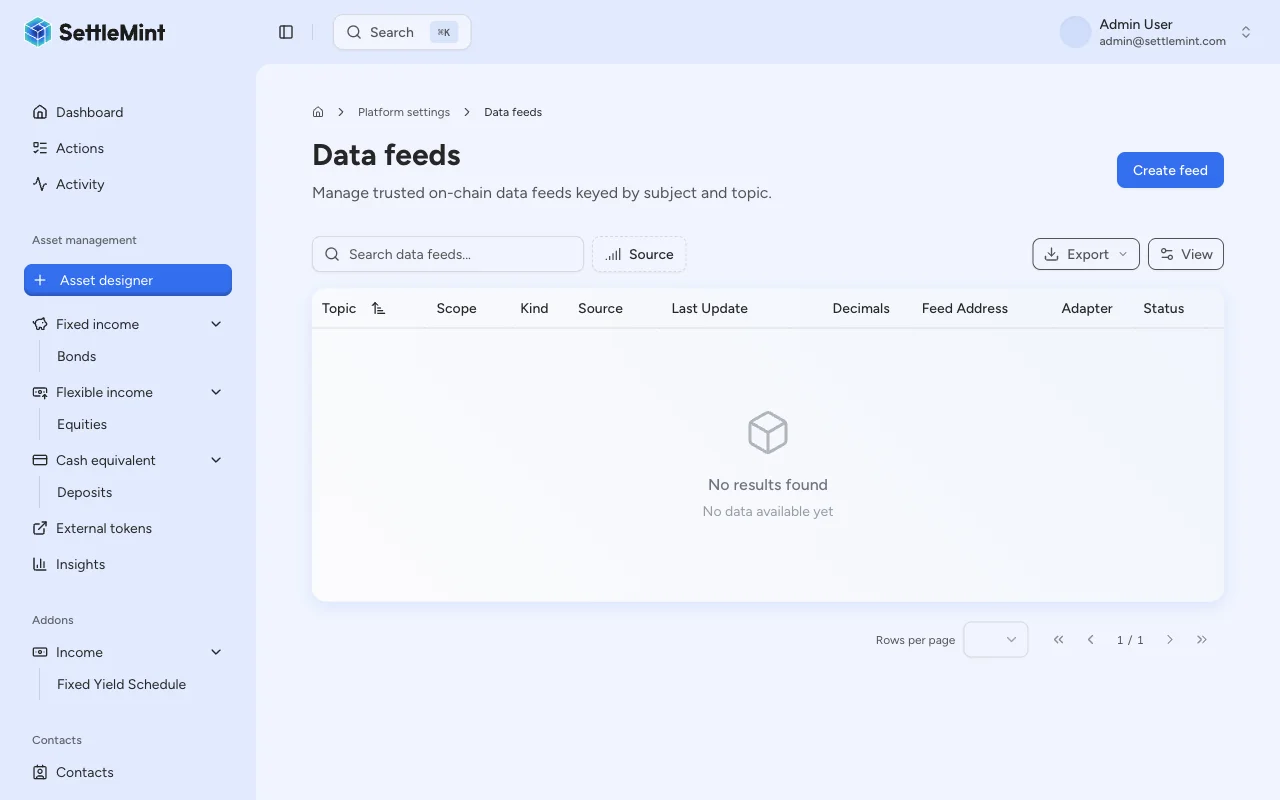
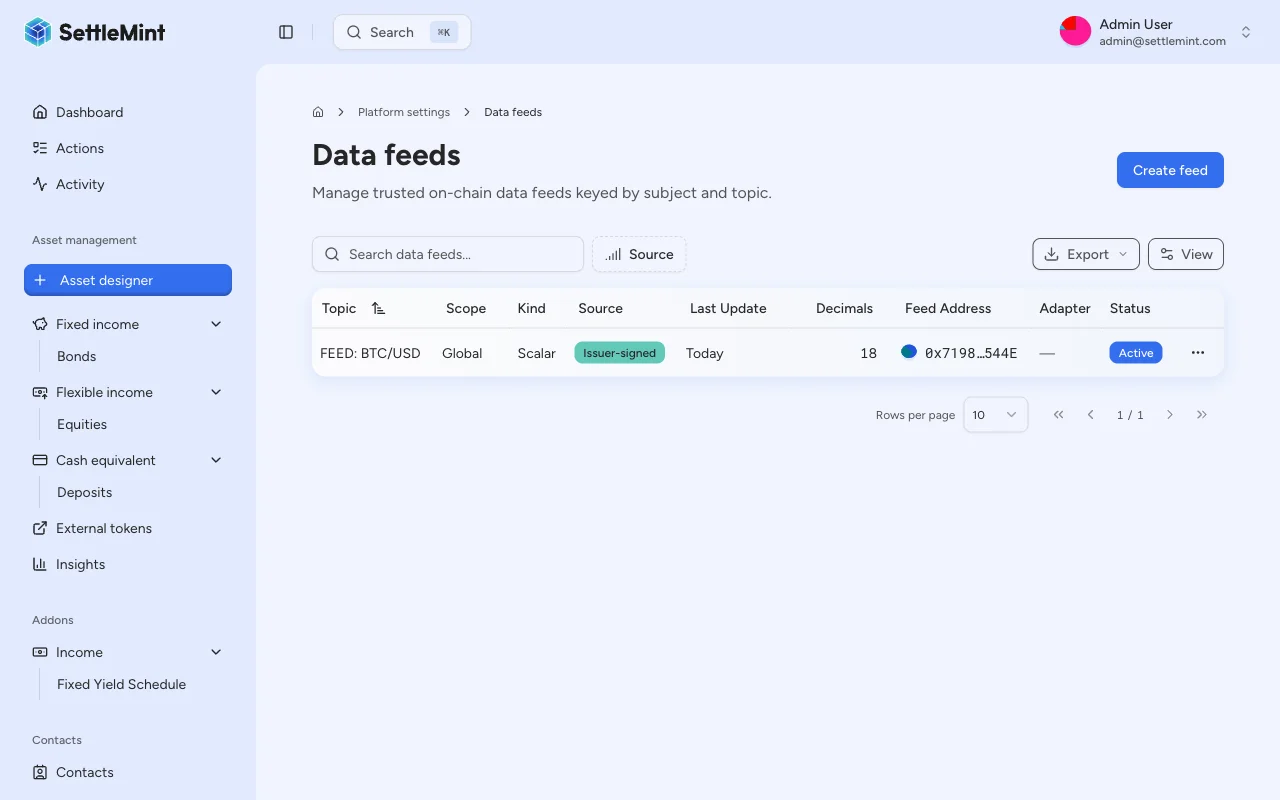
Go to **Platform Settings** > **Data Feeds** in the sidebar. The page lists registered feeds and their latest indexed values.
### Open the create feed form [#open-the-create-feed-form]
Click **Create feed** to open the feed creation form.
### Select the feed scope [#select-the-feed-scope]
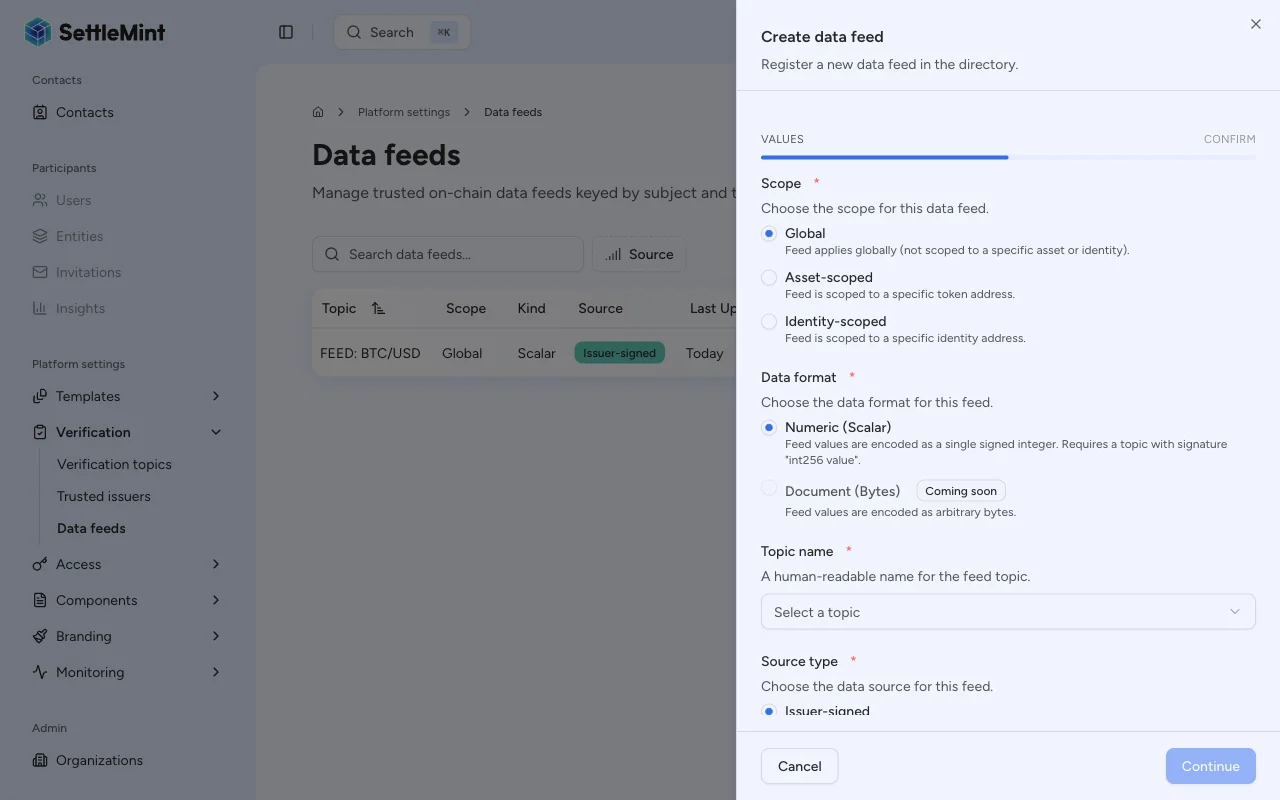
Choose the scope first. The scope determines the feed subject address.
| Scope | Use it for | Subject address |
| ------------------- | -------------------------------------------------------------------------------------------- | --------------------------------------------- |
| **Global** | Market-wide data such as BTC/USD, ETH/USD, or FX rates | DALP uses the zero address automatically |
| **Asset-scoped** | Data tied to one deployed token, such as NAV, interest rate, collateral ratio, or risk score | Select the asset from the subject dropdown |
| **Identity-scoped** | Data tied to one identity | Select the identity from the subject dropdown |
For asset or identity scope, the form shows a **Subject address** selector. Pick the exact asset or identity before continuing.
### Select the topic and source type [#select-the-topic-and-source-type]
Fill in the common feed fields:
* **Data format** - Scalar is the supported feed format.
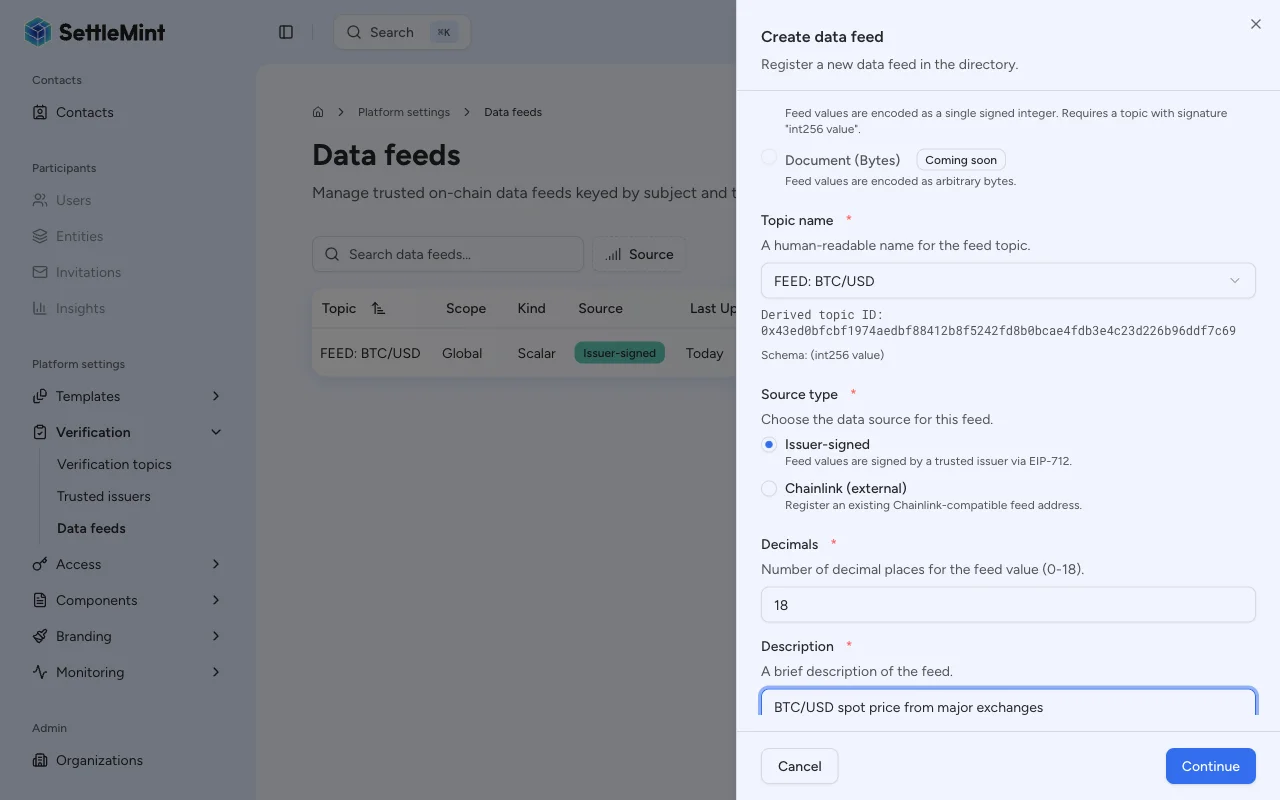
* **Topic name** - Select a scalar feed topic from the dropdown. The form shows the derived topic ID so you can confirm the topic being registered.
* **Source type** - Choose **Issuer-signed** to deploy a DALP-managed feed, or **Chainlink** to register an existing external feed address.
If the issuer-signed feed factory is not installed for the current system, the app only offers the
Chainlink-compatible registration path. Finish the platform feed setup before creating issuer-signed feeds.
### Configure the selected source [#configure-the-selected-source]
For an **issuer-signed feed**, configure the contract DALP will deploy:
| Field | What to enter |
| -------------------- | ------------------------------------------------------------------------------------------------------------------------------------------- |
| **Decimals** | Feed value precision from `0` to `18`. USD price feeds often use `8`; integer metrics can use `0`. |
| **Description** | A plain-language label for what the feed measures, such as `USDT / USD` or `BTC/USD spot price`. |
| **History mode** | `Latest only` keeps the most recent value, `Bounded` keeps a fixed number of values, and `Full` keeps all values. |
| **History size** | Required only for `Bounded` history. Use at least `1`. |
| **Require positive** | Rejects submitted values that are zero or negative. |
| **Drift allowance** | Maximum allowed difference, in seconds, between the submitted `observedAt` time and the block timestamp. Use `0` to disable drift checking. |
The form defaults issuer-signed feeds to `18` decimals, `Latest only` history, no positivity check, and `0` seconds of drift allowance. Change those values before creating the feed if your issuer updates need a different retention, precision, or validation model.
For a **Chainlink-compatible feed**, enter the external **Feed address**. DALP registers that address for the selected subject and topic with scalar feed kind. DALP does not deploy or operate that external oracle.
### Review and confirm [#review-and-confirm]
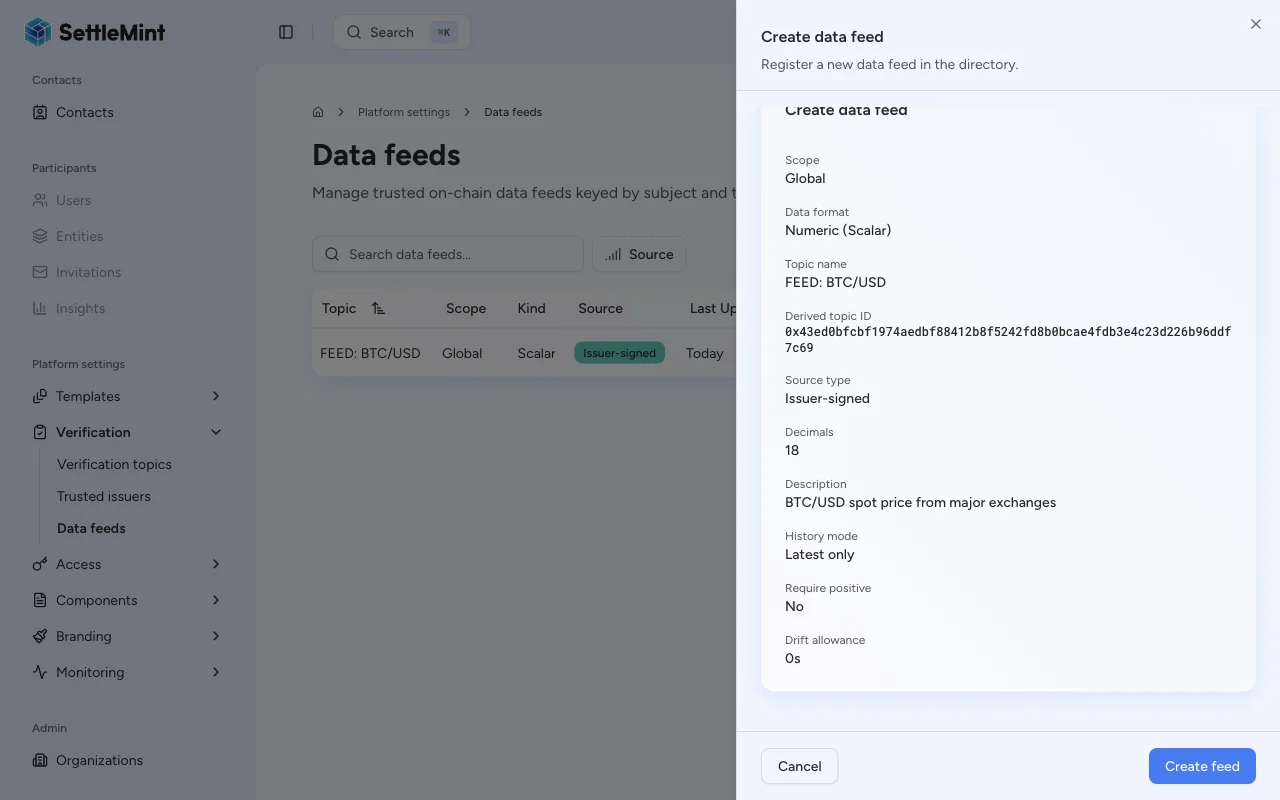
Click **Continue** to review the configuration summary. Check the scope, subject, topic, source type, and source-specific fields before submitting.
Click **Register feed** and enter your PIN to authenticate the transaction.
### Verify the feed [#verify-the-feed]
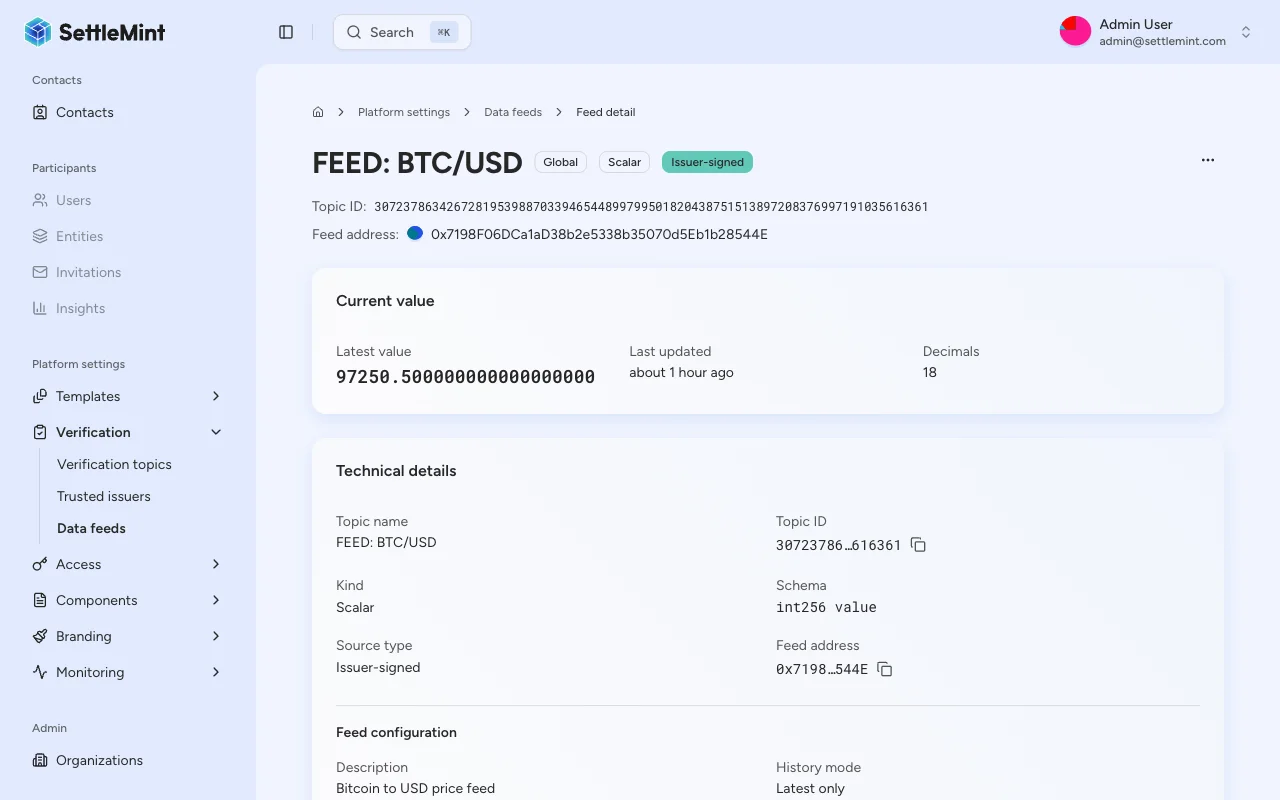
After the transaction confirms, the feed appears in the Data Feeds list. Open the feed row to review the registered subject, topic, source type, configuration, and latest value.
## What happens after registration [#what-happens-after-registration]
| Source type | What DALP does | What you do next |
| -------------------- | --------------------------------------------------------------------------------------------- | ------------------------------------------------------------------------- |
| Issuer-signed | Deploys and registers a scalar feed contract | Publish the first value through a trusted issuer |
| Chainlink-compatible | Registers the external feed address in the Feeds Directory for the selected subject and topic | Confirm the external oracle keeps updating and that DALP indexes the feed |
Issuer-signed properties are set when the feed is deployed. If you need different decimals, history mode, positivity checks, or drift controls, create a new feed with the desired configuration.
## Field summary [#field-summary]
| Field | Required | Applies to | Notes |
| ---------------- | ------------------------------ | -------------------------- | ----------------------------------------------------------------------------- |
| Scope | Yes | All feeds | Determines the subject address |
| Subject address | Asset and identity scopes only | All feeds | Auto-filled for global scope |
| Data format | Yes | All feeds | Scalar feed values are supported |
| Topic name | Yes | All feeds | Must be a scalar feed topic |
| Source type | Yes | All feeds | Choose between issuer-signed deployment and Chainlink-compatible registration |
| Feed address | Yes | Chainlink-compatible feeds | Existing external oracle contract address |
| Decimals | Yes | Issuer-signed feeds | Range: `0` to `18` |
| Description | Yes | Issuer-signed feeds | Human-readable description stored with the feed |
| History mode | Yes | Issuer-signed feeds | Controls value retention |
| History size | Bounded mode only | Issuer-signed feeds | Minimum: `1` |
| Require positive | No | Issuer-signed feeds | Rejects non-positive values when enabled |
| Drift allowance | No | Issuer-signed feeds | Time window in seconds; `0` disables drift checking |
## Troubleshooting [#troubleshooting]
| Issue | What to check |
| ---------------------------------- | ----------------------------------------------------------------------------------------------------------------------------------------------------------------------------------------------------------------------------------------------- |
| Create feed button not visible | Confirm your wallet has the **Feeds manager** role in platform access control. |
| Issuer-signed option not available | Confirm the issuer-signed feed factory is installed for the system. |
| No topics in the dropdown | Create a scalar feed topic first, see [Create a topic](/docs/user-guides/data-feeds/create-topic). |
| Continue button disabled | Select a topic first. For asset or identity scope, also choose a subject address. For issuer-signed feeds, fill in the description and bounded history size when applicable. For Chainlink-compatible feeds, fill in the external feed address. |
| Asset not in subject dropdown | Confirm the asset is deployed and visible under **Asset management**. |
| Transaction fails | Check your wallet gas balance, PIN or OTP setup, subject address, and feed factory availability. |
## Next steps [#next-steps]
* For issuer-signed feeds, [publish a feed update](/docs/user-guides/data-feeds/publish-feed-update) to submit the first value.
* For Chainlink-compatible feeds, open the feed detail page after indexing and confirm the external oracle value is visible.
* To understand how feeds fit the wider data model, read the [Data feeds overview](/docs/user-guides/data-feeds/overview).