# Data feeds overview
Source: https://docs.settlemint.com/docs/user-guides/data-feeds/overview
Understand issuer-signed scalar data feeds, their architecture, required permissions, and configuration properties.
Data feeds are the on-chain source of signed numeric data for asset prices, FX rates, NAV inputs, collateral ratios, yield inputs, and other scalar metrics. This section is for platform administrators who configure feeds, feed operators who publish values, developers who read resolved prices, and reviewers who need to understand who can change each part of the feed setup.
A feed setup answers four questions before any value can be used:
1. **What data is allowed?** A verification topic defines the scalar schema. Issuer-signed scalar feeds use the fixed signature `(int256 value)`.
2. **What entity does the data describe?** A feed scope points the value at a global market pair, an asset, or an identity.
3. **Who may publish the value?** A trusted issuer must be authorized for the topic. Publishing also requires an EIP-712 signature from that issuer.
4. **Who consumes the value?** Smart contracts, portfolio views, asset reporting, and the token price API read the latest indexed or on-chain feed data according to their own pricing rules.
DALP records feed authorization, signed submissions, on-chain feed state, and indexed price reads. Off-chain pricing policy, data provider SLAs, economic validation of submitted values, and non-scalar oracle designs stay outside this user flow except for the Chainlink-compatible feed registration option.
This overview answers one reader question: which control has to exist before a numeric value can affect an asset, price view, or reporting calculation? If you are ready to perform a task, use the decision table below to move to the topic, feed, trusted issuer, publishing, or replacement guide.
## Feed mental model [#feed-mental-model]
A data feed combines three on-chain concepts:
1. **Verification topic** - Defines the data schema. Scalar feed topics use the fixed signature `(int256 value)`.
2. **Feed contract** - Stores configuration such as decimals, history mode, drift allowance, and submitted values.
3. **Trusted issuer** - An identity authorized to publish updates to feeds using a given topic.
The topic controls the shape of the value. The feed controls where the value belongs and how submissions are stored. The trusted issuer controls who can publish updates. These are separate controls so a platform team can let one role define feed schemas, another role register feeds, and a market data operator publish values without giving that operator platform administration rights.
## Feed state lifecycle [#feed-state-lifecycle]
A feed value becomes usable only after each dependency is visible to the platform:
| Stage | What must be true | What can read it |
| ---------------- | ---------------------------------------------------------------------------------------------------------- | ---------------------------------------------------------------------------------------- |
| Topic registered | The scalar feed topic exists with the `(int256 value)` schema. | Feed creation can select the topic. |
| Feed registered | The feed contract is linked to a scope, subject address, source type, decimals, and history mode. | Platform settings and feed lists can show the feed once indexed. |
| Issuer trusted | The publisher identity is trusted for the feed topic. | Publishing can submit signed values for that topic. |
| Value submitted | The issuer signs the value, timestamp, feed address, nonce, and deadline, and the feed accepts the update. | Smart contracts can read on-chain feed state. |
| Value indexed | The indexer has processed the feed update event. | Price APIs, reporting screens, and portfolio views can resolve the latest indexed value. |
This lifecycle is why a newly created feed can appear before its first value is available to a price API. Registration, signing, on-chain submission, and indexing are separate steps.
## Who owns each part [#who-owns-each-part]
| Part | Owner | What they control | What they do not control |
| ------------------------------- | ---------------------------------------- | ------------------------------------------------------------------------------------------------- | ------------------------------------------------------------------ |
| Verification topic | Verification policy manager | Topic name and scalar feed kind | Feed deployment, feed values, or trusted issuer assignments |
| Feed registration | Feeds manager | Scope, subject address, source type, decimals, history mode, positivity rule, and drift allowance | Whether a publisher is trusted for the topic |
| Trusted issuer assignment | Compliance or verification administrator | Which identity may issue updates for the topic | Feed configuration or submitted values |
| Feed update | Trusted issuer and its signer | The signed numeric value submitted to the feed | Topic schema, feed scope, or immutable feed properties |
| Price and reporting consumption | Platform services and smart contracts | How active feed data is resolved for prices, reporting, and calculations | The economic correctness of an off-chain value before it is signed |
## Decide what to configure next [#decide-what-to-configure-next]
| If you need to... | Configure this first | Then read |
| ---------------------------------------------------------------------- | --------------------------------- | ------------------------------------------------------------------------------------------- |
| Define a new category of numeric data, such as a price, rate, or score | Scalar feed topic | [Create a topic](/docs/user-guides/data-feeds/create-topic) |
| Attach data to a market pair, token, or identity | Feed scope and feed properties | [Create a feed](/docs/user-guides/data-feeds/create-feed) |
| Allow an identity to publish updates | Trusted issuer for the feed topic | [Configure trusted issuers](/docs/user-guides/compliance/configure-trusted-issuers) |
| Submit the latest value | Signed feed update | [Publish a feed update](/docs/user-guides/data-feeds/publish-feed-update) |
| Change or stop resolving an existing feed | Directory registration | [Replace or remove a feed](/docs/user-guides/data-feeds/replace-or-remove-feed) |
| Read token prices or FX conversion paths from an integration | Indexed token price endpoint | [Token price resolution API](/docs/developer-guides/api-integration/token-price-resolution) |
## Required permissions [#required-permissions]
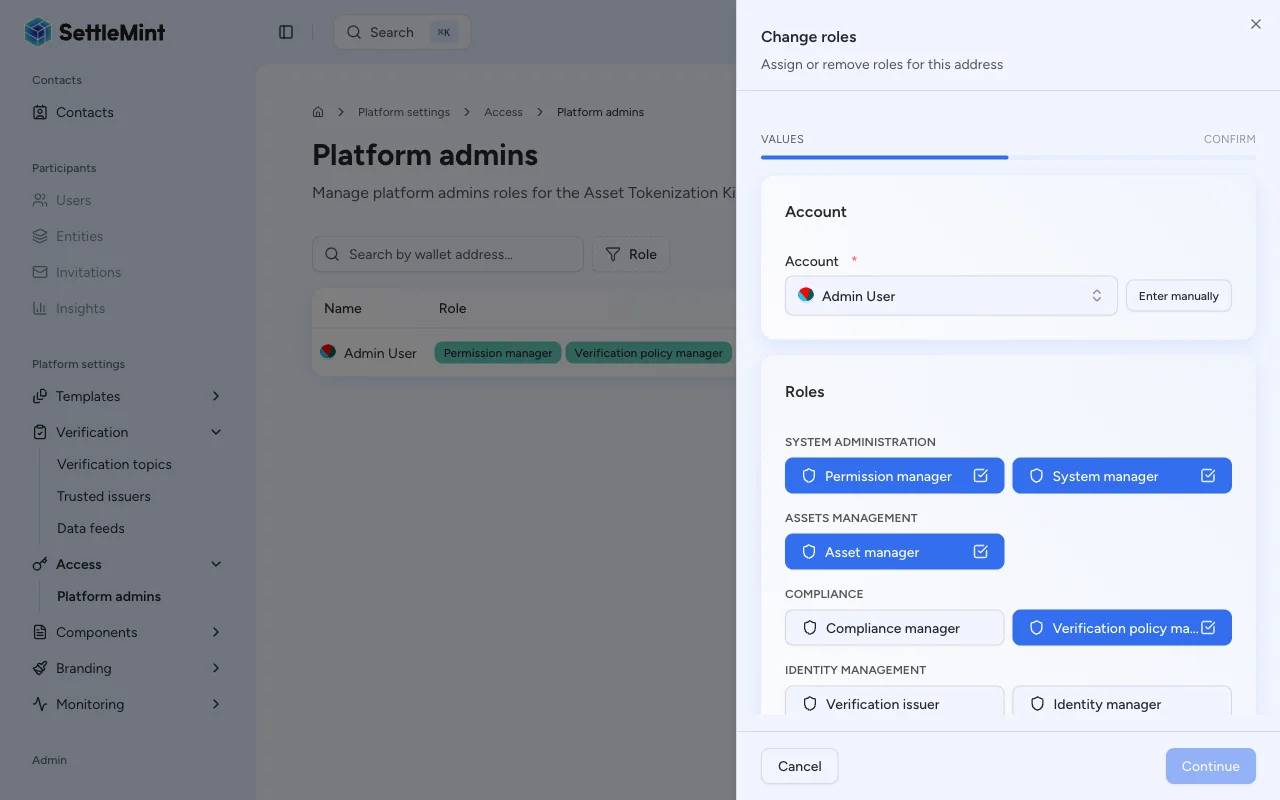
Different operations require different platform roles. Roles are assigned on the **System Access Manager** page under **Platform Settings**.
| Operation | Required role | UI label |
| -------------------------------------------- | ------------------------- | -------------------------------------------------------------------------------------------------------- |
| Create / delete / update verification topics | `claimPolicyManager` | **Verification policy manager** |
| Register / replace / remove feeds | `feedsManager` | **Feeds manager** |
| Publish feed updates | No platform role required | Any user with an associated identity, but the identity must be a **trusted issuer** for the feed's topic |
Publishing a feed update does not require a platform role, but the authenticated participant must have an associated
identity contract, and that identity must be registered as a **trusted issuer** for the feed's verification topic. See
[Configure trusted issuers](/docs/user-guides/compliance/configure-trusted-issuers) for setup instructions.
## Feed scopes [#feed-scopes]
Every feed is scoped to a subject address that determines what entity the data describes.
| Scope | Subject address | Use case |
| ------------------- | ---------------------------- | --------------------------------------------------------------------- |
| **Global** | Zero address (`0x000...000`) | Market-wide data such as BTC/USD or ETH/USD exchange rates |
| **Asset-scoped** | Token contract address | Asset-specific data such as a bond's NAV or a deposit's interest rate |
| **Identity-scoped** | Identity contract address | Entity-specific data such as a credit score or risk rating |
Choose the narrowest scope that matches the value. Use a global feed for market data shared across assets, such as an FX pair. Use an asset-scoped feed when the value belongs to one token, such as a base price or NAV input. Use an identity-scoped feed when the value belongs to a specific identity.
## Where pricing feeds are used [#where-pricing-feeds-are-used]
Pricing flows usually combine asset-scoped base-price feeds with global FX feeds. The asset-scoped feed gives DALP the token's source price. Global FX feeds connect that source currency to the organization's reporting currencies or to the currency requested by an API client.
| Consumer | Feed data used | Reader question it answers |
| ----------------------------- | ---------------------------------------------------------------------------------------- | --------------------------------------------------------------------------------- |
| Token price API | Asset-scoped base-price feed plus global FX feeds when conversion is needed | What price did DALP return, in which currency, and through which conversion path? |
| Portfolio and asset reporting | Exchange-rate feeds for the currencies enabled for the organization | Which reporting currencies can the organization display? |
| Asset-specific calculations | Asset-scoped feeds for NAV, collateral ratios, yield inputs, or other configured metrics | Which external numeric input did the asset use? |
Developer integrations can inspect the resolved price, source currency, and conversion path through the [token price resolution API](/docs/developer-guides/api-integration/token-price-resolution).
## Exchange-rate target currencies [#exchange-rate-target-currencies]
DALP uses exchange-rate feeds to convert portfolio and asset values into the currencies your organization supports for reporting. During organization setup, the base currency must be included in the selected currency list, and at least one selected currency must be different from the base currency.
Setup normally uses the exchange-rate provider's supported-currency snapshot. If that snapshot is not available yet, DALP starts from the standard target currencies `EUR`, `SGD`, `AED`, and `JPY`. The setup workflow creates feeds for the selected non-base currencies, so choosing `EUR` as the base currency creates initial target feeds for `SGD`, `AED`, and `JPY`.
After setup, admins can review enabled currencies from **Platform Settings > Currencies & Exchange Rates**. New supported currencies can be added from that page. Existing currencies cannot be removed, because their feeds are registered on-chain and may already be used by historical valuations, NAV reporting, and portfolio views.
When a supported currency is added, DALP creates the corresponding issuer-signed scalar feed for the currency pair. The feed is populated by the exchange-rate refresh cycle after the feed is available to the platform, so a newly added currency may appear before its first refreshed value is ready.
### Infrastructure readiness [#infrastructure-readiness]
System and organization setup prepare the shared feed infrastructure before exchange-rate feeds are created. DALP registers the shared `price` topic, resolves the issuer-signed scalar feed factory, and waits until the indexer can see the required feed events before continuing.
Feed creation and value seeding are separate steps. Creating exchange-rate feed contracts requires the feeds manager role. During organization setup, DALP checks the administrator wallet before creating the initial exchange-rate feeds. DALP restores that role when needed. Seeding the first values also requires an issuer identity that is trusted for the `price` topic, plus a signer authorized by that identity. If that issuer trust state is not visible yet, DALP can still create the feed contracts and let the refresh cycle publish values once the trust state is ready.
These setup steps are repeat-safe. If the topic or factory already exists, DALP uses the existing on-chain configuration instead of creating a duplicate. Temporary RPC, transport, or indexer visibility issues can be retried, so setup can continue once the dependency catches up.
See [Feeds system](/docs/architecture/components/infrastructure/feeds-system#deployment-prerequisites) for the architecture details.
## Feed properties reference [#feed-properties-reference]
These properties are set when creating a feed and cannot be changed after deployment.
| Property | Values | Description |
| -------------------- | ------------------------------- | --------------------------------------------------------------------------------------------------------------------------------------------------------- |
| **Data format** | Numeric (Scalar) | The data type stored by the feed. Currently only scalar (`int256`) is supported. |
| **Topic name** | Selected from registered topics | The verification topic that defines the feed's data schema. Only topics with the `(int256 value)` signature are available for scalar feeds. |
| **Source type** | Issuer-signed, Chainlink | How values are submitted. Issuer-signed uses EIP-712 signatures; Chainlink reads from an external oracle contract. |
| **Decimals** | 0 - 18 | The number of decimal places for the stored value. For example, a USD price with 8 decimals stores `100000000` to represent `1.00`. |
| **Description** | Free text | A human-readable description of what the feed measures. Required for issuer-signed feeds. |
| **History mode** | Latest only, Bounded, Full | Controls how many past values the feed retains. |
| **History size** | Integer >= 1 | Only used with **Bounded** history mode. Sets the maximum number of historical values to keep in a circular buffer. |
| **Require positive** | On / Off | When enabled, the feed contract rejects any submitted value that is zero or negative. |
| **Drift allowance** | Integer (seconds) | Maximum allowed time difference between the `observedAt` timestamp in a submission and the current block timestamp. Set to `0` to disable drift checking. |
### History modes explained [#history-modes-explained]
* **Latest only** - The feed stores only the most recent value. Previous values are overwritten. Best for feeds where only the current price matters.
* **Bounded** - The feed keeps a fixed-size circular buffer of past values set by **History size**. When the buffer is full, the oldest value is replaced. Useful for moving averages or volatility calculations.
* **Full** - The feed stores every submitted value permanently. Provides a complete audit trail but uses more on-chain storage.
## Setup workflow [#setup-workflow]
Setting up a data feed involves four steps:
### Create a scalar feed topic [#create-a-scalar-feed-topic]
Register a verification topic with the `feedScalar` kind. This defines the data schema for your feeds. See [Create a topic](/docs/user-guides/data-feeds/create-topic).
### Register a trusted issuer [#register-a-trusted-issuer]
Add the identity that will publish feed updates as a trusted issuer for the topic. See [Configure trusted issuers](/docs/user-guides/compliance/configure-trusted-issuers).
### Create the feed [#create-the-feed]
Register a new feed contract with the desired scope, topic, and configuration properties. See [Create a feed](/docs/user-guides/data-feeds/create-feed).
### Publish updates [#publish-updates]
Submit signed values to the feed. See [Publish a feed update](/docs/user-guides/data-feeds/publish-feed-update).
## Limits and operating scope [#limits-and-operating-scope]
| Scope item | What it means |
| -------------------------- | ------------------------------------------------------------------------------------------------------------------------------------------------------------------------------------- |
| Scalar data only | The user flow creates scalar feeds with the `(int256 value)` signature. Bytes feed topics are not selectable in this workflow. |
| Immutable feed properties | Scope, source type, decimals, history mode, positivity rule, and drift allowance are set when the feed is registered. Create a replacement feed when those properties need to change. |
| Trusted issuer enforcement | A platform role is not enough to publish. The submitting identity must be trusted for the feed topic, and the signed update must pass feed validation. |
| Price and reporting reads | The token price API and reporting views read indexed feed data. Newly created feeds or newly published values must be indexed before API clients see them. |
| Submit retry safety | Feed update submission runs through the transaction queue. Use an idempotency key on API retries so duplicate requests resolve to the same queued submission result. |
| External value quality | DALP validates authorization, signature, positivity, and drift rules. The platform does not decide whether the signed market price or metric is economically correct. |
## Related guides [#related-guides]
* [Create a topic](/docs/user-guides/data-feeds/create-topic) - Register a scalar feed verification topic
* [Create a feed](/docs/user-guides/data-feeds/create-feed) - Register a global or asset-scoped feed
* [Publish a feed update](/docs/user-guides/data-feeds/publish-feed-update) - Submit a signed value
* [Replace or remove a feed](/docs/user-guides/data-feeds/replace-or-remove-feed) - Change the active feed for a subject and topic, or stop resolving it
* [Token price resolution API](/docs/developer-guides/api-integration/token-price-resolution) - Read token prices and FX conversion paths from indexed feeds
* [Configure trusted issuers](/docs/user-guides/compliance/configure-trusted-issuers) - Authorize issuers for topics
* [Install addons](/docs/user-guides/system-addons/install-addons) - Install the Issuer-Signed Scalar Feed addon