# Walkthrough
Source: https://docs.settlemint.com/docs/user-guides/system-addons/xvp-settlement/local/walkthrough
Follow a complete example of a local settlement where a Builder sells
property tokens to a Buyer, with a Notary receiving a fee.
This walkthrough demonstrates a complete local settlement from creation to execution. You'll see how assets flow between participants and what happens at each step.
## Scenario [#scenario]
**Real estate trade with notary fee**
* Builder holds 1,000 property tokens (PROP)
* Buyer wants to purchase them for 100,000 EURD (Euro Deposit)
* Notary facilitated the trade and receives a 500 EURD fee
All assets exist on the same blockchain, making this a local settlement.
### Starting balances [#starting-balances]
| Participant | PROP | EURD |
| ------------ | ----- | ------- |
| Builder | 1,000 | 0 |
| Buyer | 0 | 100,500 |
| Notary | 0 | 0 |
| XvP Contract | 0 | 0 |
### Settlement structure [#settlement-structure]
**Flows:**
1. Builder → Buyer: 1,000 PROP
2. Buyer → Builder: 100,000 EURD
3. Buyer → Notary: 500 EURD
**Configuration:**
* Cutoff date: 24 hours from creation
* Auto-execute: Enabled
## Step-by-step walkthrough [#step-by-step-walkthrough]
### Notary creates the settlement [#notary-creates-the-settlement]
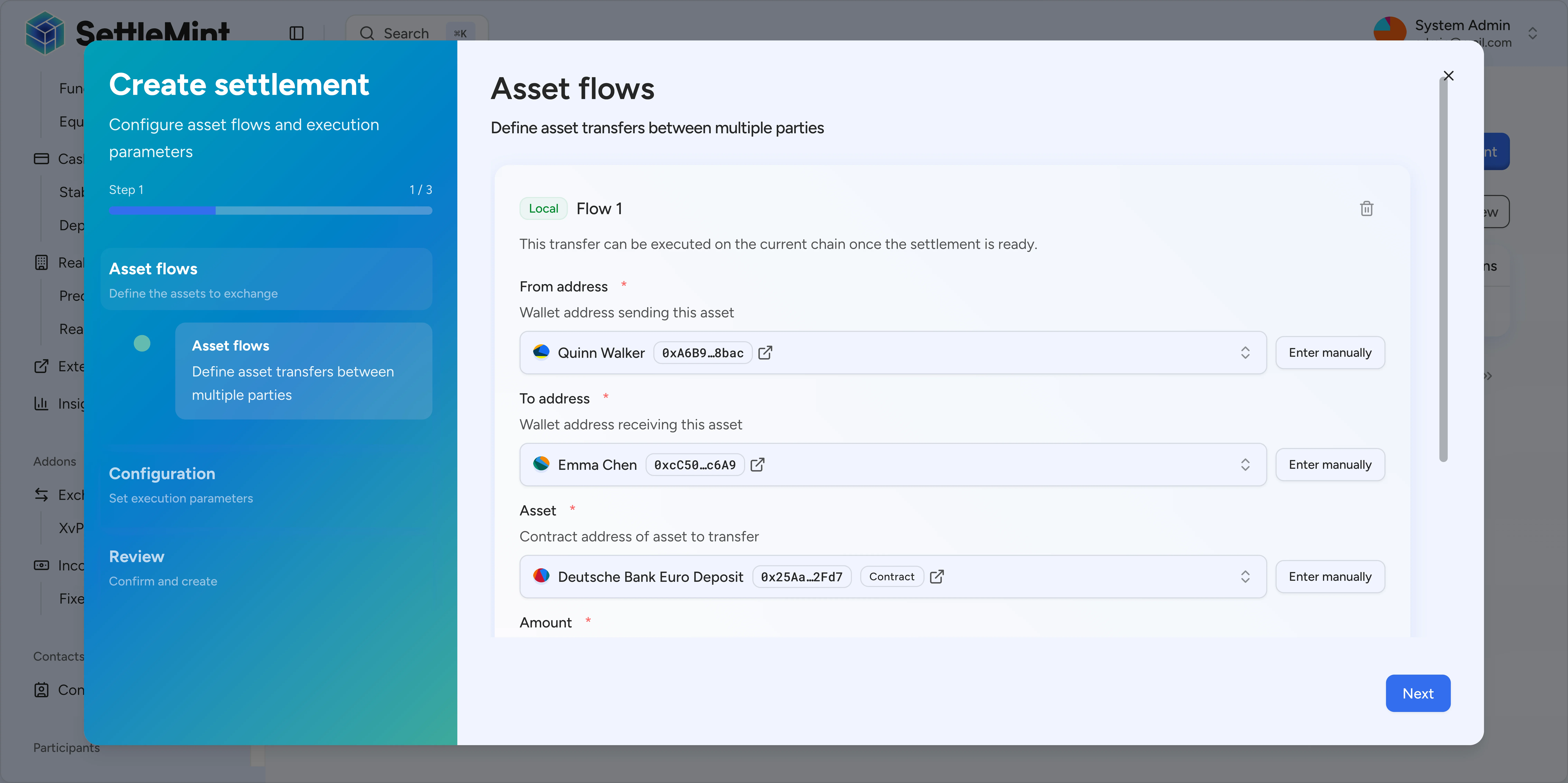
The Notary opens the settlement wizard and configures three flows:
* Flow 1: Builder sends 1,000 PROP to Buyer
* Flow 2: Buyer sends 100,000 EURD to Builder
* Flow 3: Buyer sends 500 EURD to Notary
The Notary sets a 24-hour cutoff and enables auto-execute.
**Balances after creation:**
| Participant | PROP | EURD |
| ------------ | ----- | ------- |
| Builder | 1,000 | 0 |
| Buyer | 0 | 100,500 |
| Notary | 0 | 0 |
| XvP Contract | 0 | 0 |
No assets have moved yet. The settlement is in **Pending** state.
### Builder approves [#builder-approves]
The Builder reviews the settlement and clicks **Approve**. Their 1,000 PROP are transferred to the XvP contract as escrow.
**Balances after Builder approves:**
| Participant | PROP | EURD |
| ------------ | ----- | ------- |
| Builder | 0 | 0 |
| Buyer | 0 | 100,500 |
| Notary | 0 | 0 |
| XvP Contract | 1,000 | 0 |
The settlement shows "1 of 2 approvals" and remains in **Pending** state.
### Buyer approves [#buyer-approves]
The Buyer receives notification of the pending settlement. They review all flows, confirm the amounts are correct, and click **Approve**.
Their 100,500 EURD (100,000 for the property + 500 notary fee) are transferred to the XvP contract. Since auto-execute is enabled and this is the final approval, the settlement immediately executes.
**Balances after Buyer approves (and auto-execute triggers):**
| Participant | PROP | EURD |
| ------------ | ----- | ------- |
| Builder | 0 | 100,000 |
| Buyer | 1,000 | 0 |
| Notary | 0 | 500 |
| XvP Contract | 0 | 0 |
The settlement is now in **Executed** state.
## What happens during execution [#what-happens-during-execution]
When all approvals are received, the settlement:
1. Validates all flows (sufficient balances, compliance checks)
2. Executes all transfers atomically in a single transaction
3. Distributes assets to recipients
4. Records the execution on-chain
If any transfer fails (insufficient balance, compliance block, etc.), the entire settlement reverts and all assets remain in escrow.
## Alternative scenarios [#alternative-scenarios]
### Manual execution [#manual-execution]
If auto-execute is disabled, after all senders approve:
1. Settlement enters **Ready** state
2. Anyone can click **Execute** to trigger the settlement
3. All flows execute atomically
This allows for a final review before committing.
### Buyer doesn't approve [#buyer-doesnt-approve]
If the Buyer doesn't approve before the cutoff date:
1. Settlement enters **Expired** state when the cutoff passes
2. The Builder can click **Withdraw** to reclaim their 1,000 PROP
3. The settlement cannot be executed after expiration
### Cancellation before execution [#cancellation-before-execution]
If any local participant decides to cancel before execution:
1. The participant clicks **Cancel**
2. All locked assets are returned to their original senders
3. Settlement enters **Cancelled** state
4. No assets exchanged
## Summary [#summary]
| Step | Action | Settlement state | Assets moved |
| ---- | ------------------------- | ---------------- | ---------------------------------- |
| 1 | Notary creates settlement | Pending | None |
| 2 | Builder approves | Pending (1/2) | PROP → XvP |
| 3 | Buyer approves | Executed | EURD → XvP, then atomic settlement |
## Next steps [#next-steps]
Detailed guide to using the settlement wizard.
See how cross-chain settlements work with hash time-locked contracts.