# Register user
Source: https://docs.settlemint.com/docs/user-guides/user-management/register-user
Register users in the identity registry by linking a wallet, on-chain identity, and jurisdiction before token eligibility checks run.
Registering a user links their wallet address, OnchainID identity, and jurisdiction in the identity registry. That registry entry is only one part of KYC enforcement. A user becomes transfer-ready when their OnchainID also has the claim topics required by the asset's compliance rules, and those claims come from trusted issuers authorized for those topics. For the underlying model, see [Claims and identity](/docs/architecture/concepts/claims-and-identity).
KYC evidence stays off-chain with the verifier and operator workflow. The on-chain state records the result as claims on the user's OnchainID, such as KYC or AML claim topics, plus the issuer that signed them. When a regulated token checks a mint or transfer, DALP resolves the wallet through the identity registry, reads the required claims from the OnchainID, verifies that each claim issuer is trusted for the matching topic, and then evaluates the configured compliance modules. Missing claims, claims from issuers that are not trusted for the required topic, or failed country and transfer rules can block eligibility.
## Prerequisites [#prerequisites]
* **Identity Manager** role or equivalent permissions
* Users must have completed onboarding with on-chain identity
* Understanding of user jurisdiction requirements. DALP registration routes use ISO 3166 country codes, and the dapp turns the selected country into the value submitted on-chain.
## About identity registry [#about-identity-registry]
The identity registry is an on-chain system that:
* Tracks all verified identities for your organization
* Links wallet addresses to identity contracts
* Enforces jurisdictional rules
### Identity states [#identity-states]
| State | Description | Can receive assets |
| ------------------------ | --------------------------------------------------------------------- | ------------------ |
| **Pending Registration** | Onboarded but not yet active in the registry | No |
| **Registered** | Active in the registry, but required claims may still be missing | Depends on rules |
| **Verified** | Active, with required claims from trusted issuers for the asset rules | Yes |
## Registering users [#registering-users]
### Access user management [#access-user-management]
Navigate to **Participants** > **Users**. You'll see all users with their name, email, EOA (wallet address), type, identity address, and status.
### Select unregistered user [#select-unregistered-user]
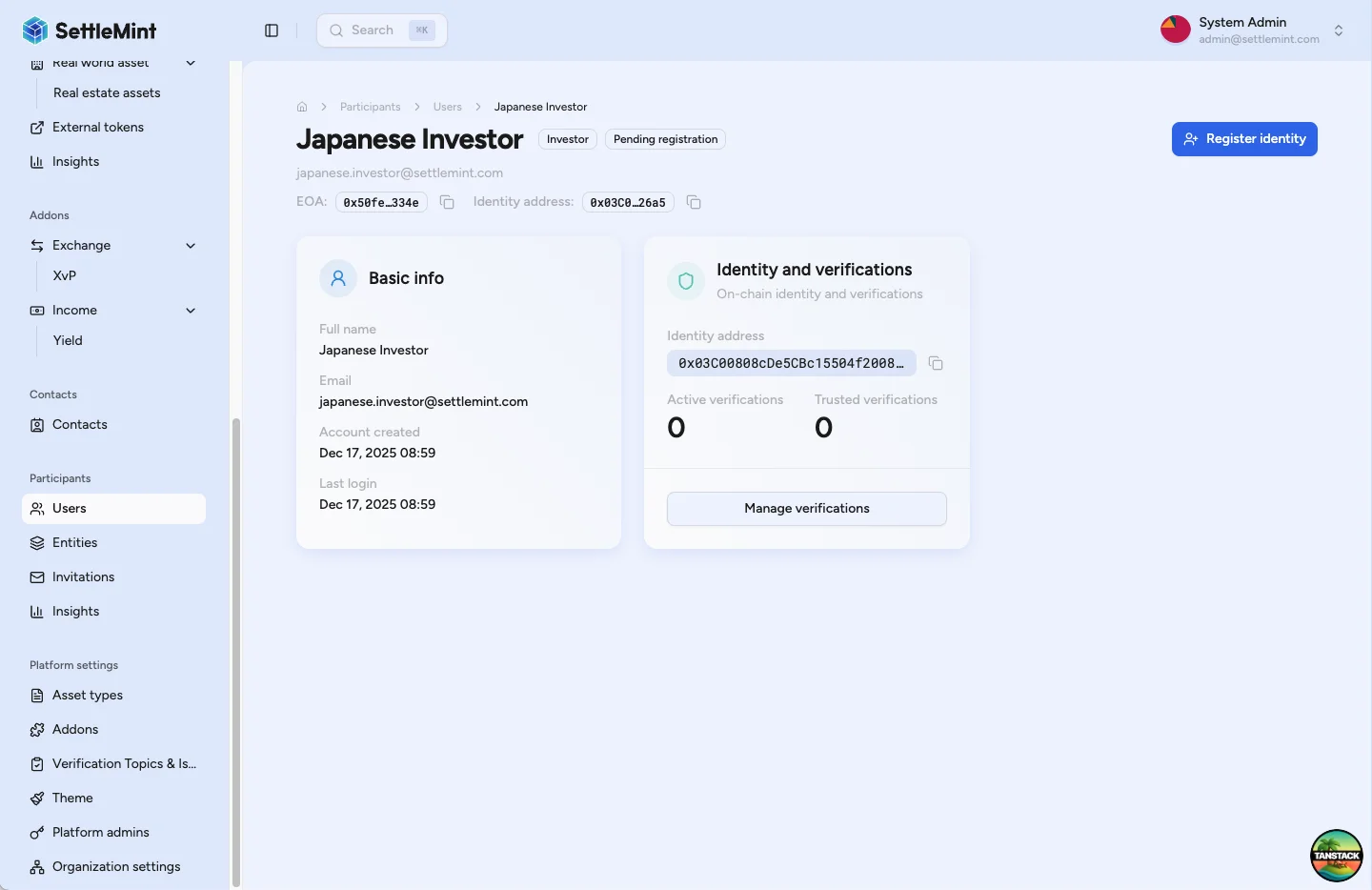
Find and click on a user you want to register. The user details page shows their information, identity contract details, current registration status, and available actions.
### Initiate registration [#initiate-registration]
Click **Register Identity** (top right button) to begin the registration process. This opens the registration flow.
### Select jurisdiction [#select-jurisdiction]
Choose the user's country from the dropdown. Jurisdiction determines applicable regulatory requirements, compliance rules, investment limits, and verification requirements.
Country selection can be used in compliance rules but doesn't automatically apply specific rules. Choose based on
user's legal residence or incorporation, not temporary location.
### Complete registration [#complete-registration]
Click **Continue** after selecting jurisdiction, review the summary, then click **Register identity**. Enter your PIN when prompted and wait for blockchain confirmation. The registry contract links the user's wallet address to their identity and country code.
### Verify registration [#verify-registration]
After transaction confirmation, the user status changes to **"Registered"**. The user is now in the identity registry and ready to receive verifications.
## Best practices [#best-practices]
### Enrollment timing [#enrollment-timing]
* Enroll users promptly after onboarding completion
* Verify user information before enrollment
* Document enrollment decisions for audit
### Jurisdiction selection [#jurisdiction-selection]
* Use user's legal residence or incorporation
* Verify jurisdiction through documentation
* Consider tax and regulatory implications
* Update if user's status changes
### Security considerations [#security-considerations]
* Verify identity before enrollment
* Monitor for duplicate enrollments
* Audit enrollment activities
* Maintain enrollment records
## Integration with compliance [#integration-with-compliance]
### Token transfers [#token-transfers]
* Registered identities are eligible only when the token's compliance rules pass
* Non-registered identities are blocked from regulated asset transactions
* An identity-verification rule can require one claim topic, such as KYC, or a logical expression such as KYC and AML
* The claim must be present on the user's OnchainID and issued by a trusted issuer authorized for that topic
* Different assets may require different claim topics, trusted issuers, country rules, or transfer approvals
### Compliance modules [#compliance-modules]
* Identity verification modules check registry enrollment and required claim topics
* Country and transfer-restriction modules can apply additional rules after identity lookup
* A single failing module blocks the mint or transfer
* Compliance reporting tracks enrolled, verified, and blocked users
### Verification process [#verification-process]
* KYC/KYB checks and document review happen off-chain before a verifier issues a claim
* The on-chain claim records the verification result, topic, issuer, signature, and supporting reference data
* Only issuers trusted for the relevant topic should issue claims used for transfer eligibility
* Multiple verifications can be issued per enrolled identity when different assets require different topics
## Troubleshooting [#troubleshooting]
| Issue | Solution |
| ------------------------------ | --------------------------------------------------------------------------------------------------------------------------- |
| Cannot see Register button | • Verify you have Identity Manager role
• Check user has completed onboarding
• Ensure user has on-chain identity |
| Registration transaction fails | • Check wallet has sufficient gas
• Verify correct user is selected
• Ensure network connectivity |
| User still shows as Pending | • Wait for blockchain confirmation
• Refresh the page
• Check transaction was successful |
| Cannot select jurisdiction | • Ensure valid country is available
• Check compliance settings
• Verify no existing registration |
## Related guides [#related-guides]
* [User Onboarding](/docs/user-guides/user-management/user-onboarding) - Understanding identity creation
* [Claims and identity](/docs/architecture/concepts/claims-and-identity) - Understand how wallet registration, OnchainID claims, and trusted issuers work together
* [Identity and compliance](/docs/architecture/security/identity-compliance) - Review how identity checks fit into the broader compliance architecture
* [Provide KYC Data](/docs/user-guides/user-management/provide-kyc-data) - How users complete their KYC profile
* [Manage KYC Data](/docs/user-guides/compliance/manage-kyc-data) - Review KYC submissions before registration
* [Verify KYC](/docs/user-guides/compliance/verify-kyc) - Issue verifications after enrollment
* [Configure Trusted Issuers](/docs/user-guides/compliance/configure-trusted-issuers) - Set up verification framework
* [Compliance Overview](/docs/user-guides/compliance/overview) - Complete compliance reference