

Burn assets
Permanently remove units of a security from circulation.
Burning removes asset units from holder balances and submits the burn to the asset contract.
Use this guide to retire issued tokens from the DALP console for share cancellation, bond redemption, buyback settlement, enforcement action, or correcting an authorised issuance.
DALP burns one holder through the burn contract call and multiple holders through the batch burn path. The operation is available only when the asset supports burning, the asset is not paused, and your account has the supply management permission for that asset.
If you automate holder burns, use the token holders and transfers API guide. For the broader asset policy model, see asset policy.
Irreversible action
Burning is permanent and cannot be undone.
Prerequisites
- The asset includes the burnable token feature and is not paused.
- Your account has the supply management role for the asset. Check the Permissions tab before starting.
- Each target address holds enough available balance for the burn amount. Frozen units do not count as available balance.
- If you burn from multiple rows, the combined amount for each address fits within that address's available balance.
- If the asset charges an external transaction fee and you burn from your connected wallet, that wallet holds enough fee token and has approved the external fee feature for the burn fee.
What the console checks
Before you continue, the burn form checks that each row has a holder address and a positive amount. If the same holder appears in more than one row, the form adds those rows together and compares the combined amount with the holder's available balance. Frozen balances do not count toward the available amount.
On the confirmation step, DALP shows the current supply, the projected new supply, the holder rows, and any fee preview. When a percentage burn fee applies, DALP shows the net amount removed from supply for each row because the fee leg transfers rather than burns. If an external transaction fee applies and the connected wallet is one of the burn sources, the sheet also checks that wallet's fee-token balance and allowance before submission.
Steps
Open burn dialog
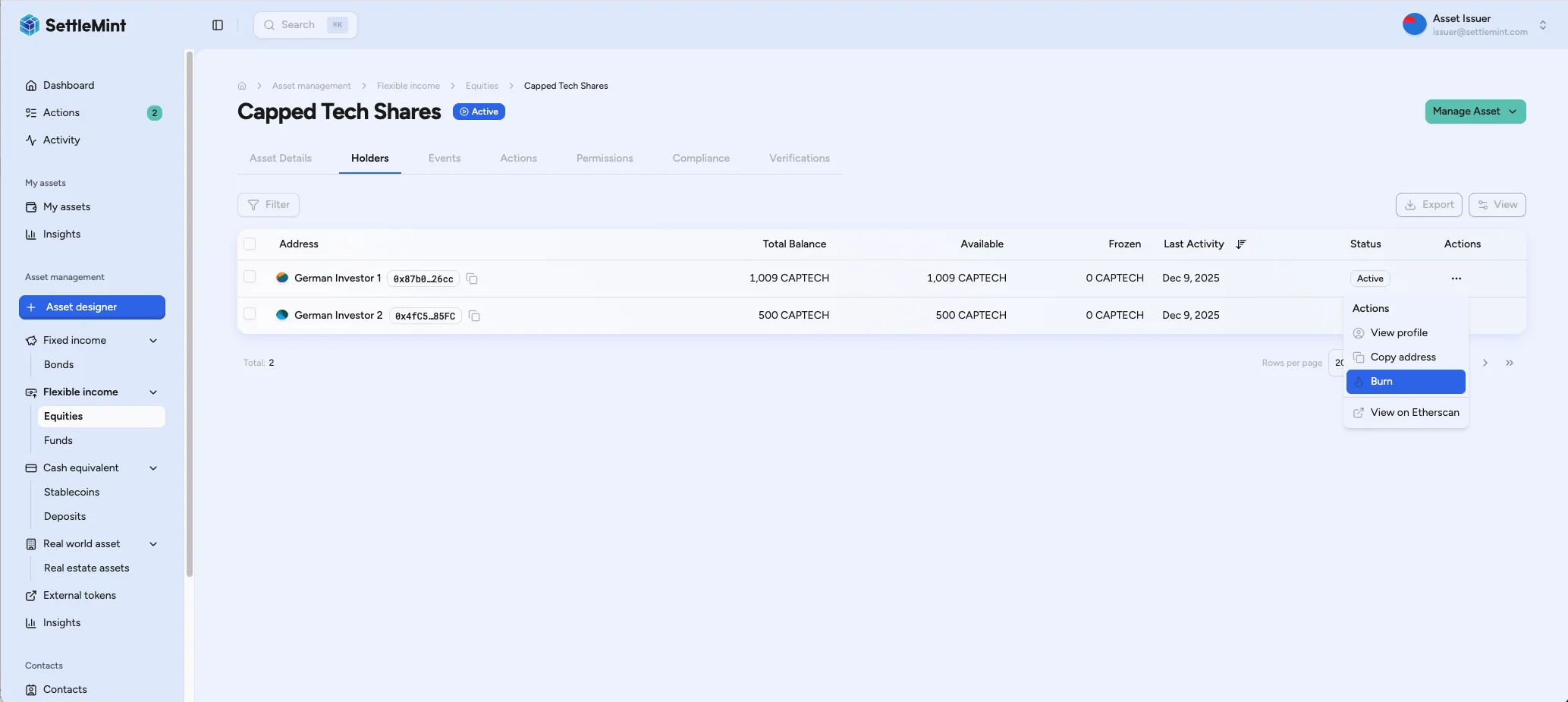
Navigate to the asset page and open the Holders tab. Click the ... menu on the holder row you want to burn from, then select Burn.
Enter details
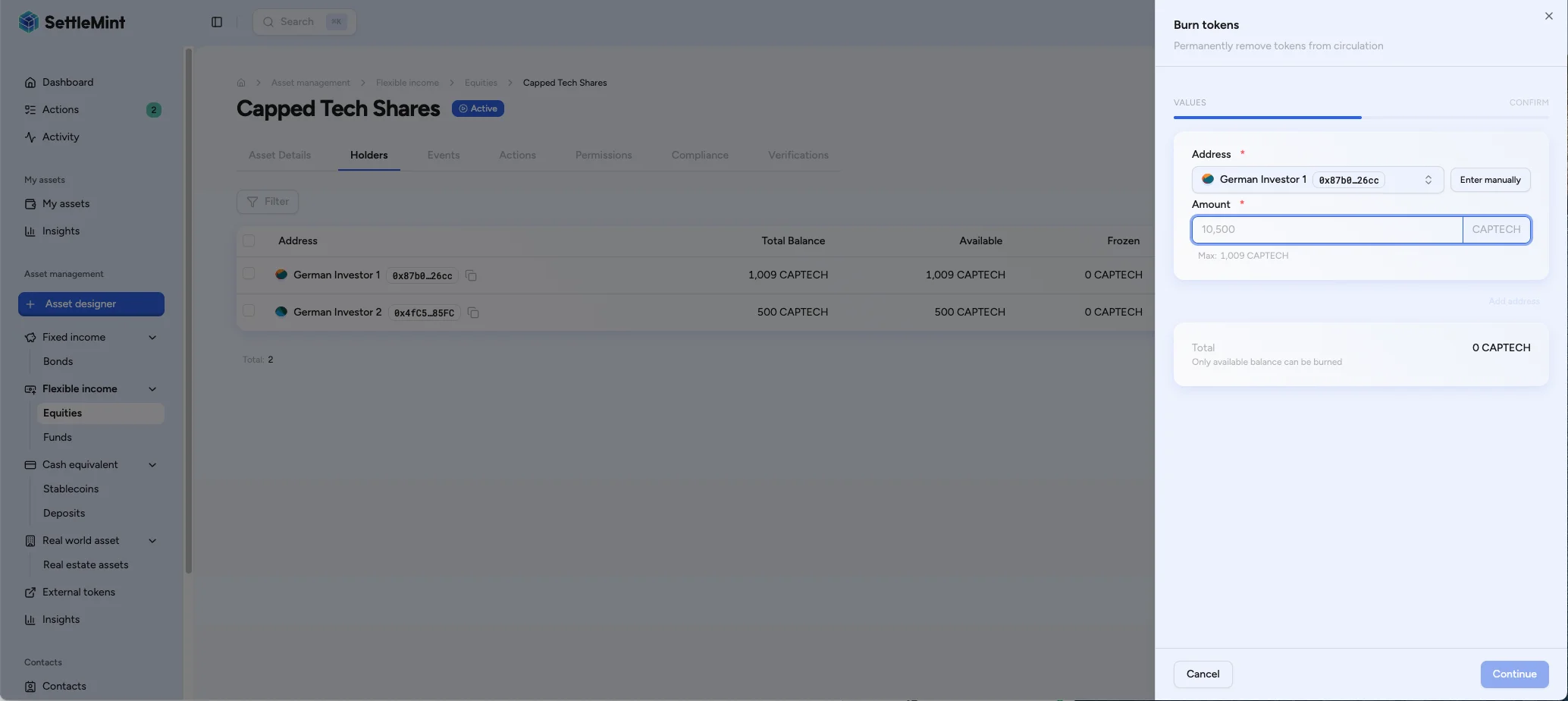
Select the holder address and enter the burn amount. Click Add address to burn from more than one holder in the same submission. DALP validates that the number of addresses matches the number of amounts and accepts up to 100 rows in one burn request.
The form checks available holder balances. If you enter the same address more than once, DALP adds those rows together and compares the total against that holder's available balance.
Confirm
Review the holder rows, current supply, projected new supply, fee preview, and wallet verification challenge. Submit only when the burn amount, source holder, and supply change match the approved servicing action.
When a percentage burn fee applies, DALP shows the net amount removed from supply for each row because the fee leg transfers rather than burns.
Authenticate with PIN or one-time password, then submit the burn.
When you burn from your connected wallet and the asset charges an external transaction fee, the confirmation screen checks your fee-token balance and allowance before you submit. With enough balance but too little allowance, use Approve fee allowance, then return to the burn confirmation.
For burns from another holder, confirm that holder's fee-token balance and allowance before submitting. Third-party wallets are not checked in the confirmation screen.
Verify totals
Return to the Asset details tab to confirm Total burned reflects the cumulative amount burned for the asset. The totals update from indexed supply history, so allow a short refresh if needed.
Troubleshooting
| Issue | Solution |
|---|---|
| Burn option is unavailable | Confirm the asset is burnable, unpaused, has available holder balance, and your account has the supply management role. |
| Amount exceeds available | Reduce the burn amount or use a holder balance that is not frozen. Duplicate rows for the same holder count together. |
| Address and amount mismatch | Remove the incomplete row or add the missing amount before submitting. |
| External fee warning | Fund the connected wallet with the fee token, or approve the external fee feature to collect the burn fee. |
| Projected supply is higher than expected | Check the fee preview; when a percentage burn fee applies, the projected supply reflects the net amount removed from supply. |