

Asset Console
The Asset Console is DALP's authenticated web interface for asset lifecycle operations. It gives operators a guided view over asset design, holdings, compliance checks, and theme configuration while keeping execution, policy, and audit evidence in the platform services behind it.
Overview
The Asset Console is DALP's authenticated web interface for people who operate, review, and inspect digital asset workflows. It is not a separate ledger or policy engine.
The console sits above the Unified API, execution engine, contract runtime, indexer, and document workflows. Users work with governed asset data in the console. Platform services keep execution controls, policy checks, and audit evidence intact.
The same platform controls apply whether a user works in the console or an application calls the Unified API. The console helps users complete the work safely; the backing services remain responsible for validation, authorization, execution, indexing, and evidence retrieval.
What the console owns
The console owns the operator experience. It provides the screens, forms, navigation, labels, previews, and status views for asset work. Users do not need to write API calls for the common console workflows.
| Console surface | What it helps users do | Backing platform responsibility |
|---|---|---|
| Dashboard and navigation | Find asset, token, onboarding, and operational surfaces | Route users to authenticated application areas |
| Asset Designer | Define an asset through guided steps for class, basics, instrument template, compliance template, permissions, and summary | Validate payloads and pass executable requests to platform services |
| Portfolio and asset views | Inspect holdings, asset state, and indexed transaction information | Reconstruct confirmed state from indexed chain and platform events |
| Branding and language controls | Render tenant-specific logos, images, colors, fonts, and translated interface text | Store and validate theme payloads and language resources |
| Document and evidence entry points | Link users to KYC, token-document, and operational evidence workflows | Enforce document authorization and retrieve protected files through the relevant APIs |
The console does not replace the API's role in the architecture. Integrations should still use the Unified API when another system needs repeatable programmatic access.
Asset design workflow
The Asset Designer is the console workflow for preparing an asset before execution. Its routed steps cover:
- asset class selection
- asset basics
- instrument template selection
- instrument-specific details
- compliance template selection
- initial asset permissions
- summary review
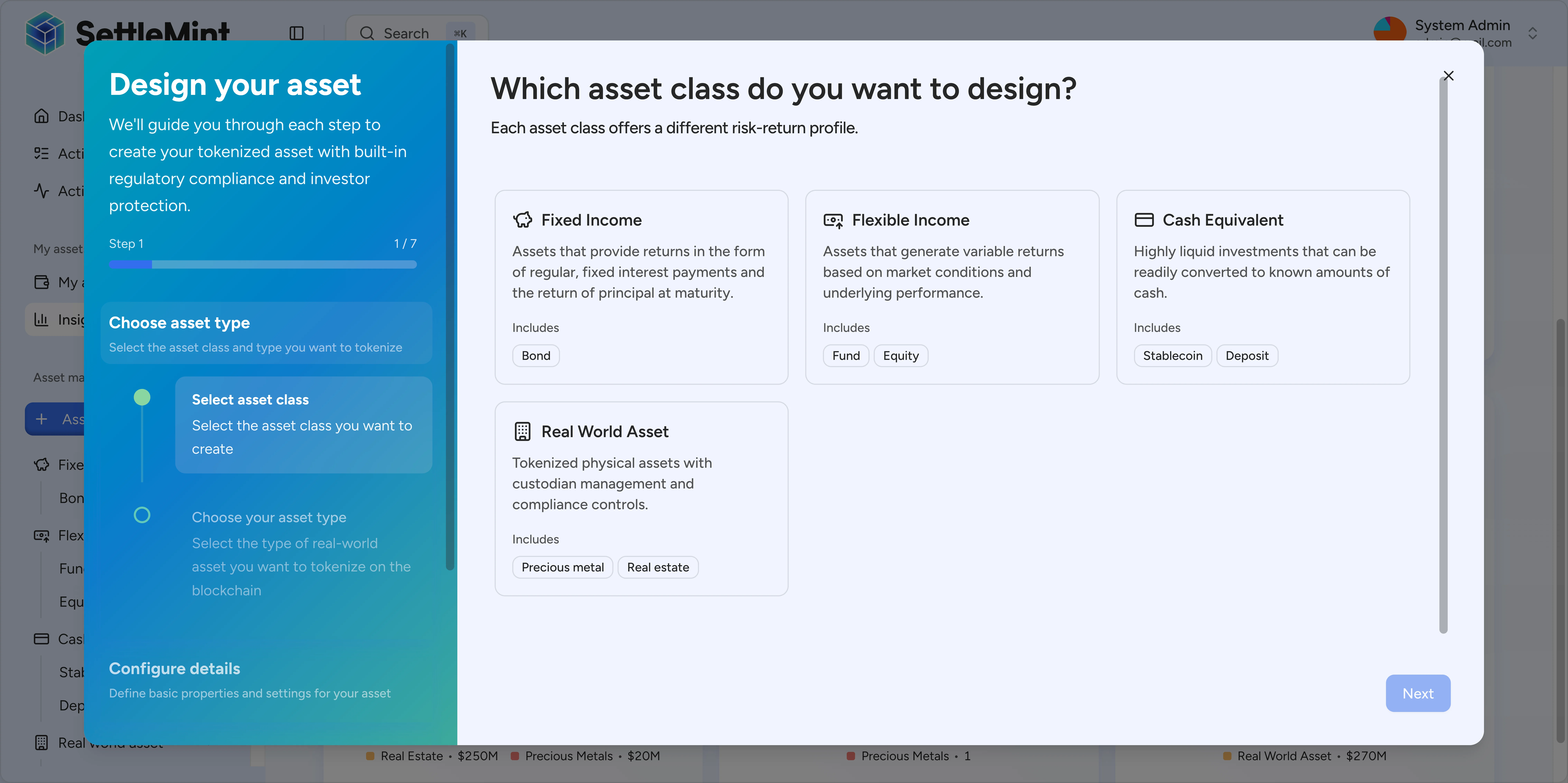
The design flow is intentionally structured. Operators move from business shape to implementation details, then review the resulting configuration. Platform services validate and execute the requested lifecycle action after the console hands off the request.
The console can also surface missing prerequisites. For example, a template step can direct a user to create or register a required asset shape before continuing the wizard.
Security and tenancy responsibilities
The console is an authenticated client. It should be treated as a user-facing control surface, not as the source of authority for business rules.
Production deployments need these controls in place:
- users authenticate before reaching private console routes
- roles and tenant membership determine which actions and records a user can see
- sensitive documents are retrieved through protected document workflows, not through public branding URLs
- execution requests pass through the same validation and authorization path used by API clients
- confirmed state comes from the indexer and platform read models rather than from browser-local assumptions
This separation matters for audits. Reviewers can distinguish between four records: what the console displayed, what the API accepted, what the execution layer submitted, and what the indexer reconstructed from event history.
Branding and public assets
Enterprise deployments can apply tenant branding through the theme system. Theme payloads cover logo variants, authentication-screen imagery, background images, favicons, Apple touch icons, font settings, light and dark color tokens, and update metadata.
| Theme key | Controls |
|---|---|
logo | Primary, compact, and authentication logo URLs such as lightUrl, darkUrl, lightIconUrl, darkIconUrl, authLightUrl, and authDarkUrl |
images | Authentication overlays, background images, favicons, Apple touch images, and favicon variants |
fonts | sans and mono font family, source, weight, preload, and custom URL settings |
cssVars.light and cssVars.dark | Light-mode and dark-mode color tokens |
metadata | Version, updater, update timestamp, and preview metadata used around theme changes |
Branding asset URLs are designed for direct browser rendering. Theme asset fields accept app-hosted paths starting with / or HTTP/HTTPS URLs, so the active theme can load logos and images without a separate document-download flow.
Do not use public branding asset URLs for investor files, token documents, KYC evidence, or operational attachments. Those records stay behind the relevant document workflows and should only be retrieved by authorized users through the matching document APIs.
Localization and accessibility
The console uses translated interface resources and shared language options for English (en-US), German (de-DE), Arabic (ar-SA), and Japanese (ja-JP). English is the fallback language when a requested language or translation key is unavailable. Arabic uses right-to-left document direction through the i18n provider.
The interface uses component-level labels, semantic text, focus states, and localized formatting helpers for values such as dates, numbers, durations, and currencies. Treat accessibility and localization as production checks, not afterthoughts: tenant branding, custom colors, and custom imagery should be reviewed against keyboard use, readable contrast, translated copy length, and right-to-left layout behavior before rollout.
Before production use
Before relying on the console in production, confirm that:
- the tenant's authentication, roles, and user membership are configured
- required asset templates, compliance templates, and permissions are available
- theme colors, logos, favicons, and custom fonts render in both light and dark modes
- public branding assets are separated from protected investor and token documents
- language fallback and right-to-left behavior are acceptable for enabled locales
- operational teams know which evidence comes from the console, the API, the execution layer, and the indexer
See also
- Authentication and security for identity management
- Roles and tenancy for access control and multi-tenant configuration
- Unified API for programmatic access
- DALP Execution Engine for operation processing
- Reporting and audit access for indexed evidence retrieval
Overview
The platform layer is where operators, integrators, and administrators enter DALP. It explains how the Asset Console, Unified API, and System Factory route requests through shared authentication, authorization, wallet verification, and audit controls.
Unified API
The Unified API is the programmatic entry point for DALP asset, compliance, servicing, and settlement operations. It exposes versioned API documentation, authenticated routes, tenant-scoped data access, and consistent request and response contracts for integration teams.