

System addons overview
Understand how DALP system addons are discovered, installed, and operated across settlement, distribution, yield, fee, feed, conversion, and infrastructure workflows.
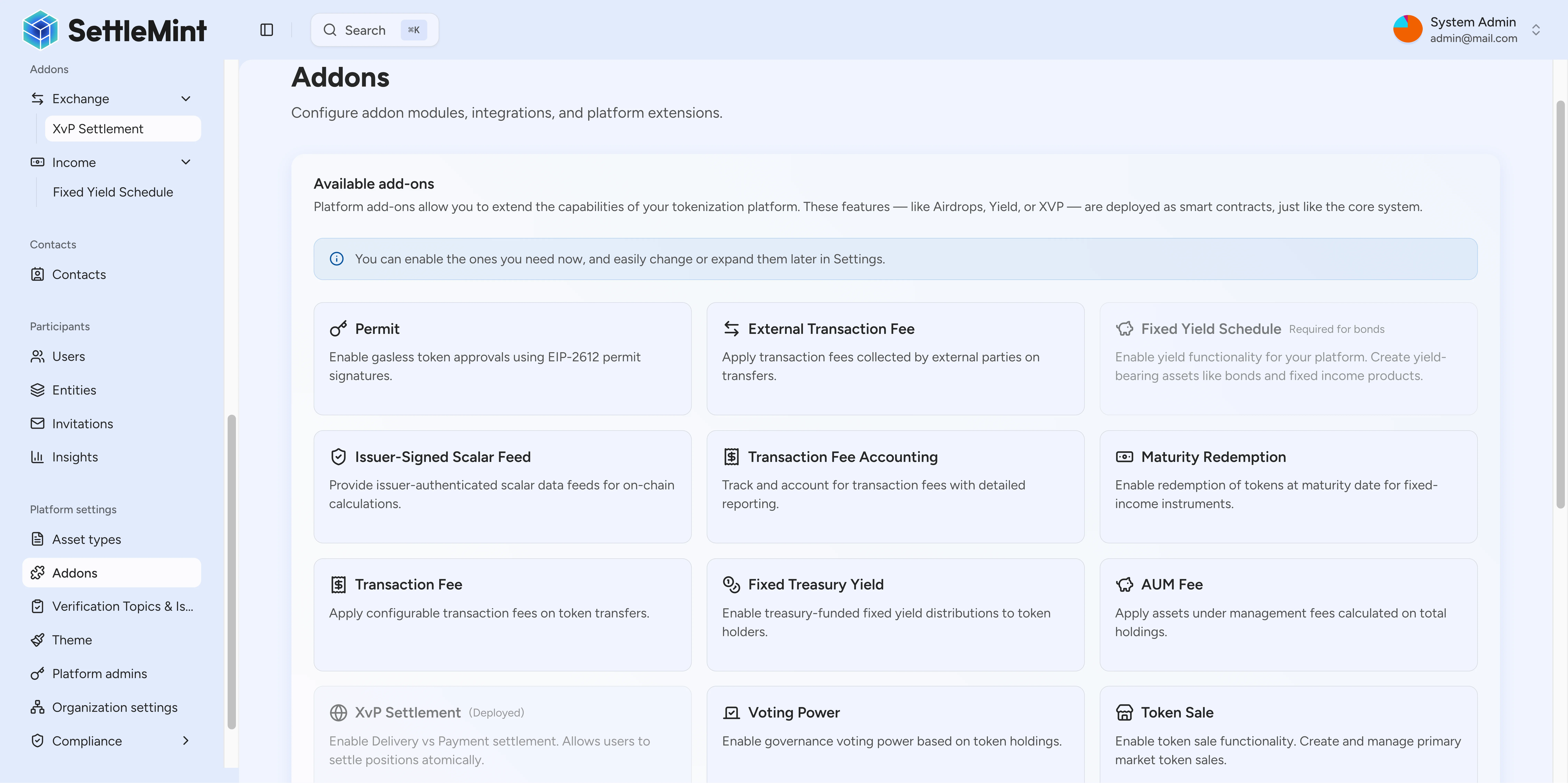
System addons are Directory-registered factories that add optional settlement, distribution, income, fee, data, conversion, and infrastructure workflows to a DALP environment. Platform administrators install visible addons from Settings > Add-ons. Operators then use addon workspaces for the actions their roles permit, while asset rules, custody approvals, compliance checks, and network execution still govern each submitted transaction.
How addons fit into the platform
System addons are registered at the system level, not on each asset. The platform reads the on-chain Directory, adds UI labels and categories for known addon types, and separates factory setup from day-to-day addon instances.
| Layer | What it controls | What you can do |
|---|---|---|
| Directory registration | Which addon types exist in the environment | Confirm the addon type is registered before installation |
| UI enrichment | Category, icon, label, hidden status, and feature grouping | Use the Add-ons settings filters to find the right addon family |
| System installation | Whether an addon factory is deployed for the platform | Install visible addon types with administrator permission |
| Addon workspace | Factory address, instance list, and addon-specific operations | Review instances and open detail pages for settlement, offering, or feature operations |
What addons do and do not own
System addons add optional platform factories. They do not take over the underlying asset, custody model, compliance rules, network operation, or treasury approval flow.
| Area | Owner | What stays outside the addon |
|---|---|---|
| Addon registration | Platform environment and Directory configuration | Registering unsupported addon types or enabling hidden contract capabilities from the Add-ons installer |
| Addon installation | Platform administrator | Bypassing administrator permissions or installing an addon before Directory registration |
| Addon workspace actions | Authorized operator for the installed factory or instance | Changing token compliance rules, custody approvals, or network settlement finality |
| Asset and transaction controls | The relevant asset, compliance, custody, and network systems | Replacing KYC checks, custody-provider decisions, off-platform execution behaviour, reserve accounting, or legal approvals |
| Read-side visibility | Indexing and UI state for the environment | Guaranteeing immediate display of a factory or instance before the source transaction is indexed |
Choose the addon family you need
The current addon registry groups visible addon types into five functional categories. Choose the family by the operation you need to run, then open the specific addon guide or workspace for the implementation details. Vault is intentionally hidden from the Add-ons settings installer and remains a contract-level treasury capability.
| Family | Visible addon types | Purpose |
|---|---|---|
| Distribution | Push airdrop, vesting airdrop, time-bound airdrop, token sale, historical balances, voting power, permit | Token distribution, offering, holder-history, governance, and permit-related workflows |
| Income and fees | Fixed yield schedule, maturity redemption, transaction fee, transaction fee accounting, external transaction fee, fixed treasury yield, AUM fee | Yield, redemption, fee, and treasury-income behaviour for assets that need those controls |
| Exchange | XvP settlement, conversion, conversion minter | Asset exchange, settlement, and conversion workflows |
| Data | Scalar feed aggregator adapter, issuer-signed scalar feed, price resolver | Price, NAV, feed, and valuation data used by platform workflows |
| Infrastructure | Paymaster signer | Platform support for account abstraction gas sponsorship |
If you are setting up the platform, start with Install addons. If an addon is already installed, go to Review addon workspaces to find its factory address, instances, and supported actions.
Vault scope
Vault is a contract-level multi-signature treasury capability. It is not listed as a visible Add-ons settings installer. See the Vault architecture reference for its roles and transaction lifecycle.
Feeds: platform settings and APIs
Feed-related addon types support data workflows. Feeds can also be reviewed from platform settings and managed through the feed APIs. See the Feeds developer guide for API-level feed operations.
Discovery and installation states
The Add-ons settings page separates addon types by current environment state, so administrators can tell whether they can act immediately or need environment setup first.
| UI state | Source condition | Meaning |
|---|---|---|
| Enabled add-ons | The system already has an installed factory for the addon type | Authorized users can open its workspace and use the supported workflows |
| Registered add-ons | The addon type is known to DALP and registered for the environment, but not installed | An administrator can install the addon factory |
| Unregistered add-ons | The addon type is known to DALP, but not registered for the environment | Register the type in the Directory before installation |
The Add-ons page also supports type and category filters. Type filters distinguish regular addons, token feature factories, and feed factories. Category filters group addon types by distribution, income and fees, exchange, data, and infrastructure.
Installation path
Administrators can install visible addon types from Settings > Add-ons. During system onboarding, DALP shows the system-addons step to administrators. Use that step to choose platform add-ons before the environment is fully configured.
If the environment has a bond factory, the onboarding flow preselects the fixed yield schedule addon. Bond workflows depend on yield scheduling, so the setup flow treats fixed yield as required for that environment.
After installation, an addon factory becomes available through an addon workspace. That workspace gives operators the factory address, the instance list, and the detail page for supported instance types such as XvP settlements or token sales.
Production checks
System addons expose platform capabilities, but each operation still passes through its own role, asset, compliance, custody, and network controls.
| Check | What to confirm before production |
|---|---|
| Access control | Administrator rights install addon factories. Contract roles and user permissions still decide which instance actions are available. |
| Registry state | A known addon type must be registered for the environment before the UI can install it. |
| Instance configuration | Each settlement, sale, feed, fee, or feature instance keeps its own configuration and lifecycle. |
| Asset and compliance rules | Token rules, compliance checks, custody decisions, and network execution still apply to submitted transactions. |
| Read-side freshness | Addon workspaces depend on indexed state. Recently deployed factories or instances can take time to appear after the source transaction completes. |
Next steps
Install addons
Install visible addon types from the Add-ons settings page or during onboarding.
Review addon workspaces
Open an installed addon, review its instances, and move into settlement or offering detail pages.
Paymaster gas sponsorship
Review when the paymaster signer addon can sponsor EVM account abstraction transactions.
XvP settlement
Coordinate asset exchange workflows after the XvP settlement addon is installed.
Yield schedule
Review automated yield distribution for bonds and other yield-bearing assets.
Replace or remove a feed
Change the feed address for an existing subject and topic, or remove a feed registration from the Feeds Directory.
Install addons
Install visible system addons from the on-chain Directory registry. The Add-ons settings page lists the addon types your environment exposes for administrator installation.