

Console
The Console is DALP's authenticated web interface for asset lifecycle operations. It gives operators a guided view over asset design, holdings, compliance checks, and theme configuration while keeping execution, policy, and audit evidence in the platform services behind it.
Overview
The Console is DALP's authenticated web interface. Operators and compliance reviewers use it to work with digital asset workflows. The Console is not a separate ledger or policy engine.
It sits above the Platform API, Workflow Engine, contract runtime, and indexer. You work with governed asset data through it. Platform services keep execution controls, policy checks, and audit evidence intact.
The same platform controls apply whether a user works in the Console or an application calls the Platform API. The interface helps users complete work safely. The backing services validate and authorize each request before executing it. Indexing and evidence retrieval stay there as well.
What the Console owns
The Console owns the operator experience. Operators complete asset work through its guided screens and forms. Status views and previews give them the context they need, with no API calls required for routine workflows.
| Console surface | What it helps users do | Backing platform responsibility |
|---|---|---|
| Dashboard and navigation | Find asset, token, onboarding, and operational surfaces | Route users to authenticated application areas |
| Asset Designer | Define an asset through guided steps for class, basics, instrument template, compliance template, permissions, and summary | Validate payloads and pass executable requests to platform services |
| Portfolio and asset views | Inspect holdings, asset state, and indexed transaction information | Reconstruct confirmed state from indexed chain and platform events |
| Branding and language controls | Render tenant-specific logos, images, colors, fonts, and translated interface text | Store and validate theme payloads and language resources |
| Document and evidence entry points | Link users to KYC, token-document, and operational evidence workflows | Enforce document authorization and retrieve protected files through the relevant APIs |
The Console does not replace the API's role in the architecture. Use the Platform API when your system needs repeatable programmatic access.
Asset design workflow
The Asset Designer is the Console workflow for preparing an asset before execution. Its steps cover:
- asset class choice
- asset basics
- instrument template selection
- instrument-specific details
- compliance template choice
- initial asset permissions
- summary review
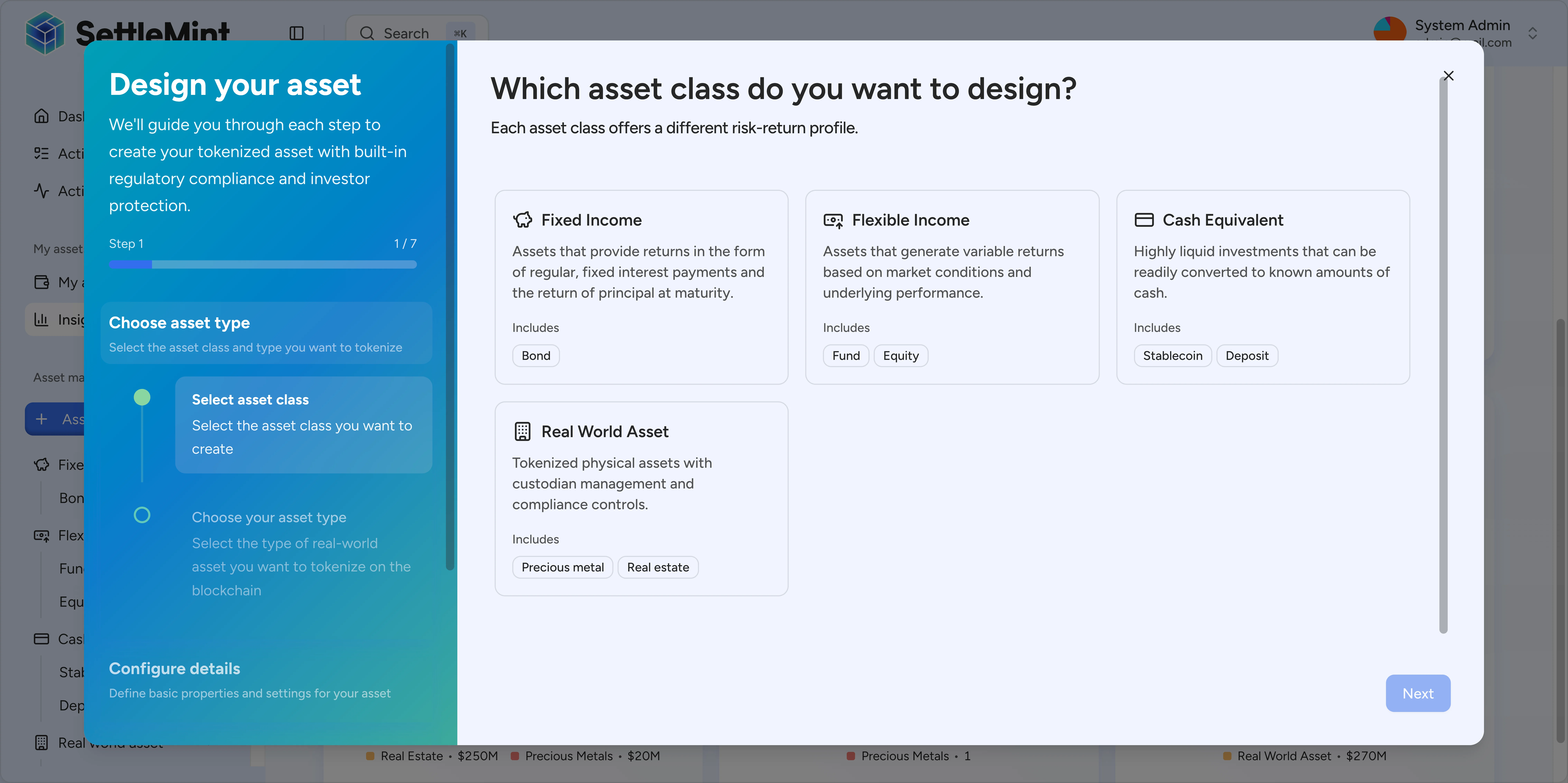
The design flow guides operators from business shape to implementation details, then to a final review. Platform services validate and execute the requested lifecycle change after the interface hands off the request.
The Console can also surface missing prerequisites. For example, a template step can direct users to create or register a required asset shape before continuing.
Security and tenancy responsibilities
The Console is an authenticated client. Treat it as a user-facing control surface, not as your source of authority for business rules.
Production deployments require these controls:
- Users authenticate before reaching private Console routes.
- Roles and tenant membership determine which records and operations a user can reach.
- Sensitive documents flow through protected document workflows, not through public branding URLs.
- Execution requests pass through the same validation and authorization path used by API clients.
- Confirmed state comes from the indexer and platform read models rather than from browser-local assumptions.
This separation matters for audits. Reviewers can distinguish between four records: what the Console displayed, what the API accepted, what the execution layer submitted, and what the indexer reconstructed from event history.
Branding and public assets
Enterprise deployments can apply tenant branding through the theme system. Submit a theme payload that covers logo variants, authentication-screen imagery, background images, favicons, Apple touch icons, font settings, and color tokens for light and dark modes. Include update metadata with the payload.
| Theme key | Controls |
|---|---|
logo | Primary, compact, and authentication logo URLs such as lightUrl, darkUrl, lightIconUrl, darkIconUrl, authLightUrl, and authDarkUrl |
images | Authentication overlays, background images, favicons, Apple touch images, and favicon variants |
fonts | sans and mono font family, source, weight, preload, and custom URL settings |
cssVars.light and cssVars.dark | Light-mode and dark-mode color tokens |
metadata | Version, updater, update timestamp, and preview metadata used around theme changes |
Theme asset URLs support direct browser rendering. Asset fields accept app-hosted paths starting with / or HTTP/HTTPS URLs, so the active theme loads logos and images without a separate document-download flow.
Do not use public theme asset URLs for investor files, token documents, KYC evidence, or operational attachments. Those records stay behind the relevant document workflows. Your authorized users retrieve them through the matching document APIs.
Localization and accessibility
The Console uses translated interface resources for English (en-US), German (de-DE), Arabic (ar-SA), and Japanese (ja-JP). English is the fallback when a requested language or translation key is unavailable. Arabic uses right-to-left document direction through the i18n provider.
The interface uses component-level labels, semantic text, focus states, and localized formatting helpers for dates, currency values, and numbers. Treat accessibility and localization as production requirements. At rollout, review tenant branding and custom imagery against keyboard use, readable contrast, translated copy length, and RTL layout behavior.
Before production use
Before you use the Console in production, confirm:
- Tenant authentication is configured, including roles and user membership.
- Required asset templates, compliance templates, and permissions are in place.
- Theme colors and logos render in both light and dark modes. Favicons and custom fonts do too.
- Public branding assets are separate from protected investor and token documents.
- Language fallback and RTL behavior are acceptable for enabled locales.
- Operational teams know which evidence comes from the Console, the API, the execution layer, and the indexer.
See also
- Authentication and security for identity management
- Roles and tenancy for access control and multi-tenant configuration
- Platform API for programmatic access
- DALP Workflow Engine for operation processing
- Reporting and audit access for indexed evidence retrieval
Platform layer - Console, API, and system creation surfaces
The platform layer is where operators, integrators, and administrators enter DALP. It explains how the Console, Platform API, and System Factory route requests through shared authentication, authorization, wallet verification, and audit controls.
Platform API
The Platform API is the programmatic entry point for DALP asset, compliance, servicing, and settlement operations. It exposes versioned API documentation, authenticated routes, tenant-scoped data access, and consistent request and response contracts for integration teams.