

System addons overview
Understand how DALP system addons are discovered, installed, and operated across settlement, distribution, yield, fee, feed, conversion, and infrastructure workflows.
System addons are Directory-registered factories that extend a DALP environment with optional workflow capabilities. The registry groups these into five families: settlement, distribution, income and fee management, data feeds, and asset conversion. Addons install when the system converges to the on-chain Directory. Onboarding handles this automatically. For anything the Directory gains afterwards, go to Organisation settings > Operations > System updates. Operators then use addon workspaces for the operations their roles permit, while asset rules, custody approvals, compliance checks, and network execution still govern each submitted transaction.
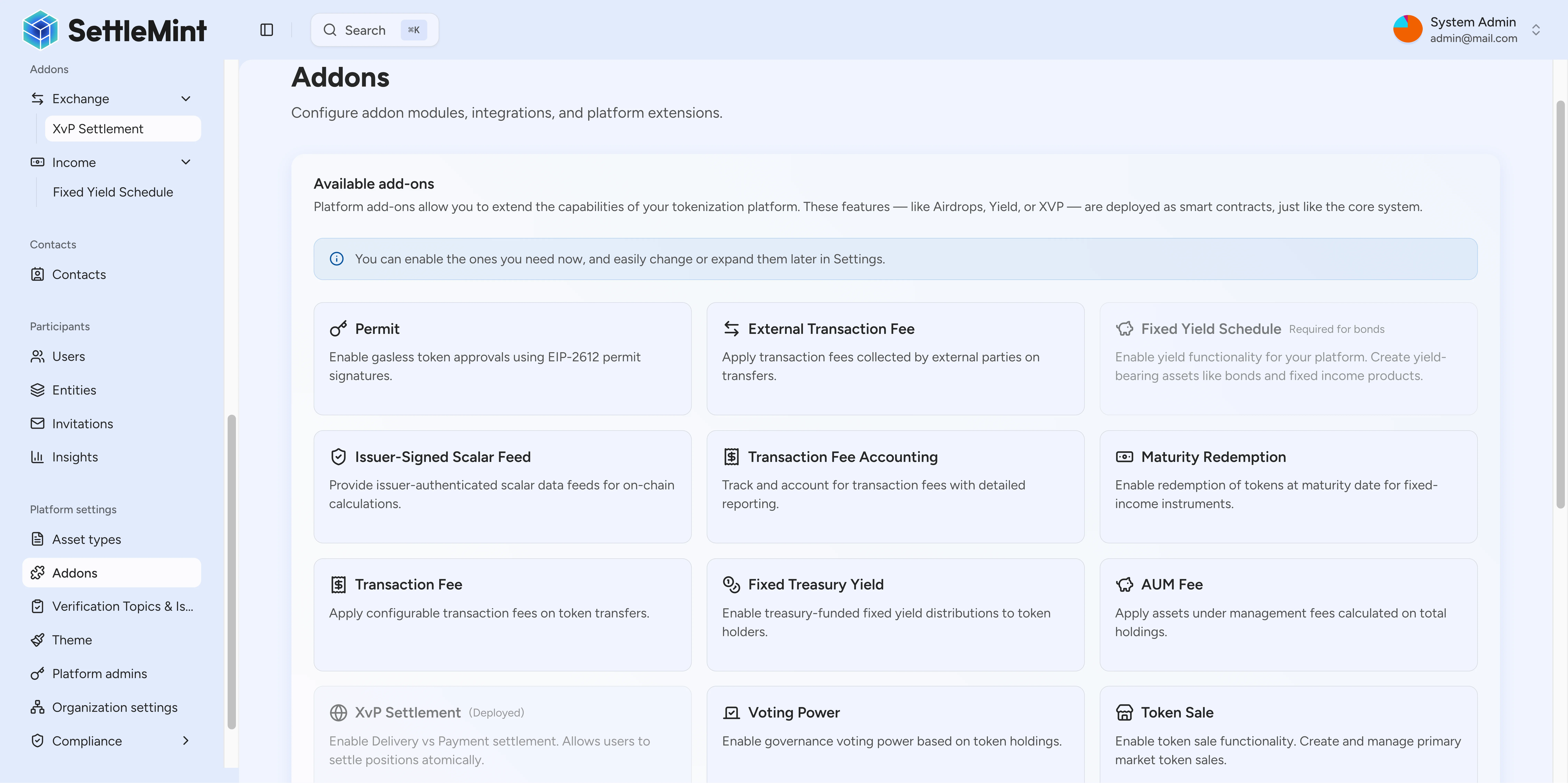
How addons fit into the platform
The platform registers system addons at the system level, not on each asset. It reads the on-chain Directory, adds UI labels and categories for known addon types, and separates factory setup from day-to-day addon instances.
| Layer | What it controls | What you can do |
|---|---|---|
| Directory registration | Which addon types exist in the environment | Confirm the Directory has registered the addon type before installing it |
| UI enrichment | Category, icon, label, hidden status, and feature grouping | Use the System updates filters to find the right addon family |
| System installation | Whether the platform has deployed an addon factory | Install visible addon types with administrator permission |
| Addon workspace | Factory address, instance list, and addon-specific operations | Review instances and open detail pages for settlement, offering, or feature workflows |
What addons do and do not own
System addons add optional platform factories. They do not take over the underlying asset, custody model, compliance rules, network operation, or treasury approval flow.
| Area | Owner | What stays outside the addon |
|---|---|---|
| Addon registration | Platform environment and Directory configuration | Registering unsupported addon types or enabling hidden contract capabilities through System updates |
| Addon installation | Platform administrator | Bypassing administrator permissions or installing an addon before Directory registration |
| Addon workspace operations | Authorized operator for the installed factory or instance | Changing token compliance rules, custody approvals, or network settlement finality |
| Asset and transaction controls | The relevant asset, compliance, custody, and network systems | Replacing KYC checks, custody-provider decisions, off-platform execution behaviour, reserve accounting, or legal approvals |
| Read-side visibility | Indexing and UI state for the environment | Guaranteeing immediate display of a factory or instance before the indexer processes the source transaction |
Choose the addon family you need
The current addon registry groups visible addon types into five functional categories. Choose the family by the operation you need to run, then open the specific addon guide or workspace for the implementation details. The platform hides Vault from System updates. It remains a contract-level treasury capability that syncs silently.
| Family | Visible addon types | Purpose |
|---|---|---|
| Distribution | Push airdrop, vesting airdrop, time-bound airdrop, token sale, historical balances, voting power, permit | Token distribution, offering, holder-history, governance, and permit-related workflows |
| Income and fees | Fixed yield schedule, maturity redemption, transaction fee, transaction fee accounting, external transaction fee, fixed treasury yield, AUM fee | Yield, redemption, fee, and treasury-income behaviour for assets that need those controls |
| Exchange | XvP settlement, conversion, conversion minter | Asset exchange, settlement, and conversion workflows |
| Data | Scalar feed aggregator adapter, issuer-signed scalar feed, price resolver | Price, NAV, feed, and valuation data used by platform workflows |
| Infrastructure | Paymaster signer | Platform support for advanced accounts gas sponsorship |
If you are setting up the platform, start with Install addons. If an addon is already installed, go to Review addon workspaces to find its factory address and instance list.
Discovery and installation states
System updates separates components by current environment state, so administrators can tell whether a component is already on the system, available to install, or not yet registered in the Directory.
| State | Source condition | Meaning |
|---|---|---|
| Installed | The system already has the factory for the addon type | Authorized users can open its workspace and use the supported workflows |
| Available to install | The Directory has registered the addon type, but it is not yet on the system | A system manager installs it by running System updates |
| Not registered | The Directory has not registered the addon type for this environment | Register the type in the Directory before installing it |
Installation path
Onboarding installs every available component automatically, so most environments never need a manual install step. When the Directory later gains a new addon, factory, or compliance module, install it from Organisation settings > Operations > System updates. That step compares your system against the Directory and converges it in one guided run. The update installs all missing addons in one run. See Install addons for the full walkthrough.
If the environment has a bond factory, onboarding includes the fixed yield schedule addon. Bond workflows depend on yield scheduling, so onboarding installs it as part of the standard set.
After installation, an addon factory becomes available through an addon workspace. That workspace gives operators the factory address, the instance list, and the detail page for supported instance types such as XvP settlements or token sales.
Production checks
System addons expose platform capabilities. Each operation still passes through the standard access and compliance controls, and custody decisions and network execution apply as normal.
| Check | What to confirm before production |
|---|---|
| Access control | Administrator rights install addon factories. Contract roles and user permissions still decide which instance operations are available. |
| Registry state | The Directory must have registered the addon type for the environment before the UI can install it. |
| Instance configuration | Each settlement, sale, feed, fee, or feature instance keeps its own configuration and lifecycle. |
| Asset and compliance rules | Token rules, compliance checks, custody decisions, and network execution still apply to submitted transactions. |
| Read-side freshness | Addon workspaces depend on indexed state. Recently deployed factories or instances can take time to appear after the source transaction completes. |
Next steps
Install components by converging your system to the Directory through System updates. The update compares the current system against the Directory and installs all missing addons in one guided run.
Open an installed addon, review its instances, and move into settlement or offering detail pages. The workspace shows the factory address and instance list for the addon type.
Review when the paymaster signer addon can sponsor EVM advanced accounts transactions. The paymaster is an infrastructure addon that the platform syncs silently from the Directory.
Coordinate asset exchange workflows after the XvP settlement addon is installed. The XvP settlement workspace lists active settlements and lets authorized operators approve or execute them.
Review automated yield distribution for bonds and other yield-bearing assets. Yield schedule is installed automatically when a bond factory is present in the environment.
Add a reporting currency
Add a currency to your organization's exchange-rate feeds, read the latest rate snapshot, and troubleshoot a failed Save additions from the Currencies & exchange rates settings page.
Installing system addons
Addons are installed by converging your system to the on-chain Directory. Onboarding installs every available component, and System updates installs anything added to the Directory later.