

Forced transfer
A custodian-authorised on-chain transaction that debits one holder and credits another, bypassing normal approval and freeze controls for governed exception cases.
A forced transfer bypasses the source holder's signature and the token's normal compliance-module checks. The Platform API routes it through custodian-level contract authority, which means it executes even when standard transfer paths are blocked by freeze controls or pending approvals.
Treat forced transfer as a governed operator workflow. The smallest safe test is to open the forced-transfer form for a non-production asset and verify that the source holder, recipient, and evidence are all in place before submitting. Stop if the exception has not been approved.
When to use a forced transfer
Use forced transfer only when the custodian has authority to resolve an exception and the recipient is known before submission.
| Case | Example |
|---|---|
| Court or insolvency order | Move tokens to a court-appointed trustee or controlled account. |
| Estate handling | Move tokens from a deceased holder to a verified beneficiary wallet. |
| Sanctions or compliance case | Move tokens out of an address that can no longer hold the asset. |
| Lost wallet recovery | Move tokens from a verified lost wallet to the holder's new verified wallet. |
| Operational correction | Correct a documented exception approved by the asset operator. |
Do not use forced transfer to avoid normal holder approval, a compliance review, or routine friction. If the holder can initiate the transfer and the recipient passes the usual checks, use the standard transfer flow instead.
Prerequisites
Confirm you have the Custodian role and that the recipient is registered. Gather these materials before opening the form: a source holder address with sufficient balance; the approved transfer amount; exception evidence (court order, probate document, sanctions record, or recovery approval); and custody and compliance sign-off for the operation.
What the operation does
A forced transfer debits the source holder and credits the recipient in one custodian-authorised transaction. This comparison shows which controls the operation bypasses and which still apply.
| Check or control | Normal transfer | Forced transfer |
|---|---|---|
| Holder signature or approval | Required | Not required |
| Custodian role | Not required | Required |
| Standard freeze restrictions | Apply | Bypassed |
| Asset pause state | Blocks transfer | Not rejected at contract layer; console availability can still be gated |
| Configured compliance can-transfer check | Applies | Bypassed |
| Recipient registration and identity check | Applies | Applies |
The recipient check is the key boundary. A forced transfer can override the source holder's participation, but it still sends tokens only to a registered recipient for the asset.
Steps
Open the forced-transfer form
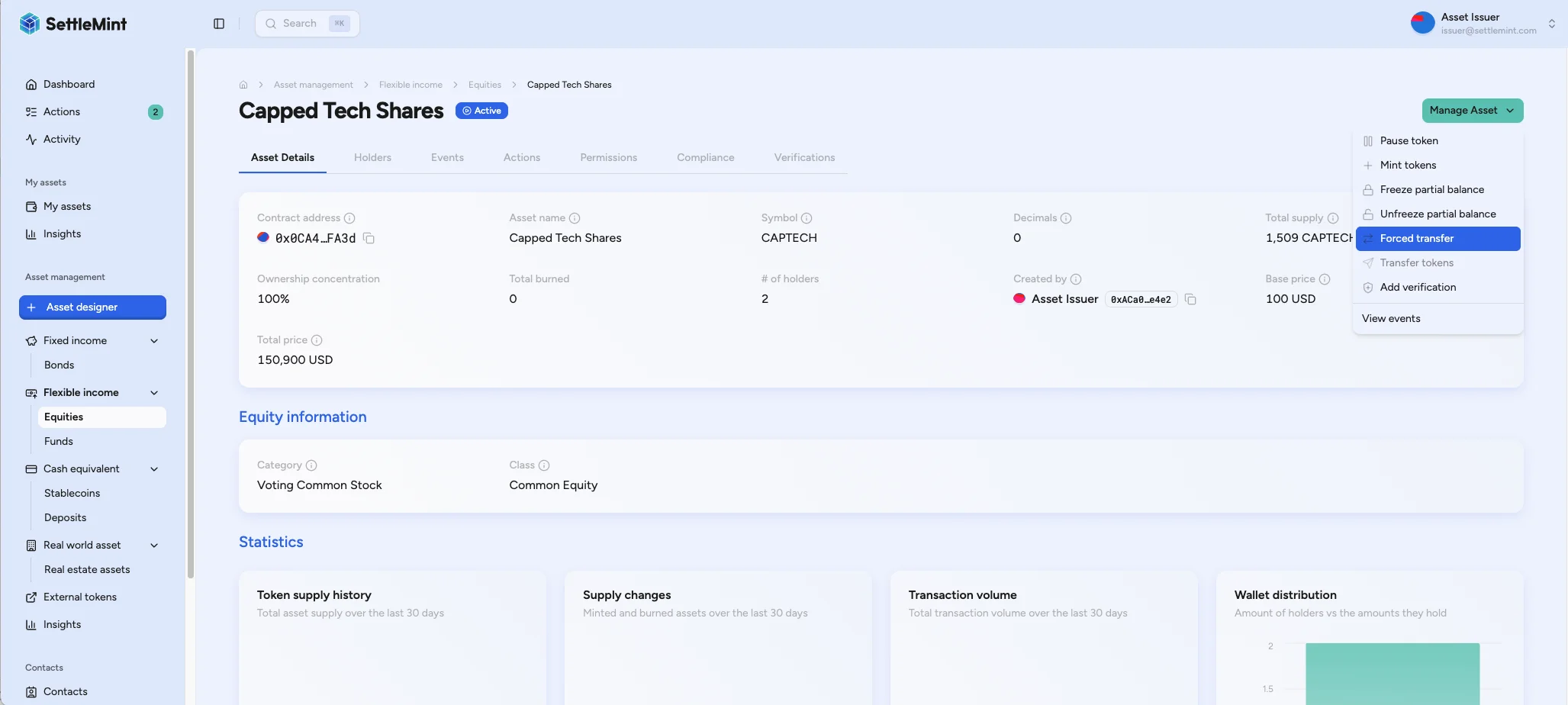
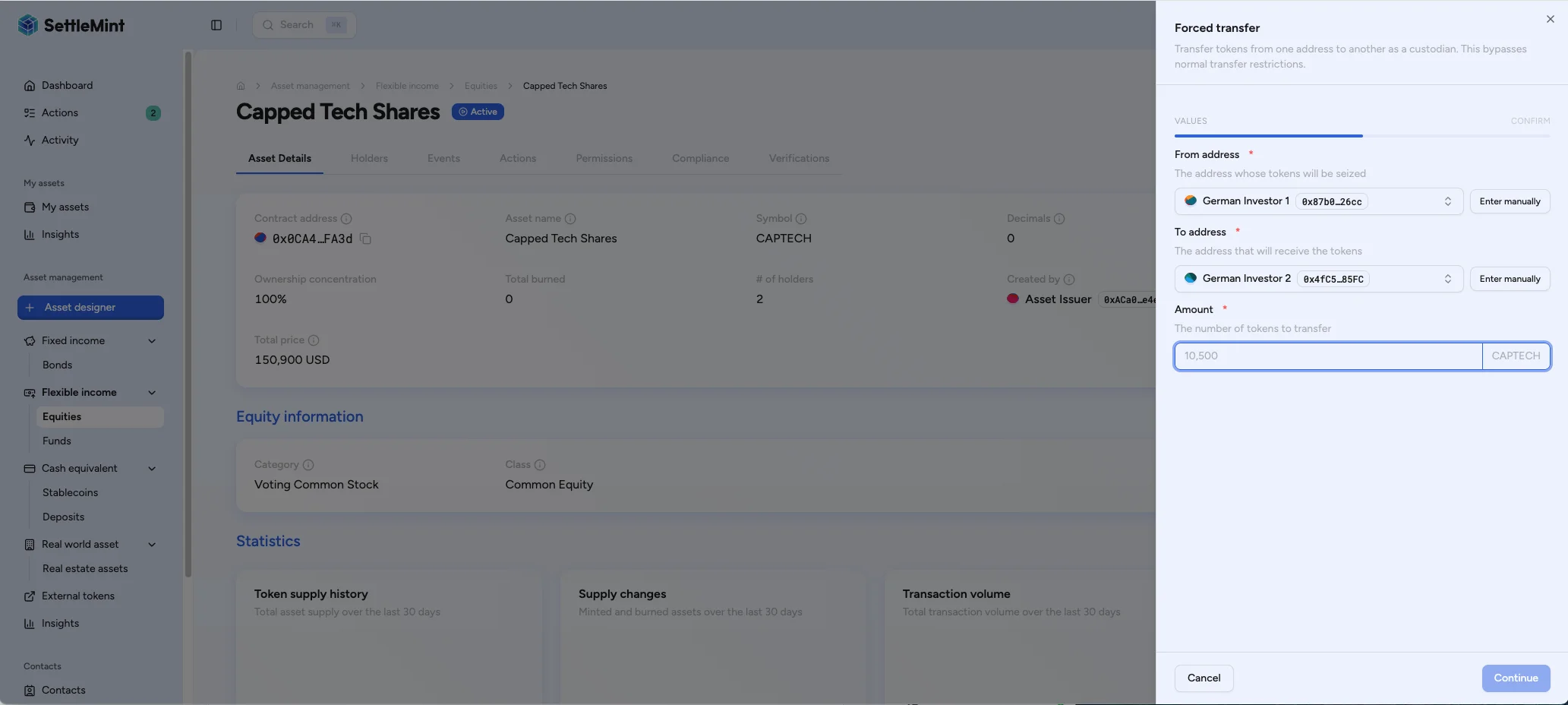
Go to Asset Management, select the asset, then choose Manage Asset > Forced transfer. The form opens with From and To address fields and an Amount field.
Check the exception before entering values
Confirm that the case is approved, the recipient is registered, and the source holder has enough balance. Resolve any gap first. A queued write with an incorrect participant or amount is difficult to undo once the operation submits, so verify all three conditions before you proceed to the form.
Enter transfer details
Both the From and To fields offer two ways to set an address:
- Search suggests holder addresses for the asset. It lists participant accounts and leaves out the asset's own contract identities, such as the asset contract, claim issuers, and add-ons, so you do not pick a system address by mistake.
- Enter manually lets you type any address directly. Use Enter manually when the source or recipient is not in the suggestions, which is common for a forced transfer: a lost or court-controlled wallet, a recovery wallet, or a trustee account may have no participant entry yet. Toggle back with Search instead.
Fill in:
- From address: the holder address losing tokens
- To address: the verified recipient address
- Amount: the token amount to move
A manually entered address is still subject to the recipient registration and identity checks described above. Manual entry only changes how you select the address, not which transfers the asset allows.
The Console checks the recipient before you can continue. As you enter the To address, the form runs a recipient eligibility pre-check against the asset. If the address is not an eligible recipient for the asset, the form keeps Continue disabled and shows the recipient as ineligible, so an ineligible recipient is caught before submission instead of reverting on-chain. The search picker already limits suggestions to eligible holder accounts, so this pre-check matters most for an address you enter by hand. The pre-check is a recipient eligibility read only. It confirms the recipient is registered and eligible for the asset, not that the full transfer also clears amount, balance, or other controls. For the same check in an integration, see Recipient eligibility check.
Review and authenticate
Check that the source address, destination, and amount in the confirmation text match the approved exception case. Authenticate with the required operator factor (such as PIN or OTP) and submit.
Retain the evidence
Log the transaction hash, approving operator, reason for the exception, and supporting legal or recovery evidence. Keep this record where auditors can match the business approval to the on-chain movement.
After submission
A forced transfer is a queued write operation. After submission, reconcile the queued transaction status, the asset activity, and the source and recipient balances before submitting another forced transfer for the same approved exception.
If the console or integration loses the response, treat the operation as pending until the transaction status or asset activity proves otherwise. API integrations should keep the same idempotency context for a network retry instead of creating a new business instruction. For the wider retry model, see the replay, idempotency, and mint controls reference.
Production checks
Forced transfers need stronger operational discipline than routine transfers. Before using them in production:
- Limit the Custodian role to approved operators and review the assignment regularly.
- Define which evidence is required for each exception type.
- Decide who can approve the operation before the custodian submits it.
- Test the workflow on a non-production asset, including recipient rejection and insufficient-balance cases.
- Confirm how your deployment handles paused assets in the Console and in any approved emergency procedures at the contract level.
- Monitor transaction status after submission and retain the operation record with the case file.
- If an integration retries the API submission, use the forced-transfer API's idempotency handling so a network retry does not create a duplicate queued operation.
Troubleshooting
| Issue | What to check |
|---|---|
| Option not visible | Verify that your operator account has the Custodian role for the asset and that the Console makes this operation available for the current asset state. |
| Insufficient balance | Check the source holder's balance before submitting the transfer. |
| Recipient rejected | The recipient is not an eligible recipient for the asset. The form blocks Continue when the recipient eligibility pre-check fails, before any on-chain submission. Verify that the recipient address is registered and eligible for the asset. |
| Address not in the search list | The picker hides contract identities and only suggests holder accounts. Use Enter manually to type the source or recipient address directly. |
| Transaction reverts | Check the source balance, recipient identity status, gas, wallet verification, and custody policy. |
| Asset is paused | Pause can block this Console workflow. Unpause the asset first, or follow your deployment's contract-level emergency procedure if one is approved. |
| Evidence missing | Stop the operation until the legal, recovery, or compliance evidence is attached to the case record. |
Related operations
The Custodian role also enables balance freeze and unfreeze operations, as well as wallet recovery. For API use, see Execute forced transfers through the API and Token holders and transfers. For reconciliation after the write, see Token events. For the normal compliance path, see Compliance transfer flow. For permissions, see Per-Asset RBAC.
How to freeze and unfreeze holder balances
Restrict or release a holder address or part of a holder balance for approved custodian cases.
How to force convert holder principal
Run a custodian-initiated conversion that bypasses the holder consent path, used for mandatory convertible instruments and institution-approved exception cases.