

Provide KYC data
Complete a versioned KYC profile with identity details and supporting documents so an Identity Manager can review it.
A KYC (Know Your Customer) profile in DALP holds the identity details and supporting documents used for participant review. An Identity Manager reviews the profile before the participant can be approved for regulated asset workflows.
KYC data is versioned. You work on a draft, submit that version for review, and keep a history of previous versions. After submission, the reviewed version stays locked. If a reviewer requests changes, DALP opens an update path so you can create a separate corrected draft.
Prerequisites
Before you start, you need:
- A DALP account with platform onboarding completed.
- A wallet and on-chain identity linked to your account.
- The personal details your organization requires for identity checks.
- Any supporting documents requested by your organization, such as a passport, national ID, driver's license, or proof of address.
What DALP stores in a KYC version
A KYC version can contain these identity fields:
| Field | What to enter | Validation to expect |
|---|---|---|
| First name and last name | Your legal name as shown on your identity documents. | Names are trimmed and must be 64 characters or less in the profile form. |
| Date of birth | Your birth date. | The date must show that you are at least 18 years old. |
| Country | Your country of citizenship or legal residence. | DALP stores a normalized ISO country code. |
| Residency status | Your residency classification. | Supported values are resident, non-resident, dual resident, or unknown. |
| National ID | A government-issued identifier, such as a passport or national ID number. | The value must not be blank and must be 50 characters or less when provided. |
All fields support draft-style onboarding. If your organization allows a partial draft, you can save incomplete data and return later before submission.
KYC status workflow
| Status | What it means | What you can do |
|---|---|---|
| Draft | The version is still being prepared. | Edit fields, upload or delete documents, and submit for review. |
| Submitted | The version has been sent into the review workflow. | View the submission. Editing is locked. |
| Under review | An Identity Manager is reviewing the version. | View the submission and wait for approval, rejection, or an update request. |
| Approved | The version has been approved and becomes the approved profile version. | View the approved data. Create a new draft if your information changes. |
| Rejected | The version was rejected by the reviewer. | Read the rejection reason and create a corrected draft. |
In the current participant submission flow, submitting a draft sends it into review and locks it. Reviewers can then approve it, reject it, or request an update.
Complete your KYC profile
Open your KYC profile
Open your account menu from your avatar in the top-right corner, select Profile, and find the KYC Information card.
If you skipped personal information during onboarding, start from this card and save your first draft.
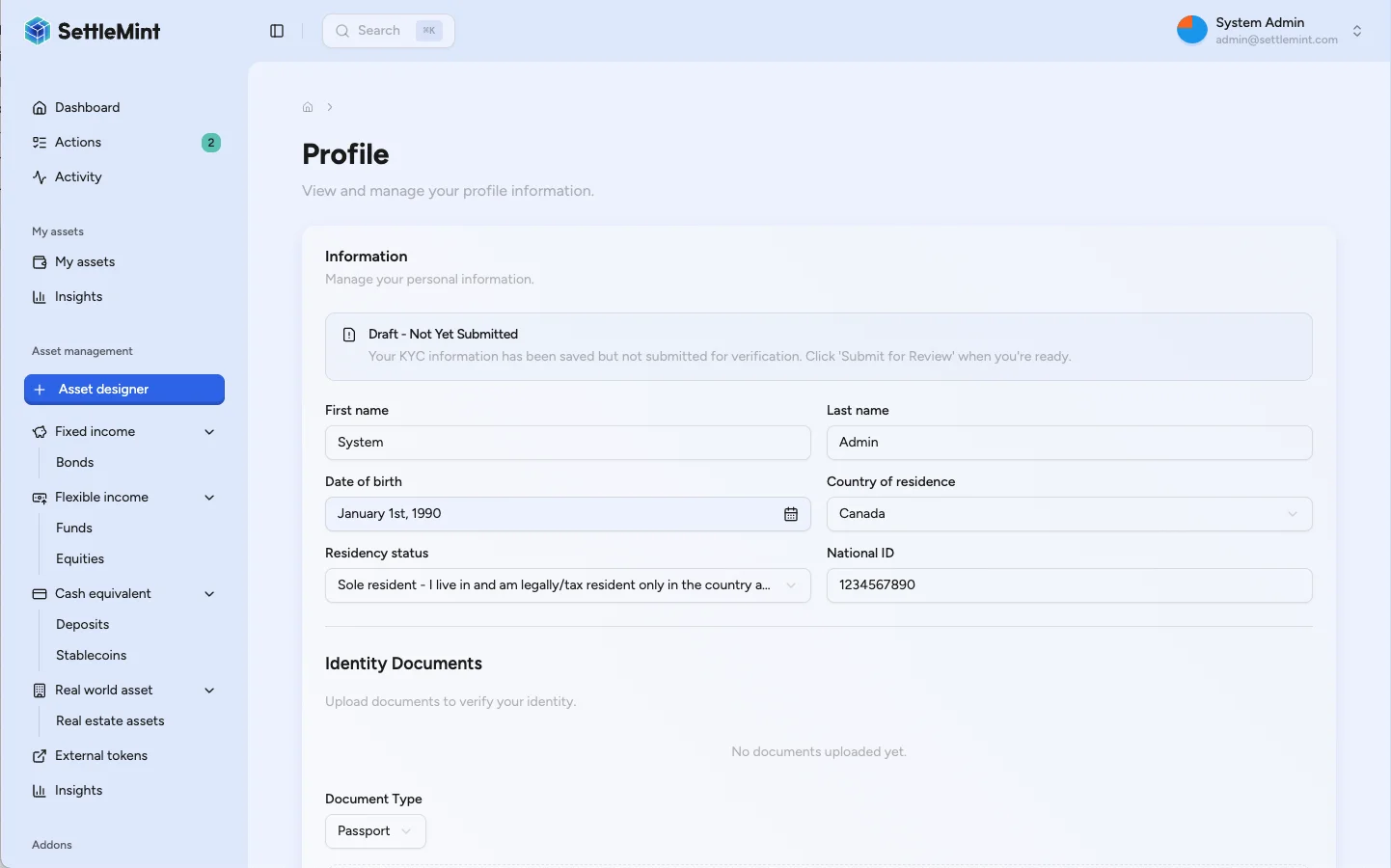
Enter your identity details
Fill in the identity fields requested by your organization. Use the same legal name, date of birth, country, residency status, and identifier that appear on your supporting documents.
If a field is not applicable or your organization has not requested it, leave it blank only when the form allows it. The reviewer may still ask for more information later.
Save a draft
Select Save draft to store the version.
You can keep editing while the version is in draft status. DALP locks the version when it leaves draft, so check names, dates, country, residency status, and identifiers before submission.
Upload supporting documents
After a draft exists, use the document section to add supporting files. Supported document categories are:
- Passport
- Driver's license
- National ID
- Proof of address
- Other supporting document
Supported file formats are PDF, JPEG, PNG, and WebP. Each file must be 25 MB or smaller. DALP records the document type, file name, size, MIME type, upload time, and uploader.
Documents can be added or removed while the version remains in Draft. After submission, document changes are locked until a new draft is created or an update request is fulfilled.
Submit for review
When the draft is ready, select Submit for review and confirm the submission.
Submission locks the version and sends it to the Identity Manager review workflow. Documents are optional at the platform level, but your organization may still require specific documents before approving the profile.
What happens after submission
After submission, the KYC card shows the current review state. You can view the submitted data, but you cannot change it while it is in the review workflow.
An Identity Manager can:
- Approve the version. The profile becomes approved, and this version is recorded as the approved version.
- Reject the version. The profile shows the rejection reason, and you need to create a corrected draft before resubmitting.
- Request an update. The version stays under review, an update request opens, and the profile is marked as needing correction.
If you already had an approved version and submit a new draft, the new version replaces it on approval. If the new version is rejected, the earlier approved profile stays in place.
Correct rejected or update-requested data
Read the reviewer feedback
For a rejection, review the rejection reason or reviewer notes shown with the KYC version. For an update request, open the update request and read the reason, required fields, and due date if one is set.
Create a corrected draft
Create a new draft from your latest or approved KYC data. DALP keeps previous versions so auditors and reviewers can see the review history.
Update fields and documents
Correct the requested fields and replace any documents that are incomplete, expired, unreadable, or inconsistent with the identity details.
Submit again
Submit the corrected draft for another review cycle. The Identity Manager receives the updated version and can approve, reject, or request further changes.
Document quality checklist
Before submitting, check that:
- Names, dates, countries, residency status, and identifiers match the documents you provide.
- Uploaded files are legible, complete, and not expired.
- Multi-page documents include every required page.
- The selected document type matches the uploaded file.
- You have included every document your organization requested, even though DALP does not require a document for every platform-level submission.
Troubleshooting
| Issue | What it means | What to do |
|---|---|---|
| You cannot edit the profile | The version is no longer in draft status. | Wait for review to finish, or respond when the reviewer requests an update. |
| A draft already exists | DALP allows one active draft at a time for the profile. | Continue editing the existing draft, or replace it if the interface offers that option. |
| Document upload fails | The file may be too large, the format may be unsupported, or the draft may no longer be editable. | Use PDF, JPEG, PNG, or WebP; keep the raw file at or below 25 MB; confirm the version is still in Draft. |
| Submit fails | Only draft versions can be submitted. | Reopen the KYC card and confirm you are working on the active draft version. |
| Review feedback is unclear | The reviewer controls organization-specific KYC requirements. | Contact your Identity Manager or platform administrator before resubmitting. |
| You cannot see the KYC card | Your account may not have completed onboarding or identity setup. | Confirm that your wallet and on-chain identity are linked, then contact your administrator. |
Production and audit notes
- Treat KYC data as sensitive personal information. Only upload documents through the DALP KYC flow provided by your organization.
- Draft-only editing protects integrity. Once submitted, the version is immutable from the participant's perspective.
- Document records are tied to the KYC version they support. Replacing evidence for a later review requires a new draft or an update-request flow.
- Version history preserves the review trail: who created, submitted, reviewed, approved, rejected, or requested changes on a version.
Related guides
- Manage KYC data for Identity Manager review, approval, rejection, and update-request workflows.
- Open private files for the access checks DALP applies when you or a reviewer opens stored evidence.
- Verify KYC for issuing on-chain KYC verification claims after documentation review.
- Your onchain identity to see the verifications recorded against your identity after they are issued.
- KYC document uploads for integrators building document upload flows.
Recover a user's identity
Recover a user who lost wallet access, review the console preview, confirm recovery, and re-issue claims on the replacement identity.
Register user
Complete identity registration so a user becomes eligible for regulated asset checks, with wallet, OnchainID, and jurisdiction linked in the registry.