

Register user
Complete identity registration so a user becomes eligible for regulated asset checks, with wallet, OnchainID, and jurisdiction linked in the registry.
The identity registry entry is the prerequisite DALP checks first on every mint and transfer. Without it, regulated asset transactions are blocked regardless of what other claims or approvals the user holds. Registration alone does not make the user eligible for every asset: claim topics, trusted issuers, country rules, and transfer restrictions all apply after the registry resolves the wallet.
KYC evidence stays off-chain with the verifier and operator workflow. DALP records the result on the user's OnchainID as claims, such as KYC or AML topics, plus the issuer that signed them. When a regulated token checks a mint or transfer, DALP resolves the wallet through the registry, reads the required claims, verifies that each claim issuer is trusted for the matching topic, and then evaluates the configured compliance modules. Missing claims, untrusted issuers, or failed country and transfer rules can all block eligibility.
For the underlying identity model, see Claims and identity.
Prerequisites
- Identity Manager role or equivalent permissions.
- A user with a wallet and OnchainID created during onboarding.
- A confirmed jurisdiction for the user. DALP registration routes use ISO 3166 alpha-2 country codes, and the Console submits the selected country on-chain.
- Wallet verification for the signing user. The Console asks for the wallet approval method before it submits the registration transaction.
What registration changes
Registration writes the wallet-to-identity relationship into the identity registry. The user moves from pending to registered once the transaction is confirmed and indexed.
| State | What it means | Can receive regulated assets |
|---|---|---|
| Pending registration | The user has a wallet and OnchainID, but the registry does not yet mark the identity as active. | No |
| Registered | The registry can resolve the user's wallet to an active OnchainID and country. Required claims may still be missing. | Depends on the asset rules |
| Verified for an asset | The registered identity has the claim topics required by that asset, signed by trusted issuers for those topics. | Yes, when the other compliance modules pass |
Registration is therefore the identity-registry step in a broader compliance flow. Trusted issuer claims, KYC review, country restrictions, and transfer approval rules still control whether a specific asset can be minted or transferred to the user.
Before you register
Review these details before submitting the transaction:
- The selected user is the intended holder or operator account.
- The wallet address shown on the user profile is the one you want to bind to the OnchainID.
- The OnchainID belongs to the selected user.
- The country selection reflects the user's legal residence or incorporation, not a temporary location.
- Any required KYC, KYB, AML, sanctions, accreditation, or other off-chain review is complete before a trusted issuer issues claims.
Register a user
Open the user profile
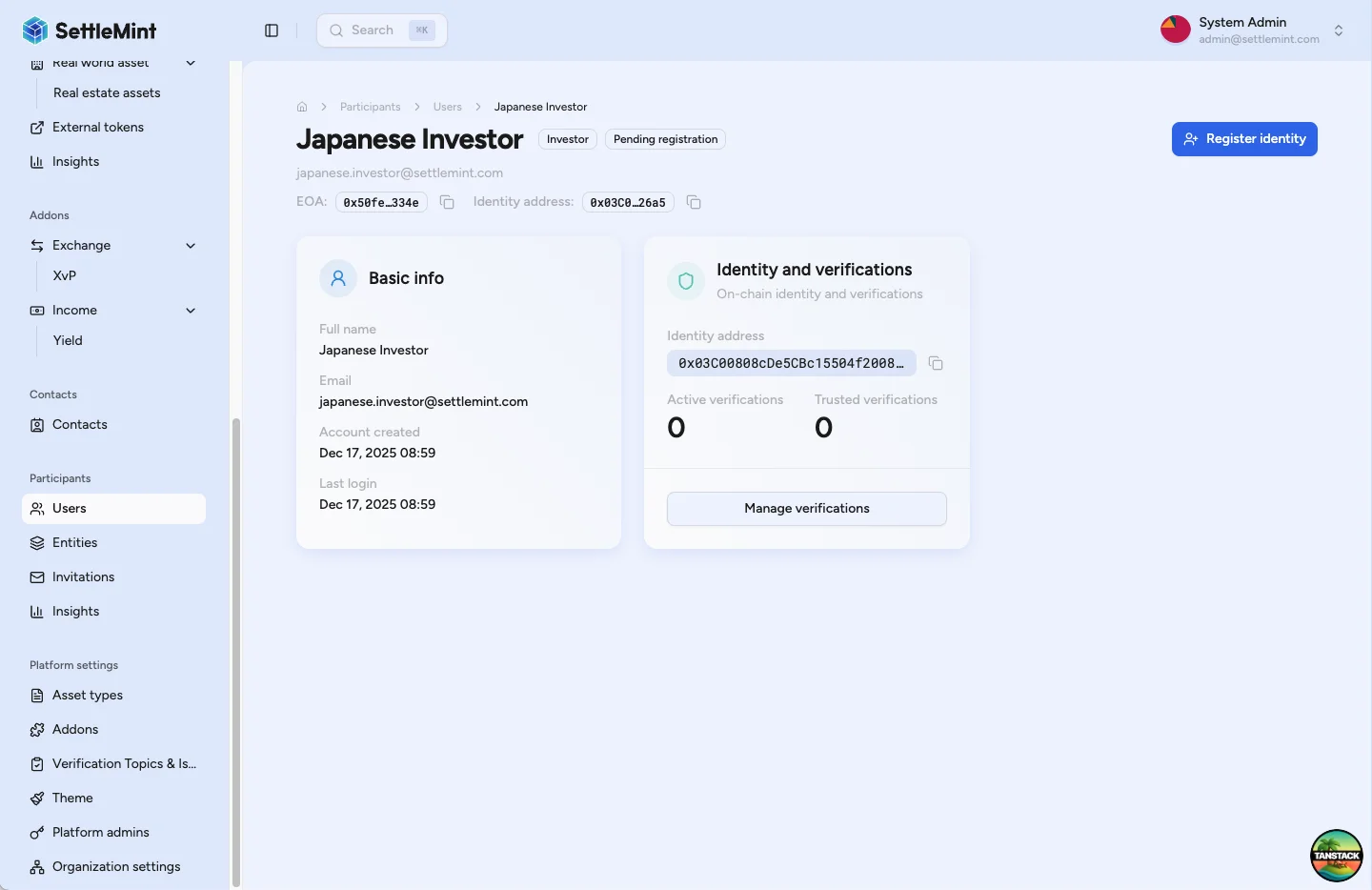
Go to Participants > Users and select the user you want to register. The profile shows the user's name, email, wallet address, identity address, registration status, and the steps you can take.
Start identity registration
Click Register Identity. The registration sheet opens for the selected identity and wallet.
Select the user's jurisdiction
Choose the country from the dropdown. DALP validates the selection as an ISO 3166 alpha-2 country code before submitting the transaction.
Review the summary
Review the country and wallet address shown in the confirmation step. If either value is wrong, go back before signing.
Sign and submit the registration
Click Register identity, complete the wallet verification prompt, and wait for blockchain confirmation. The registry contract links the user's wallet address to their OnchainID and country code.
Confirm the registered state
After the transaction is confirmed and indexed, the user status changes to Registered. The user can now receive trusted issuer claims and can pass asset eligibility checks when the required claims and compliance rules also pass.
Compliance impact
Token mints and transfers
- Non-registered identities are blocked from regulated asset transactions.
- Registered identities are eligible only when the token's compliance rules pass.
- An identity-verification rule can require one claim topic, such as KYC, or a logical expression such as KYC and AML.
- The required claim must be present on the user's OnchainID and issued by a trusted issuer authorised for that topic.
- Different assets can require different claim topics, trusted issuers, country rules, or transfer approvals.
Compliance modules
- Identity verification modules confirm registry enrolment and required claim topics.
- Country and transfer-restriction checks can apply additional rules after identity lookup.
- One failing module is enough to block the mint or transfer.
- Compliance reporting shows enrolment and verification status and flags users blocked from transacting.
Verification process
- KYC, KYB, AML, sanctions, accreditation, and document review happen off-chain before a verifier issues a claim.
- The on-chain claim records the verification result, topic, issuer, signature, and supporting reference data.
- Only issuers trusted for the relevant topic should issue claims used for transfer eligibility.
- Multiple verifications can be issued per enrolled identity when different assets require different topics.
Operational checks
- Register users after onboarding creates the wallet and OnchainID.
- Verify the user's legal residence or incorporation evidence before selecting the country.
- Keep the off-chain evidence and approval record in your operating workflow.
- Review duplicate or stale user records before registration.
- Use the identity recovery workflow when the registered wallet is lost or compromised. A normal profile edit does not replace the registered wallet binding.
Troubleshooting
| Issue | What to check |
|---|---|
| Cannot see Register Identity | Verify that your role includes identity registration, the user has completed onboarding, and the user has an OnchainID. |
| Registration transaction fails | Inspect the signing wallet, wallet verification prompt, gas or network availability, and whether the selected identity is already registered. |
| User still shows as pending | Wait for blockchain confirmation and indexing, refresh the page, then verify the transaction succeeded. |
| Cannot select jurisdiction | Confirm a valid country is available and that the user does not already have an active registration. |
| Registered user still cannot receive an asset | Review the asset's required claim topics, trusted issuer configuration, country rules, and transfer restrictions. Registration alone does not satisfy every asset rule. |
Related guides
- User onboarding: how users get a wallet and OnchainID before registration.
- Claims and identity: how wallet registration, OnchainID claims, and trusted issuers work together.
- Identity and compliance: how identity checks fit into the broader compliance architecture.
- Provide KYC data: how users complete their KYC profile.
- Manage KYC data: how operators review KYC submissions.
- Verify KYC: how verifiers issue claims after review.
- Configure trusted issuers: the issuer and claim-topic framework.
- Recover a user's identity: lost or compromised wallet access.
How to provide your KYC data
Complete a versioned KYC profile with identity details and supporting documents so an Identity Manager can review it.
Tokenized asset compliance controls in DALP
Understand how DALP enforces tokenized asset compliance controls across identity, eligibility, transfer approvals, supply limits, capital raise limits, issuance volume, collateral checks, and trusted verification issuers.