

Observability
The observability stack provides platform visibility through metrics collection, log aggregation, distributed tracing, and Grafana dashboards for deployments that enable the observability chart.
Overview
DALP observability is the deployment telemetry layer for self-hosted environments that enable the observability chart. The stack collects metrics, logs, and traces from platform components. Operators use those signals to inspect health, investigate incidents, and connect application behaviour to infrastructure state.

Blockchain monitoring covers chain RPC and indexer diagnostics exposed through the DALP API, dapp, and CLI. The observability stack covers deployment-level collection, dashboards, alerts, and log or trace inspection.
Observability does not replace audit logs, compliance reports, or custody records. Security reviewers should treat it as supporting evidence for operational visibility, not as the authoritative record for regulated activity, privileged actions, or custody decisions. During incidents, it helps operators answer four questions: what changed, which component emitted the signal, where to look next, and which environment is affected.
Three pillars
Metrics
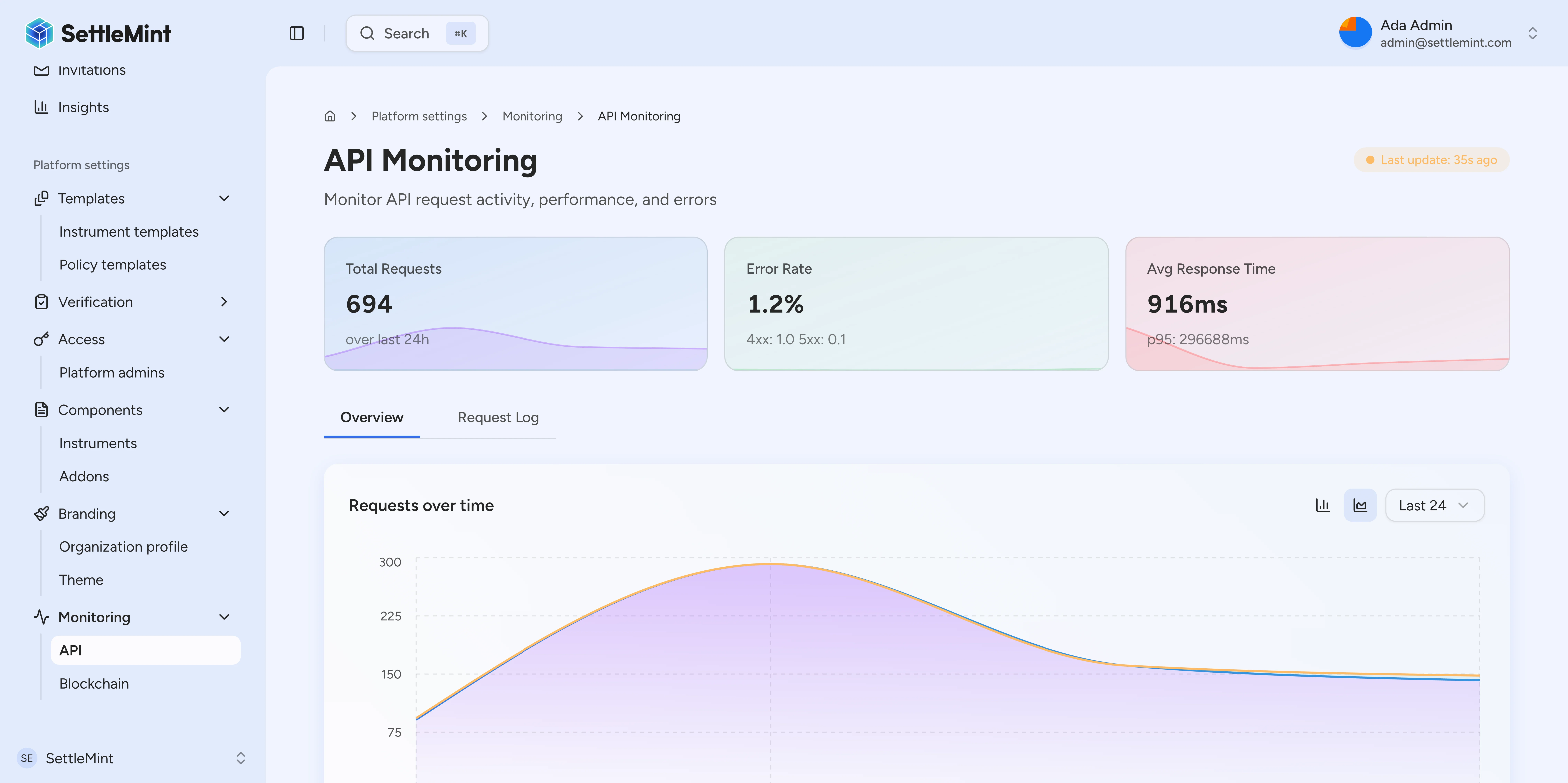
Time-series metrics capture quantitative measurements over time. Counters, gauges, and histograms represent request counts, resource use, and latency distributions.
| Metric category | Examples | Use case |
|---|---|---|
| Request metrics | Request counts, 4xx or 5xx rates, p95 latency | API performance monitoring |
| Resource metrics | CPU, memory, connections | Capacity planning |
| Business metrics | Transactions, assets, users | Operational reporting |
| Chain metrics | Block lag, block age, finality lag, RPC state | Blockchain health triage |
| Indexer metrics | Sync failures, handler errors, backfill state | Live indexing triage |
DALP API monitoring summaries aggregate request rollups by status class and return total requests, 4xx and 5xx counts, average duration, and p95 duration for the selected time range. Blockchain monitoring summaries read the latest health snapshots per service and expose chain ID, network name, service type, latest status, sync lag, block height, block age, finality lag, stall duration, and recent collector latencies.
Logs
Structured logs capture discrete events with context that operators can query. Correlation identifiers link related log entries across components.
DALP redacts common credential and token shapes before log records are written to configured sinks. Covered values include SettleMint access tokens, bearer tokens, private keys, provider access keys, webhook or integration tokens, RPC URLs that contain embedded keys, and email addresses. Redaction applies to log messages and structured properties, so operators can use logs for debugging without intentionally storing those values.
Traces
Distributed traces follow operations across component boundaries. Spans capture timing and metadata for each step. Trace visualization reveals bottlenecks and failure points in complex operations.
Dashboard areas
Grafana dashboards can cover these monitoring areas when the observability stack and relevant exporters are enabled:
| Dashboard area | Audience | Example signals |
|---|---|---|
| Operations overview | Platform operators | Request rates, error rates, latency |
| Transaction monitor | Operations team | Pending transactions, gas usage, confirmations |
| Compliance activity | Compliance officers | Verification volumes, approval rates |
| Security overview | Security team | Authentication events, access patterns |
| Infrastructure health | DevOps | Resource utilization, node health |
Deployable components
The observability Helm chart can deploy the telemetry components used by self-hosted environments. The chart includes VictoriaMetrics for metrics storage, Grafana Alloy for telemetry collection, metrics-server and kube-state-metrics for Kubernetes resource and object metrics, Grafana for dashboards, Loki for logs, Prometheus node exporter for host metrics, and Tempo for traces.
Local development values enable the observability stack by default. Staging values disable the observability chart by default, and other deployment values may also disable the stack, so treat observability as a deployment option that must be enabled and configured for the target environment.
Grafana access on OpenShift
On OpenShift clusters, the observability chart can expose Grafana through an OpenShift Route when the Route API is available and the Grafana Route option is enabled. The Route targets the Grafana service, uses the configured host and path, and can include TLS settings such as edge, passthrough, or re-encrypt termination with the deployment's insecure-traffic policy.
This Route is disabled by default. Enable it only when the cluster should expose Grafana through the OpenShift Router instead of another ingress pattern, and keep the hostname, TLS policy, and access controls aligned with the organization's observability access model.
Alerting
Alert rules can notify operators when metrics exceed thresholds or exhibit anomalous patterns.
| Alert category | Example condition | Severity |
|---|---|---|
| Error rate spike | Elevated error rate over a sustained window | Critical |
| Latency degradation | P99 latency materially above baseline | Warning |
| Resource exhaustion | High memory or CPU utilization | Warning |
| Chain connectivity | Sustained block production or RPC connectivity issues | Critical |
| Transaction failure | Elevated transaction failure rate | Warning |
Alert routing depends on the deployment's notification configuration. Alert labels include the originating cluster name from the deployment telemetry configuration. Multi-cluster operators can identify the affected environment before they inspect dashboards or logs.
Live indexing alerts
When the observability chart is enabled, DALP can alert on live indexing health. Each alert includes the affected Kubernetes namespace, chain ID, and cluster name. Operators can triage one chain in one cluster without masking it behind healthy chains elsewhere.
| Alert signal | What it indicates | Triage hint |
|---|---|---|
| Live indexing lag | The live indexer is more than 1,000 blocks behind chain head, has not reduced that lag over a 30-minute lookback, and remains in that condition for 15 minutes. | Check whether indexer lag is rising, flat, or recovering, then compare indexer and RPC health. |
| Sync or handler errors | The live indexer recorded sync failures or event-handler failures in the recent alert window. | Query the handler-error metric by event and contract type to find the failing handler. |
| Backfill not progressing | The live indexer has pending backfill work and the pending count has not decreased over the monitored window. | Check indexer pod health, RPC latency, and whether the pending queue is growing or flat. |
| Native-balance collection | Operator-wallet balances, balance fetches, or refresh-queue depth need attention. | Use the affected chain ID and wallet address to confirm the balance or collector backlog. |
For live-indexing alerts, start from the alert labels, then inspect the indexer dashboard and logs for the same cluster, namespace, and chain ID. Handler-error alerts page at the chain level. Query the underlying handler-error metric by event and contract type to distinguish one failing handler from a chain-wide indexing outage.
Meta-transaction attribution metrics
DALP records signer attribution for indexed domain events. For each event, the resolver checks the same transaction for the next ExecutedForwardRequest marker from a registered forwarder. Forwarder-marked events use the marker's signer. Direct and unmarked events use the transaction sender.
Forwarder attribution follows the forwarder's active window. When a deployment rotates to a new forwarder, DALP keeps the previous forwarder available for historical event blocks. DALP does not trust the previous forwarder for later events. Historical backfills use the markers that were active for the backfilled block range, so reindexing can rebuild signer attribution for older forwarded transactions.
Operators can use these counters to inspect ERC-2771 signer attribution:
dalp.didx.meta_tx.signer_resolved: Counts each event with resolved signer attribution. Use theresolver_source,event, andcontract_typelabels to separate forwarder-attributed events from transaction-sender attribution.dalp.didx.meta_tx.signer_caller_divergence: Counts events where the resolved signer differs from an on-chaincallerfield. DALP emits this counter for event families that still carry that field, includingTokenBoundandTokenUnbound.
Use signer_resolved as the baseline for attribution volume. Use signer_caller_divergence to investigate signer and caller mismatches on the event families that emit it.
Application logging configuration
Application logging can be configured through the config.yml file.
| Setting | Environment variable | Default | Description |
|---|---|---|---|
app.logLevel | LOG_LEVEL or SETTLEMINT_LOG_LEVEL | info | Minimum log level: debug, info, warn, warning, error, fatal |
app.logOrpcRequests | LOG_ORPC_REQUESTS | false | Enable verbose ORPC request/response logging |
Note:
LOG_LEVELtakes precedence during auto-configuration. Invalid values are silently ignored and fall back to environment defaults (debug for development, info for production, warning for test).
ORPC request logging
When app.logOrpcRequests is enabled, the platform logs detailed information for each API request:
- Request ID and URL
- HTTP method and elapsed time
- Response status codes
- Procedure execution paths
This setting is disabled by default to keep logs clean in development and production. Enable it for debugging API issues:
# config.yml
app:
  logOrpcRequests: true
Or via environment variable:
LOG_ORPC_REQUESTS=true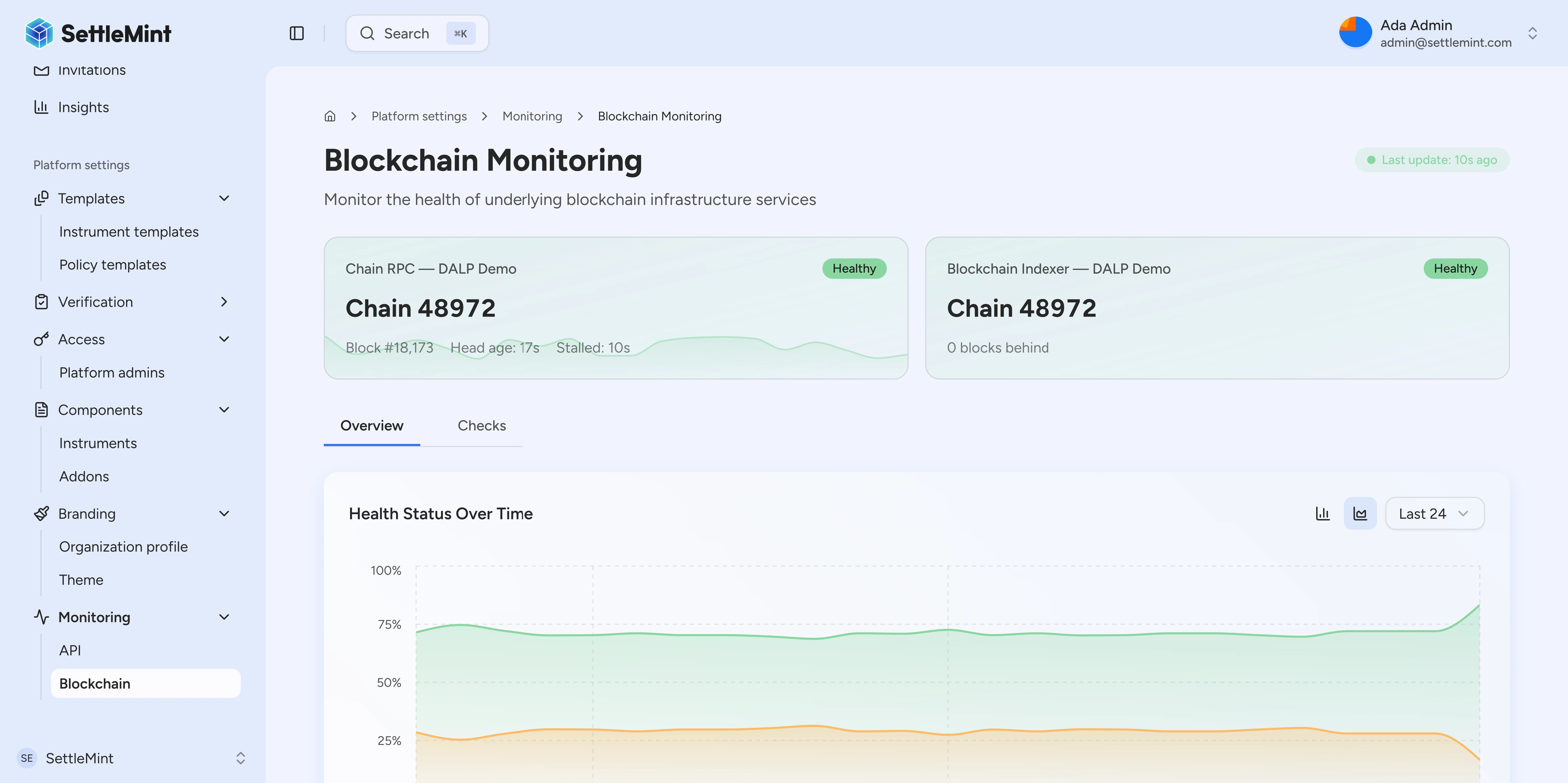
Audit logging
Observability data can support audit investigations by preserving operational events and correlation context. Typical events include:
- Authentication events with outcome and context
- Authorization decisions with resource and action
- Data access with query details and results
- Configuration changes with before and after state
- Administrative actions with operator identity
Retention, export, and tamper-evidence requirements depend on the deployment's logging storage, backup, and compliance configuration.
Incident response
During an incident, start with the signal that paged the operator, then keep the investigation anchored to the affected environment, namespace, chain ID, request ID, or trace ID.
| Investigation step | Use this signal | Outcome |
|---|---|---|
| Correlate one operation | Request ID or trace ID | Link logs, metrics, and traces for the same operation. |
| Rebuild the timeline | Log search with time filters | Identify the event sequence before and after impact. |
| Estimate customer impact | Request volume, error rates, affected services | Separate isolated failures from platform-wide impact. |
| Locate failing component | Trace spans, service health, indexer and RPC snapshots | Focus remediation on the failing component boundary. |
| Confirm recovery | Error rate, latency, lag, and snapshot trend changes | Verify that the same signal returned to baseline. |
Deployment integration
Self-hosted deployments can use the DALP observability chart for in-cluster telemetry collection, storage, and dashboards. If an organization already operates a monitoring platform, use the deployment configuration to decide which telemetry components to enable and how to route metrics, logs, traces, and alerts.
When enabled, the observability chart includes Grafana dashboard configuration for common self-hosted deployments.
See also
- Operability for the wider production operations model
- Database for database monitoring
- Failure modes for recovery behaviour during outages
- Blockchain monitoring for chain RPC and indexer diagnostics
- Chain Gateway for network metrics
Overview
Architecture-level map for operating DALP deployments: telemetry, PostgreSQL persistence, workflow durability, high availability handoffs, and failure behavior.
Database
PostgreSQL is the authoritative store for DALP application data, with validated connection settings, TLS modes, pooling, UTC sessions, health checks, and operator-owned HA and backup planning.