

DALP OpenAPI specification and typed client generation
Access the OpenAPI specification and generate type-safe clients for integrating with the DALP platform programmatically.
DALP serves versioned OpenAPI 3.x specifications for the REST API. Use /api/v2/spec.json as the contract for new integrations, generated clients, Postman collections, Insomnia workspaces, and read-only API reviews. Use /api/v1/spec.json only when you maintain an existing v1 integration.
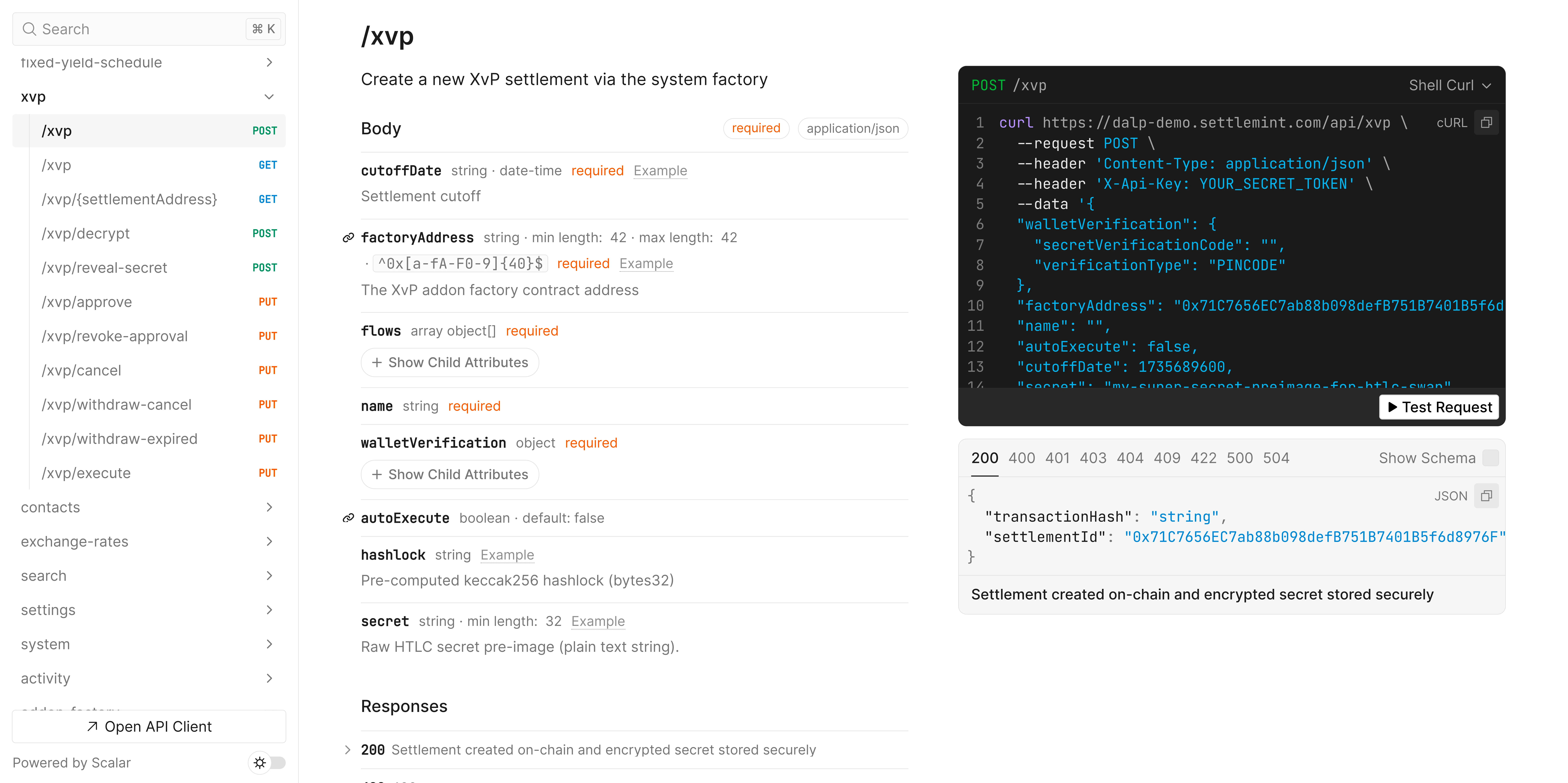
OpenAPI specification endpoints
DALP exposes a versioned interactive API explorer and a machine-readable OpenAPI JSON file. Use the JSON endpoint when you generate clients, import the API into Postman or Insomnia, or preview the contract with tools such as Redoc.
| API version | Interactive explorer | OpenAPI JSON | Use it for |
|---|---|---|---|
| v2 | /api/v2 | /api/v2/spec.json | New integrations and generated clients. |
| v1 | /api/v1 | /api/v1/spec.json | Existing integrations that still use v1 routes. |
Choose /api/v2/spec.json for new integrations. Use /api/v1/spec.json only when you maintain a v1 client. Treat the OpenAPI JSON as the source of truth for route shape and use the surrounding DALP docs for operating rules the schema cannot capture: idempotency recovery, wallet verification, event reconciliation, and transaction-timeout handling.
The JSON endpoint returns a document conforming to the OpenAPI 3.x specification. Each version includes endpoint definitions, request/response schemas, public error payloads, authentication via X-Api-Key, and shared headers such as Idempotency-Key, Prefer, X-Transaction-Speed, X-Participant, and X-Executor.
DALP serves the explorer HTML separately from the OpenAPI JSON. The explorer at /api/v2 loads a local Scalar bundle, then fetches /api/v2/spec.json asynchronously. The JSON endpoint returns cached, precompressed responses when the client sends Accept-Encoding: br or Accept-Encoding: gzip. Use the same /api/v2/spec.json URL in all tools; the server selects the encoding.
Viewing the specification
Open the current explorer in your browser to inspect endpoints, schemas, and try authenticated calls against your live environment:
Open DALP API explorer
Fetch the JSON specification for code generators and API tools. Import the URL directly to auto-generate a collection with all endpoints configured. The command below confirms the spec is reachable and shows the API title and version:
curl https://your-platform.example.com/api/v2/spec.json | jq '.info.title, .info.version'Authentication
All API requests require authentication via an API key in the X-Api-Key header or a session cookie. Session-based authentication requires wallet verification for sensitive operations that trigger blockchain transactions. API key authentication skips wallet verification automatically, so the walletVerification field can be omitted.
Use X-Participant and X-Executor to select the acting participant or execution wallet explicitly. See Request headers for defaults and validation errors.
DALP validates participant and executor selection before queueing a blockchain operation. Remove the headers to fall back to automatic selection, or retry after the selected wallet is available.
See also Getting started, Request headers, Smart wallet API overview, Webhook endpoints, and UserOperations.
Response headers
Transaction hash header
Mutation operations that submit blockchain transactions return the transaction hash in the X-Transaction-Hash response header. The API waits for confirmation automatically, so most integrations can ignore this header.
When you receive a CONFIRMATION_TIMEOUT error, use the hash to check whether the operation eventually succeeded before retrying. For full recovery patterns, see Transaction tracking.
API namespaces
The table below groups each namespace with its description and example operations.
| Namespace | Description | Example operations |
|---|---|---|
token | Token CRUD, supply management, compliance, stats | token.create, token.mint, token.burn, token.transfer, token.freezeAddress |
transaction | Blockchain transaction status tracking | transaction.read |
system | Platform infrastructure (access control, identity, claims) | system.accessManager.grantRole, system.identity.register, system.trustedIssuers.create |
user | User profile and organisation membership | user.me, user.update |
account | Blockchain wallet and identity management | account.identity, account.claims |
actions | Scheduled tasks and executable operations | actions.list, actions.read |
addons | Optional features such as token sales and fixed yield | addons.tokenSale.create, addons.fixedYield.create, addons.fixedYield.claim |
contacts | Contacts for frequent wallet recipients | contacts.list, contacts.create |
exchangeRates | Foreign exchange rates for multi-currency assets | exchangeRates.list, exchangeRates.supportedCurrencies |
organisation | Organisation deployment lifecycle and progress | organization.deploy, organization.deployStatus, organization.deployStream |
search | Global search across tokens, contacts, transactions | search.query |
settings | Platform configuration and preferences | settings.get, settings.update |
externalToken | Import and track tokens from other systems | externalToken.register, externalToken.list |
organisation | Organisation deployment and deployment status streams | organization.deployStream |
bundler | ERC-4337 JSON-RPC discovery for account abstraction | eth_chainId, eth_supportedEntryPoints |
auth | Better Auth endpoints (sign-in, sessions, passkeys) | /auth/sign-in, /auth/session, /auth/passkey/create |
Each namespace maps to versioned HTTP routes. For example, v2 token operations use routes under /api/v2/tokens.
Bundler JSON-RPC endpoint
The advanced accounts bundler endpoint is exposed separately from the OpenAPI procedure namespaces because ERC-4337 wallets call it as JSON-RPC 2.0. See Bundlers for the concept model.
| Endpoint | Protocol | Supported methods | Use it for |
|---|---|---|---|
POST /api/v2/bundler | JSON-RPC 2.0 | eth_chainId, eth_supportedEntryPoints | Discover the active chain and EntryPoint. |
Send the method name in the JSON-RPC method field. eth_chainId returns the active chain ID as a hexadecimal string. eth_supportedEntryPoints returns an array containing the EntryPoint address registered for the active network after directory and indexer resolution.
curl -X POST "$DALP_API_URL/api/v2/bundler" \
  -H "Content-Type: application/json" \
  -d '{"jsonrpc":"2.0","id":1,"method":"eth_supportedEntryPoints","params":[]}'
Requests without an id are treated as JSON-RPC notifications and return 204 No Content, including unsupported ERC-4337 method names. Unsupported methods return a JSON-RPC method not found response only when the request includes an id.
For paymaster funding, sponsorship settings, and signer-key rotation, use System paymasters and Paymasters and gas sponsorship.
Exchange-rate operations
Use the exchangeRates namespace when an integration needs current or historical fiat rates for multi-currency assets.
| Operation | HTTP route | Permission | Use it for |
|---|---|---|---|
exchangeRates.list | GET /api/v2/exchange-rates | exchangeRates:list | List feed-backed rates with pagination, sorting, and filters. |
exchangeRates.read | GET /api/v2/exchange-rates/{baseCurrency}/{quoteCurrency} | exchangeRates:read | Read one current currency pair. |
exchangeRates.history | GET /api/v2/exchange-rates/{baseCurrency}/{quoteCurrency}/history | exchangeRates:list | Read historical values for one pair. |
exchangeRates.supportedCurrencies | GET /api/v2/exchange-rates/supported-currencies | exchangeRates:read | Read the provider's supported ISO 4217 currency-code snapshot. |
The current exchange-rate API is read-only. It exposes list, current pair read, pair history, and supported-currency discovery operations.
DALP does not expose public update, delete, or sync routes for manual rate overrides.
baseCurrency and quoteCurrency use ISO 4217 alpha-3 currency codes such as USD and EUR. The list response includes baseCurrency, quoteCurrency, rate, effectiveAt, updatedAt, and feedAddress; rate and timestamps can be null when a feed exists but has not observed a value yet.
Use GET /api/v2/exchange-rates/supported-currencies before presenting currency choices for onboarding, platform settings, or payment-currency configuration.
The response returns the configured exchange-rate provider key and a sorted list of supported currency codes:
{
  "data": {
    "providerKey": "open-er-api",
    "currencies": ["AED", "EUR", "USD"]
  },
  "links": {
    "self": "/v2/exchange-rates/supported-currencies"
  }
}
The list reflects the provider's current supported-currency snapshot; DALP caches the response for fast reads. If a later configuration request rejects a currency as unsupported, refresh the list from this endpoint before retrying. For the product workflow behind currency selection, see Exchange-rate target currencies, Exchange rate commands for CLI equivalents, and Feeds system for the feed architecture behind the API.
Organisation deployment stream
The organization.deployStream operation exposes deployment progress as a server-sent event stream for the active organisation. Use it to drive live progress UIs without polling.
| Operation | HTTP route | Use it for |
|---|---|---|
organization.deployStream | GET /api/v2/organizations/deployments/{deploymentId}/stream | Watch organization deployment progress until it ends. |
The deploymentId is scoped to the caller's active organisation. A caller can subscribe only to that organisation's deployment stream. A missing organisation context or a deploymentId from another organisation returns a not-found shaped error before the stream starts, so clients should treat it the same way as an unavailable deployment.
The stream emits events in this order:
| Event type | Meaning | Client handling |
|---|---|---|
tree | Full deployment tree. Sent when the workflow state is available and whenever node shape changes. | Replace the local deployment tree with the received nodes. |
update | Status change for an existing deployment node. | Patch the matching node by nodeId. |
complete | Terminal deployment result. success: true means the deployment finished successfully. success: false can include failedSteps. | Stop listening and show the final result. |
error | Stream or polling failure encoded as a public Platform API error payload. | Stop listening, inspect error.id, error.retryable, and the request ID. |
A successful or failed complete event closes the stream. A terminal stream error yields one error event and closes. For failed deployments, read complete.failedSteps[].wireError when present; it uses the same public contract-error fields documented in Error handling.
Reconnect only when the terminal payload is retryable or when the user restarts the deployment workflow. Do not keep polling after complete or error.
Fixed yield schedule operations
The addons.fixedYield namespace exposes the fixed yield schedule lifecycle:
| Operation | HTTP route | Use it for |
|---|---|---|
addons.fixedYield.create | POST /api/v2/addons/fixed-yield-schedules | Create a fixed yield schedule for a token. |
addons.fixedYield.read | GET /api/v2/addons/fixed-yield-schedules/{scheduleAddress} | Read one schedule by contract address. |
addons.fixedYield.topUp | POST /api/v2/addons/fixed-yield-schedules/{scheduleAddress}/top-ups | Deposit denomination asset into the schedule. |
addons.fixedYield.withdraw | POST /api/v2/addons/fixed-yield-schedules/{scheduleAddress}/withdrawals | Withdraw unused denomination asset. |
addons.fixedYield.claim | POST /api/v2/addons/fixed-yield-schedules/{scheduleAddress}/claims | Claim available yield from the schedule. |
Create requests include the token address, yield rate in basis points, payment interval, future start and end times, and the ISO 3166-1 numeric country code. topUp and withdraw also include the amount and linked token address; withdraw includes the recipient address.
A schedule claim chains several capped settlements in one request, so a holder with a large backlog can be caught up without claiming repeatedly. A synchronous claim response carries a complete flag that signals whether the holder is fully caught up. For the flag values and the backlog-draining loop, see Claim or withdraw funds.
For CLI examples and funding notes, see Fixed yield schedule commands and Configure yield schedules.
User statistics data sources
User statistics endpoints (user.stats, user.statsUserCount, user.statsGrowthOverTime) report counts based on
organisation membership data in the DALP database. Recent activity is derived from each member's most recent login
timestamp, falling back to their created date when login history is unavailable.
TypeScript SDK
Use @settlemint/dalp-sdk for TypeScript services that call DALP directly. The packaged SDK provides typed route namespaces, SDK-managed x-api-key headers, and serializers for DALP numeric and timestamp values. For setup and client configuration, see Getting started.
Using with API tools
Interactive explorer
The interactive explorer serves the selected API version. Open it to inspect request schemas, response examples, and try endpoints before writing integration code:
- Open
/api/v2in your browser, for examplehttps://your-platform.example.com/api/v2. - Expand endpoint groups to inspect request schemas and response examples.
- Use the explorer for quick checks, then build production clients from
/api/v2/spec.json.
The explorer is useful for manual inspection. For automated checks, CI imports, generated clients, and large-spec troubleshooting, fetch /api/v2/spec.json directly. Use a tool that sends Accept-Encoding: br or Accept-Encoding: gzip. If a browser tab fails while rendering the explorer, verify the JSON endpoint first:
curl -L --compressed https://your-platform.example.com/api/v2/spec.json \
  | jq '.openapi, .info.title, (.paths | length)'
A successful JSON response means the route contract is available even if the browser renderer needs a refresh or another viewing tool. Use Redoc, Postman, Insomnia, or a local file preview when you need a read-only contract view outside the live explorer.
Redoc
For a cleaner, read-only documentation view:
- Download the OpenAPI spec:
curl https://your-platform.example.com/api/v2/spec.json > openapi.json. - Serve with Redoc:
npx @redocly/cli preview-docs openapi.json - Open
http://localhost:8080in your browser.
Postman
Postman imports the DALP OpenAPI 3.x spec directly from /api/v2/spec.json and generates a collection with every endpoint, request body, and parameter already configured. No separately maintained DALP Postman collection exists to download and keep in sync. Point Postman at the live spec instead.
Import the OpenAPI spec into Postman:
- Click Import in Postman.
- Select the Link tab.
- Paste
https://your-platform.example.com/api/v2/spec.json. - Click Continue and then Import. Postman generates a collection from the spec.
- Configure the collection's authorization with your API key:
- Auth Type: API Key
- Key:
X-Api-Key - Value: your DALP API key
- Add to: Header
The generated collection groups requests by the API namespaces in this reference. Use it as a starting point and add your own folders and requests to test larger integration flows across DALP endpoints and your own services. When the contract changes, re-import the same /api/v2/spec.json link to refresh the generated requests.
Insomnia
Import the OpenAPI spec into Insomnia:
- Click Create and then Import.
- Paste
https://your-platform.example.com/api/v2/spec.json. - Click Scan and then Import.
- Add an environment variable for the
X-Api-Keyheader.
curl examples
Before copying examples into integration code, use the OpenAPI specification as the route contract. The following command lists all routes:
curl https://your-platform.example.com/api/v2/spec.json \
  | jq '.paths | keys[]' \
  | head
For authenticated calls, send the API key in the X-Api-Key header and the request body defined by the operation schema:
curl -X GET https://your-platform.example.com/api/v2/exchange-rates/supported-currencies \
  -H "X-Api-Key: $DALP_API_KEY" \
  -H "Accept: application/json"
For mutation routes that submit blockchain transactions, API-key authentication does not require a walletVerification field. Session-cookie authentication requires wallet verification on sensitive operations. The key itself acts as the authorization factor for API-key requests, so the platform does not issue a second interactive challenge.
Generating client SDKs
Use the OpenAPI spec to generate clients for languages beyond TypeScript. Run the generator against the live /api/v2/spec.json URL so the output reflects the current contract.
Replace -g python with the generator name for your language and -o with your output directory. The available generators below cover the most common server-side languages:
| Language | Generator flag | Output directory |
|---|---|---|
| Python | python | ./dalp-python-client |
| Go | go | ./dalp-go-client |
| C# / .NET | csharp-netcore | ./dalp-csharp-client |
| Java | java | ./dalp-java-client |
Example for Python:
openapi-generator-cli generate \
  -i https://your-platform.example.com/api/v2/spec.json \
  -g python \
  -o ./dalp-python-client
Generated clients may require manual adjustments for BigInt and BigDecimal serialization. The TypeScript SDK includes toBigDecimal() and fromBigDecimal() helpers for this reference. After generation, replace any hardcoded base URLs with the deployment origin and set the X-Api-Key header in the generated client configuration.
Error handling
The API returns standardized HTTP status codes and machine-readable public error payloads. Check id, category, status, and retryable to decide whether to retry. Use message, why, and fix to repair the request or show the operator a specific next step.
See Error handling for the complete error reference, retry guidance, and blockchain revert reasons.
Production integration checks
Confirm these integration choices before building against the API reference.
| Check | Where to confirm it |
|---|---|
| API key creation and base client setup | Getting started |
| Participant and executor header selection | Request headers |
| Idempotent mutation retries and async responses | Token lifecycle |
| Confirmation-timeout recovery | Transaction tracking |
| Webhook payloads and event replay handling | Webhook endpoints |
| Public error payload fields and retry guidance | Error handling |
Next steps
- Getting started: create an API key and configure the TypeScript client
- Error handling: handle errors and implement retry strategies
- Transaction tracking: recover from confirmation timeouts
- Token lifecycle: visual flowcharts for token operations