

Create users
Directly create user accounts with automatic wallet and identity setup for faster onboarding.
The "Create User" feature allows administrators to directly create user accounts with automatic wallet and identity setup. Unlike invitations, this creates accounts immediately without sending emails, making it ideal for demo environments, testing scenarios, and users who don't need platform access.
Prerequisites
- Identity Manager role or equivalent permissions
- Completed platform setup with organization created
- Understanding of when to use direct creation vs. invitations
When to use Create Users
Recommended scenarios
- Demo preparation - Setting up users quickly for demonstrations
- Testing environments - Creating test accounts with known credentials
- Passive token holders - Users who only receive tokens and don't perform on-chain actions
- Training scenarios - Preparing accounts for workshops or training
When to use invitations instead
- Production environments - Users should control their own credentials
- Security-sensitive setups - Users should generate their own wallets
- Active participants - Users who need to mint, transfer, or manage roles require login access to create API keys
No email notifications
Creating users directly does not send automatic emails. The administrator manages all account details and can share credentials manually as needed.
User creation process
Navigate to user management
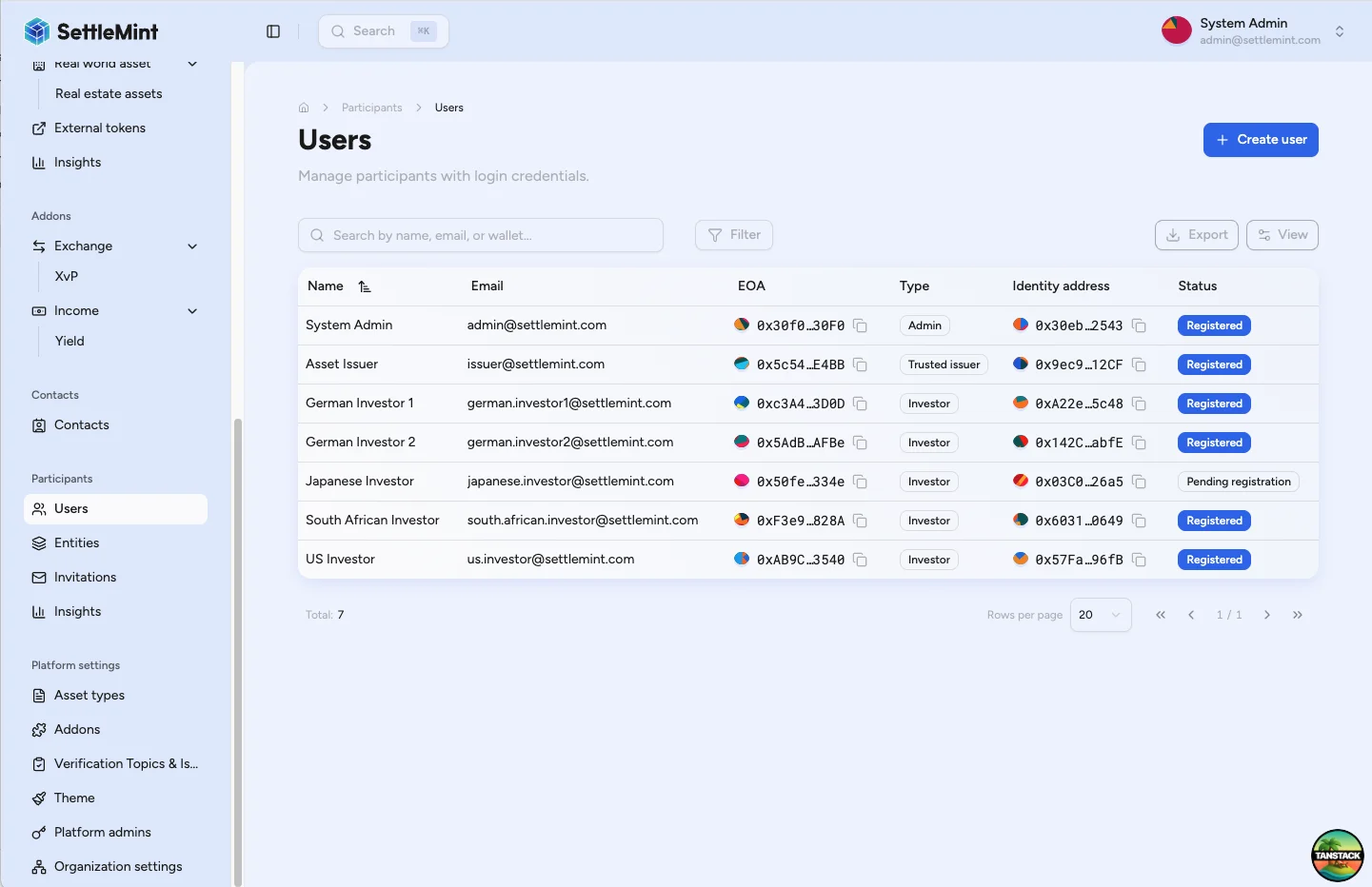
Go to Participants > Users in the sidebar. You'll see a list of all users with a Create user button.
Enter user information
Click "Create user" to open the creation form. Enter the user's display name and email address, then click Save user.
Authenticate identity creation
Enter your PIN when prompted. This is required because creating a user involves blockchain transactions to generate the user's wallet (EOA) and deploy their on-chain identity contract.
User creation complete
Once the blockchain transactions confirm, the user account is created with an automatically generated wallet address and deployed on-chain identity. The user appears in the Users table with "Active" status.
Post-creation steps
For administrators
- Provide platform access - Share the platform URL with users so they can access via "Forgot password"
- Enroll in registries - Add users to relevant asset registries for token eligibility
- Assign administrative roles - Grant platform admin roles if needed
- Verify identity - Complete KYC verification for compliance if required
Unknown passwords
User passwords are randomly generated and unknown to administrators. Users must use the "Forgot password" flow to set their own secure password.
For users
The created user needs to:
- Navigate to platform login
- Click "Forgot password" or "Reset password"
- Enter their email address
- Check email for reset instructions
- Set new password following link in email
- Log in with email and new password
What gets created automatically
Account setup
- User account with email as username
- Secure random password (must be reset)
Blockchain components
- Wallet address - New externally owned account (EOA)
- Private key storage - Securely encrypted
- On-chain identity - Smart contract deployed
- Identity registration - Registered as pending in identity registry
Limitations and considerations
- Password reset required - Extra step for user access
- No wallet security - Account security only, no PIN setup
- Skipped onboarding - Users bypass standard invitation flow
- No email notifications - No clean invitation emails for users
- Pre-onboarded state - User already "onboarded" without self-service setup
Comparison with Invite Users
| Aspect | Create User | Invite User |
|---|---|---|
| Speed | Immediate | Depends on user response |
| Security | Admin-managed | User-controlled |
| Best for | Demos, testing | Production, external users |
| Organization | Your org only | Can create own orgs |
| Setup | Automatic | User-guided |
| Control | Admin controlled | User controlled |
Troubleshooting
| Issue | Solution |
|---|---|
| Create User button not available | • Verify you have Identity Manager role • Check you're in the correct organization • Ensure platform is properly initialized |
| User creation fails | • Verify email address is unique • Check required fields are completed • Ensure sufficient gas for identity deployment |
| User cannot log in | • Confirm they've reset password using email link • Verify email address is correct • Check account creation was successful |
| Wallet/identity issues | • Identity contract deployment may take time • Check blockchain transaction confirmations • Verify gas was sufficient for deployment |
Related guides
- Invite Users - Alternative invitation-based approach
- User Onboarding - Understanding the user experience
- Add Administrators - Assigning roles after creation
Invite users
Send invitations for team members and external partners to join your platform from the Users page, and understand what the recipient completes after accepting.
Participants hub
The Participants hub helps operators review users, entities, identity registration status, KYC evidence, holdings, activity, and security signals.