

Configure trusted issuers
Configure system and token trusted issuers by API, including claim-topic updates, token overrides, and issuer removal.
For the web interface approach, see the user guide.
Prerequisites
- Platform URL (e.g.,
https://your-platform.example.com) - API key from a user with the Claim Policy Manager role (see Getting Started for API key setup)
- Wallet verification method enabled on your account (e.g., pincode or 2FA)
- Understanding of your compliance requirements
- Wallet address of the user you want to make a trusted issuer
About trusted issuers
Trusted issuers are identity addresses authorized in the active system's trusted issuer registry. Assets that use identity verification rules rely on these issuers when checking whether a wallet has a claim for the required topic. For background on how the verification system works, see Compliance Overview.
System and token scope
System endpoints manage the active platform context. Token endpoints manage only the selected asset's token-level
Trusted Issuer Registry. A token trusted issuer does not replace the system or global registry; DALP resolves the
effective chain as token -> system -> global when it checks which issuer claims count for that token.
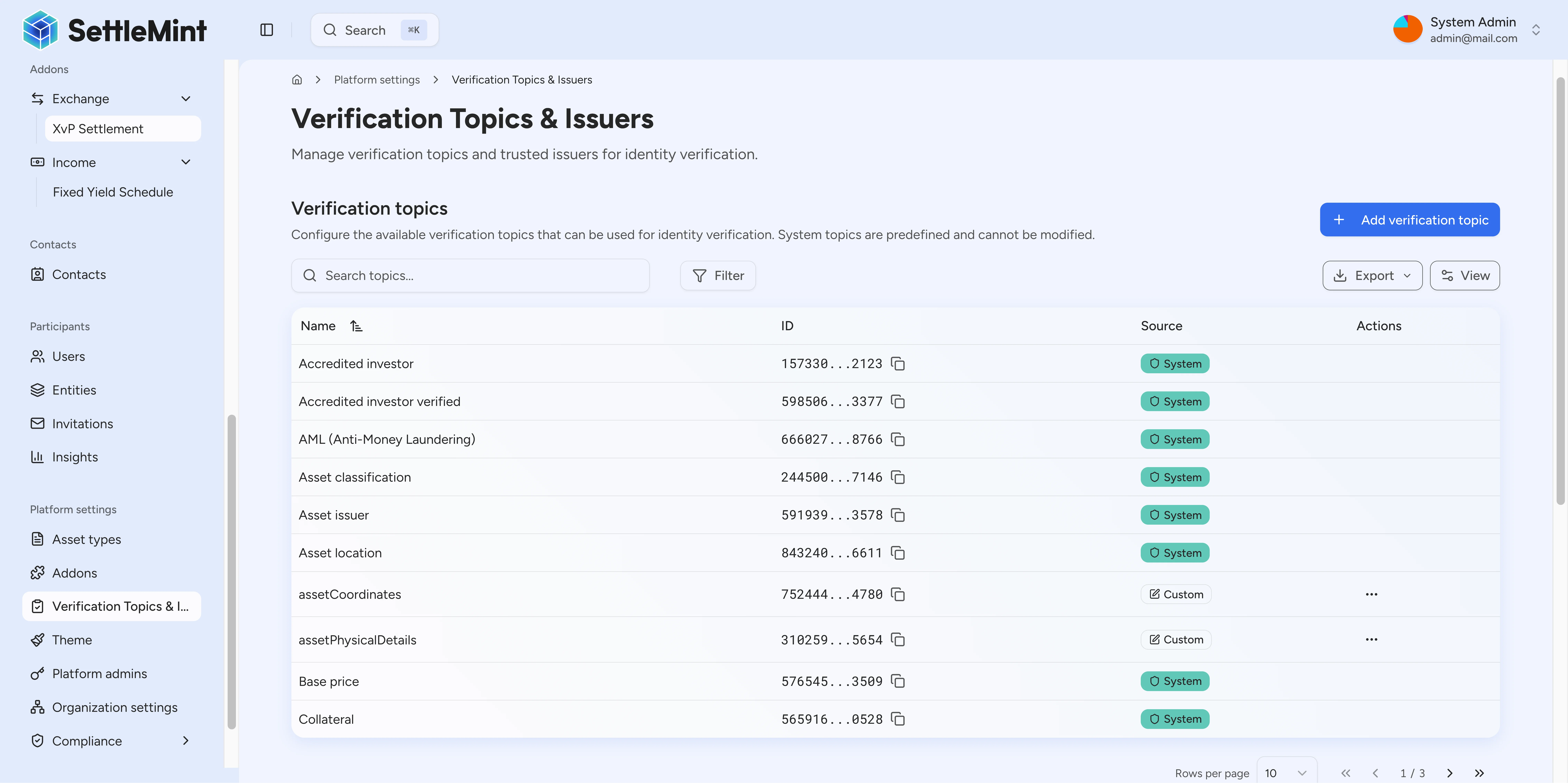
Available verification topics
The platform includes preset verification topics for common compliance scenarios. Each topic has a unique topicId and a signature that defines the claim data structure.
Custom verification topics
These are preset topics included with the platform. You can create additional custom verification topics to meet your specific compliance requirements.
Investor verification topics
| Topic Name | Signature | Purpose |
|---|---|---|
knowYourCustomer | string claim | Basic KYC verification |
accreditedInvestor | string claim | Accredited investor status |
accreditedInvestorVerified | string claim | Verified accredited investor |
qualifiedInstitutionalInvestor | string claim | Qualified institutional buyer (QIB) |
professionalInvestor | string claim | Professional investor status |
antiMoneyLaundering | string claim | AML compliance verification |
regulationS | string claim | Regulation S (non-US investor) compliance |
Issuer verification topics
| Topic Name | Signature | Purpose |
|---|---|---|
issuerLicensed | string licenseType, string licenseNumber, string jurisdiction, uint256 validUntil | Issuer licensing status |
issuerJurisdiction | string jurisdiction | Issuer jurisdiction |
issuerProspectusFiled | string prospectusReference | Prospectus filing |
issuerProspectusExempt | string exemptionReference | Prospectus exemption |
issuerReportingCompliant | bool compliant, uint256 lastUpdated | Reporting compliance |
Asset verification topics
| Topic Name | Signature | Purpose |
|---|---|---|
assetClassification | string class, string category | Asset classification |
assetLocation | string city, string districtCode, string areaId | Asset location |
assetIssuer | address issuerAddress | Asset issuer identity |
basePrice | uint256 amount, string currencyCode, uint8 decimals | Base price information |
collateral | uint256 amount, uint256 expiryTimestamp | Collateral details |
contractIdentity | address contractAddress | Contract identity |
uniqueIdentifier | string identifier | Unique identifier |
Topic IDs
Each topic has a unique large numeric topicId (e.g.,
26984799302505749158794800959285050858086405868089409909048783980951278841746). Use GET /api/v2/system/claim-topics to retrieve the exact topic IDs for your platform.
Managing system claim topics
Use claim topic mutations only when the platform needs a new or changed claim data shape. Existing asset and compliance flows usually rely on the preset topics above.
To create a claim topic, send a human-readable name, a comma-separated ABI type list in signature, and wallet verification:
curl -X POST "https://your-platform.example.com/api/v2/system/claim-topics" \
  -H "X-Api-Key: [REDACTED]" \
  -H "Content-Type: application/json" \
  -d '{
    "name": "assetOrigin",
    "signature": "string,uint256",
    "walletVerification": {
      "secretVerificationCode": "[REDACTED]"
    }
  }'
The API normalizes the signature to the parenthesized ABI form on-chain. Send string,uint256, not (string,uint256).
To change the data shape for an existing topic, use PUT /api/v2/system/claim-topics/{name} with the replacement signature and wallet verification. To remove a topic scheme, use DELETE /api/v2/system/claim-topics/{name} with wallet verification.
Production claim-topic changes
Treat topic updates and removals as platform-level configuration changes. Confirm which asset policies, trusted issuers, and integrations use the topic before changing its signature or removing it from the registry.
Configuring trusted issuers
Get issuer's identity address
First, you need the identity contract address of the user you want to make a trusted issuer. If you have their wallet address, query their identity:
curl -X GET "https://your-platform.example.com/api/system/identity/by-wallet/0x742d35Cc6634C0532925a3b844Bc9e7595f0bEb" \
  -H "X-Api-Key: YOUR_API_KEY"
Response:
{
  "id": "0x8e5F72f6E5b3B4D1234567890AbCdEf1234567890",
  "account": {
    "id": "0x742d35Cc6634C0532925a3b844Bc9e7595f0bEb",
    "contractName": null
  },
  "isContract": false,
  "hasIdentity": true,
  "claims": []
}
Important: Use the id field (identity CONTRACT address), not the account.id (wallet address).
List available verification topics
Query the available verification topics to identify which topics you want this issuer to be trusted for:
curl -X GET "https://your-platform.example.com/api/v2/system/claim-topics" \
  -H "X-Api-Key: YOUR_API_KEY"
Response:
[
  {
    "id": "0x534b8f03c16c92c70d1da1d2fae43b98352bf3d7...",
    "topicId": "26984799302505749158794800959285050858086405868089409909048783980951278841746",
    "name": "knowYourCustomer",
    "signature": "string claim",
    "registry": {
      "id": "0x534b8f03c16c92c70d1da1d2fae43b98352bf3d7"
    }
  },
  {
    "id": "0x534b8f03c16c92c70d1da1d2fae43b98352bf3d7...",
    "topicId": "15733030998618876990024220391915773205162379317494393310546829862321881862123",
    "name": "accreditedInvestor",
    "signature": "string claim",
    "registry": {
      "id": "0x534b8f03c16c92c70d1da1d2fae43b98352bf3d7"
    }
  },
  {
    "id": "0x534b8f03c16c92c70d1da1d2fae43b98352bf3d7...",
    "topicId": "39526553109170329799339511574661256630735485618560740361645615581310848276505",
    "name": "qualifiedInstitutionalInvestor",
    "signature": "string claim",
    "registry": {
      "id": "0x534b8f03c16c92c70d1da1d2fae43b98352bf3d7"
    }
  }
  // ... additional topics available
]
Note the topicId values for the topics you want to assign to this issuer. See Available verification topics above for the complete list.
Add trusted issuer
Create the trusted issuer by specifying their identity address and the verification topic IDs they can issue:
curl -X POST "https://your-platform.example.com/api/v2/system/trusted-issuers" \
  -H "X-Api-Key: YOUR_API_KEY" \
  -H "Content-Type: application/json" \
  -d '{
    "issuerAddress": "0x8e5F72f6E5b3B4D1234567890AbCdEf1234567890",
    "claimTopicIds": [
      "26984799302505749158794800959285050858086405868089409909048783980951278841746",
      "15733030998618876990024220391915773205162379317494393310546829862321881862123"
    ],
    "walletVerification": {
      "secretVerificationCode": "YOUR_PINCODE"
    }
  }'
Response:
{
  "data": {
    "txHash": "0x1234567890abcdef...",
    "issuerAddress": "0x8e5F72f6E5b3B4D1234567890AbCdEf1234567890"
  },
  "meta": {
    "txHashes": ["0x1234567890abcdef..."]
  },
  "links": {
    "self": "/v2/system/trusted-issuers"
  }
}
Multiple verification topics
You can assign multiple verification topics in a single request by including multiple topic IDs in the claimTopicIds
array. If you send the request with asynchronous transaction processing enabled, the API accepts the request with a
transactionId, status, and statusUrl instead of returning the completed blockchain mutation envelope
immediately.
Verify completion
Query the trusted issuers list with an issuer ID filter to confirm the issuer was added with the correct verification topics. Filtering by the identity address you just added keeps the completion check deterministic, even when your organization has many trusted issuers:
curl --globoff -X GET "https://your-platform.example.com/api/v2/system/trusted-issuers?filter[id]=0x8e5F72f6E5b3B4D1234567890AbCdEf1234567890&page[offset]=0&page[limit]=25" \
  -H "X-Api-Key: YOUR_API_KEY"
Response:
{
  "data": [
    {
      "id": "0x8e5F72f6E5b3B4D1234567890AbCdEf1234567890",
      "account": null,
      "claimTopics": [
        {
          "id": "0x534b8f03c16c92c70d1da1d2fae43b98352bf3d7...",
          "topicId": "26984799302505749158794800959285050858086405868089409909048783980951278841746",
          "name": "knowYourCustomer",
          "signature": "string claim"
        },
        {
          "id": "0x534b8f03c16c92c70d1da1d2fae43b98352bf3d7...",
          "topicId": "15733030998618876990024220391915773205162379317494393310546829862321881862123",
          "name": "accreditedInvestor",
          "signature": "string claim"
        }
      ],
      "deployedInTransaction": "0x1234567890abcdef1234567890abcdef1234567890abcdef1234567890abcdef",
      "isGlobal": false
    }
  ],
  "meta": {
    "total": 1,
    "facets": {}
  },
  "links": {
    "self": "/v2/system/trusted-issuers?sort=id&filter%5Bid%5D=0x8e5F72f6E5b3B4D1234567890AbCdEf1234567890&page%5Boffset%5D=0&page%5Blimit%5D=25",
    "first": "/v2/system/trusted-issuers?sort=id&filter%5Bid%5D=0x8e5F72f6E5b3B4D1234567890AbCdEf1234567890&page%5Boffset%5D=0&page%5Blimit%5D=25",
    "prev": null,
    "next": null,
    "last": "/v2/system/trusted-issuers?sort=id&filter%5Bid%5D=0x8e5F72f6E5b3B4D1234567890AbCdEf1234567890&page%5Boffset%5D=0&page%5Blimit%5D=25"
  }
}
Key fields to verify:
data[].idmatches the issuer's identity address you addeddata[].claimTopicscontains the verification topics you assigned (with fields:id,topicId,name,signature)data[].isGlobalidentifies whether the issuer came from a global trusted issuer registry rather than the organization registry
The issuer can now issue verifications for the assigned topics.
Token-level trusted issuers
Use token-level trusted issuers when one asset needs a narrower or different issuer policy than the platform default. The token list endpoint returns the resolved token -> system -> global chain so an integration can see which issuers are token-specific and which issuers are inherited from the system or global registry.
| Source | What it means | Can this endpoint remove it? |
|---|---|---|
token | Issuer is registered on this token's Trusted Issuer Registry | Yes, with the token delete endpoint |
system | Issuer is inherited from the active system registry | No, manage it through the system trusted-issuer endpoints |
global | Issuer is inherited from a global registry | No, manage it through the global or platform-level process |
Token issuers require a token registry
If the list response returns meta.hasTrustedIssuersRegistry: false, the token has no token-level Trusted Issuer
Registry. DALP can still show inherited system or global issuers, but token-specific add and remove operations are not
available for that token.
List token trusted issuers
curl --globoff -X GET "https://your-platform.example.com/api/v2/tokens/0x1234567890AbCdEf1234567890AbCdEf1234567890/trusted-issuers?filter[source]=token&page[offset]=0&page[limit]=25" \
  -H "X-Api-Key: YOUR_API_KEY"
Use filter[source] to limit results to token, system, or global. Use filter[q] to search by issuer account address. The response is paginated and includes meta.total, meta.facets, and meta.hasTrustedIssuersRegistry.
{
  "data": [
    {
      "id": "0x8e5F72f6E5b3B4D1234567890AbCdEf1234567890",
      "account": { "id": "0x742d35Cc6634C0532925a3b844Bc9e7595f0bEb" },
      "inheritanceLevel": "token",
      "registry": { "id": "0x4567890AbCdEf1234567890AbCdEf1234567890123" },
      "isInheritedElsewhere": false,
      "claimTopics": [
        {
          "topicId": "26984799302505749158794800959285050858086405868089409909048783980951278841746",
          "name": "knowYourCustomer"
        }
      ]
    }
  ],
  "meta": {
    "total": 1,
    "facets": {},
    "hasTrustedIssuersRegistry": true
  },
  "links": {
    "self": "/v2/tokens/0x1234567890AbCdEf1234567890AbCdEf1234567890/trusted-issuers?filter%5Bsource%5D=token&page%5Boffset%5D=0&page%5Blimit%5D=25",
    "first": "/v2/tokens/0x1234567890AbCdEf1234567890AbCdEf1234567890/trusted-issuers?filter%5Bsource%5D=token&page%5Boffset%5D=0&page%5Blimit%5D=25",
    "prev": null,
    "next": null,
    "last": "/v2/tokens/0x1234567890AbCdEf1234567890AbCdEf1234567890/trusted-issuers?filter%5Bsource%5D=token&page%5Boffset%5D=0&page%5Blimit%5D=25"
  }
}
Add a token trusted issuer
curl -X POST "https://your-platform.example.com/api/v2/tokens/0x1234567890AbCdEf1234567890AbCdEf1234567890/trusted-issuers" \
  -H "X-Api-Key: YOUR_API_KEY" \
  -H "Content-Type: application/json" \
  -d '{
    "issuerAddress": "0x8e5F72f6E5b3B4D1234567890AbCdEf1234567890",
    "claimTopicIds": [
      "26984799302505749158794800959285050858086405868089409909048783980951278841746"
    ],
    "walletVerification": {
      "secretVerificationCode": "YOUR_PINCODE"
    }
  }'
issuerAddress is the issuer identity contract address, not the issuer's EOA wallet address. claimTopicIds must contain at least one decimal-string topic ID and can contain at most 50 topic IDs. The response is an asynchronous blockchain mutation response with txHash and issuerAddress; refresh the list after indexer pickup to confirm the row appears with inheritanceLevel: "token".
Remove a token trusted issuer
curl -X DELETE "https://your-platform.example.com/api/v2/tokens/0x1234567890AbCdEf1234567890AbCdEf1234567890/trusted-issuers/0x8e5F72f6E5b3B4D1234567890AbCdEf1234567890" \
  -H "X-Api-Key: YOUR_API_KEY" \
  -H "Content-Type: application/json" \
  -d '{
    "walletVerification": {
      "secretVerificationCode": "YOUR_PINCODE"
    }
  }'
The delete endpoint only removes token-level rows. If the issuer is inherited from the system or global registry, the token endpoint returns a not-found error and does not remove the inherited issuer from the effective chain. If isInheritedElsewhere is true on a token row, removing that token row leaves the parent-tier trust visible in the resolved list.
Managing trusted issuers
Add or remove one topic atomically
Use the single-topic endpoints when your integration needs to add or remove one verification topic without replacing the issuer's full topic list:
curl -X POST "https://your-platform.example.com/api/v2/system/trusted-issuers/0x8e5F72f6E5b3B4D1234567890AbCdEf1234567890/claim-topics/26984799302505749158794800959285050858086405868089409909048783980951278841746" \
  -H "X-Api-Key: YOUR_API_KEY" \
  -H "Content-Type: application/json" \
  -d '{
    "walletVerification": {
      "secretVerificationCode": "YOUR_PINCODE"
    }
  }'
Use DELETE on the same path to remove the topic from that issuer. These endpoints compute the next topic list server-side, so a single-topic add or remove does not overwrite unrelated topics that are already assigned to the issuer.
The response includes issuerAddress, topicId, and txHash. If the requested add is already present, or the requested remove is already absent, the call is idempotent and returns an empty txHash instead of submitting another on-chain update.
Retry concurrent topic edits
If another claim-topic mutation for the same trusted issuer is already running, the API returns a retryable 409
DALP-0461 conflict. Wait for the active mutation to finish, refresh the issuer's topic list, then retry only if the
topic still needs to change.
Update issuer topics
To replace the full set of verification topics for an issuer:
curl -X PATCH "https://your-platform.example.com/api/v2/system/trusted-issuers/0x8e5F72f6E5b3B4D1234567890AbCdEf1234567890" \
  -H "X-Api-Key: YOUR_API_KEY" \
  -H "Content-Type: application/json" \
  -d '{
    "claimTopicIds": [
      "26984799302505749158794800959285050858086405868089409909048783980951278841746",
      "15733030998618876990024220391915773205162379317494393310546829862321881862123",
      "39526553109170329799339511574661256630735485618560740361645615581310848276505"
    ],
    "walletVerification": {
      "secretVerificationCode": "YOUR_PINCODE"
    }
  }'
Response:
{
  "txHash": "0xabcdef1234567890...",
  "issuerAddress": "0x8e5F72f6E5b3B4D1234567890AbCdEf1234567890"
}
Topic replacement
The claimTopicIds array replaces all existing topics. Include all topics you want the issuer to be trusted for, not
just new additions.
Remove trusted issuer
To revoke an issuer's trusted status:
curl -X DELETE "https://your-platform.example.com/api/v2/system/trusted-issuers/0x8e5F72f6E5b3B4D1234567890AbCdEf1234567890" \
  -H "X-Api-Key: YOUR_API_KEY" \
  -H "Content-Type: application/json" \
  -d '{
    "walletVerification": {
      "secretVerificationCode": "YOUR_PINCODE"
    }
  }'
Response:
{
  "txHash": "0x9876543210fedcba...",
  "issuerAddress": "0x8e5F72f6E5b3B4D1234567890AbCdEf1234567890"
}
Before DALP submits the removal transaction, it checks the indexed trusted-issuer registry.
If the issuer is not registered for the active system, the API returns SYSTEM_TRUSTED_ISSUER_NOT_FOUND and does not queue the on-chain call.
Impact of removal
Removing an issuer takes that issuer out of the trusted-issuer registry and its claim-topic mappings. Existing verification records remain available for review, but claims from the removed issuer no longer count as trusted for compliance checks.
Get topic details with trusted issuers
Get full details for a specific claim topic, including its trusted issuers:
curl -X GET "https://your-platform.example.com/api/v2/system/claim-topics/knowYourCustomer" \
  -H "X-Api-Key: YOUR_API_KEY"
Response:
{
  "id": "0x534b8f03c16c92c70d1da1d2fae43b98352bf3d7...",
  "name": "knowYourCustomer",
  "signature": "string claim",
  "topicId": "26984799302505749158794800959285050858086405868089409909048783980951278841746",
  "trustedIssuers": [
    {
      "id": "0x8e5F72f6E5b3B4D1234567890AbCdEf1234567890",
      "addedAt": "2024-01-15T10:30:00Z",
      "revokedAt": "1970-01-01T00:00:00Z",
      "account": {
        "id": "0x742d35Cc6634C0532925a3b844Bc9e7595f0bEb"
      }
    }
  ]
}
The response includes full topic details along with all non-revoked trusted issuers authorized for that topic.
List claim topics for a trusted issuer
Get the full topic list for a specific trusted issuer identity:
curl -X GET "https://your-platform.example.com/api/v2/system/trusted-issuers/0x8e5F72f6E5b3B4D1234567890AbCdEf1234567890/topics" \
  -H "X-Api-Key: YOUR_API_KEY"
Response:
{
  "issuerAddress": "0x8e5F72f6E5b3B4D1234567890AbCdEf1234567890",
  "claimTopics": [
    {
      "id": "0x534b8f03c16c92c70d1da1d2fae43b98352bf3d7...",
      "topicId": "26984799302505749158794800959285050858086405868089409909048783980951278841746",
      "name": "knowYourCustomer",
      "signature": "string claim"
    }
  ]
}
Request parameters
Create claim topic
| Parameter | Type | Required | Description |
|---|---|---|---|
name | string | Yes | Topic scheme name, up to 100 characters |
signature | string | Yes | Comma-separated ABI type list, without parentheses |
walletVerification | object | Yes | Your wallet verification to authorize the transaction |
Update claim topic
PUT /api/v2/system/claim-topics/{name} updates the topic signature. Send the replacement signature without parentheses.
| Parameter | Type | Required | Description |
|---|---|---|---|
name | string | Yes | Topic name to update (path parameter) |
signature | string | Yes | Replacement comma-separated ABI type list |
walletVerification | object | Yes | Your wallet verification to authorize the transaction |
Delete claim topic
DELETE /api/v2/system/claim-topics/{name} removes the named topic scheme from the system claim topic registry.
| Parameter | Type | Required | Description |
|---|---|---|---|
name | string | Yes | Topic name to remove (path parameter) |
walletVerification | object | Yes | Your wallet verification to authorize the transaction |
List system trusted issuers
GET /api/v2/system/trusted-issuers accepts standard collection query parameters. Results are returned in identity-address order by default:
| Parameter | Type | Required | Description |
|---|---|---|---|
page[limit] | number | No | Number of trusted issuers to return |
page[offset] | number | No | Number of trusted issuers to skip |
filter[id] | string | No | Filter by trusted issuer identity address |
filter[q] | string | No | Global search across supported collection fields |
Create system trusted issuer
| Parameter | Type | Required | Description |
|---|---|---|---|
issuerAddress | string | Yes | Identity contract address (0x...) |
claimTopicIds | string[] | Yes | Array of verification topic IDs (min: 1) |
walletVerification | object | Yes | Your wallet verification to authorize the transaction |
Update system trusted issuer
PATCH /api/v2/system/trusted-issuers/{issuerAddress} replaces the issuer's topic set with the supplied claimTopicIds array. Use the single-topic routes below when you only need to add or remove one topic without resending the complete set.
| Parameter | Type | Required | Description |
|---|---|---|---|
issuerAddress | string | Yes | Identity address to update (path parameter) |
claimTopicIds | string[] | Yes | New array of verification topic IDs (min: 1) |
walletVerification | object | Yes | Your wallet verification to authorize the transaction |
Delete system trusted issuer
| Parameter | Type | Required | Description |
|---|---|---|---|
issuerAddress | string | Yes | Identity address to remove (path parameter) |
walletVerification | object | Yes | Your wallet verification to authorize the transaction |
Get topic details (with trusted issuers)
| Parameter | Type | Required | Description |
|---|---|---|---|
name | string | Yes | Claim topic name (path parameter, e.g., knowYourCustomer) |
List claim topics for issuer
GET /api/v2/system/trusted-issuers/{issuerAddress}/topics lists the claim topics currently assigned to one trusted issuer.
| Parameter | Type | Required | Description |
|---|---|---|---|
issuerAddress | string | Yes | Trusted issuer identity address (path param) |
Add or remove one claim topic
Use these routes when the issuer already exists and you want to mutate a single topic assignment:
POST /api/v2/system/trusted-issuers/{issuerAddress}/claim-topics/{topicId}adds one topic to the issuer.DELETE /api/v2/system/trusted-issuers/{issuerAddress}/claim-topics/{topicId}removes one topic from the issuer.
Both routes require walletVerification in the request body and return the same blockchain mutation response shape as other trusted-issuer mutations. Adding a topic that is already present, or removing one that is already absent, is treated as idempotent and may return no transaction hash.
Token trusted issuers
| Endpoint | Required parameters | Description |
|---|---|---|
GET /api/v2/tokens/{tokenAddress}/trusted-issuers | tokenAddress; optional filter[q], filter[source], page[offset], page[limit] | Lists the resolved token, system, and global trusted issuer chain for one token |
POST /api/v2/tokens/{tokenAddress}/trusted-issuers | tokenAddress, issuerAddress, non-empty claimTopicIds, walletVerification | Adds an issuer to the token-level Trusted Issuer Registry |
DELETE /api/v2/tokens/{tokenAddress}/trusted-issuers/{issuerAddress} | tokenAddress, issuerAddress, walletVerification | Removes a token-level issuer row |
filter[source] accepts token, system, or global. Token create requests accept 1 to 50 claimTopicIds; each ID must be a non-negative decimal string that fits uint256. Create requests can return DALP-4001, DALP-4003, or DALP-4214; delete requests can return DALP-4001 or DALP-4003.
Wallet verification object
| Field | Type | Description |
|---|---|---|
secretVerificationCode | string | 6-digit pincode or TOTP code |
verificationType | string | "PINCODE" (default), "SECRET_CODES", or "OTP" |
Response fields
Trusted issuers list
GET /api/v2/system/trusted-issuers returns a paginated object:
| Field | Type | Description |
|---|---|---|
data | array | Trusted issuer records for the requested page |
meta.total | number | Total matching trusted issuers before pagination |
meta.facets | object | Facet metadata for collection filters |
links | object | Pagination links for the current query |
Trusted issuer
| Field | Type | Description |
|---|---|---|
id | string | Issuer identity contract address |
account | object | Reserved for linked account details; the paginated list currently returns null |
claimTopics | array | Verification topics this issuer can verify |
deployedInTransaction | string | Transaction hash where issuer was added |
isGlobal | boolean | Whether the issuer came from a global registry rather than organization-only |
Token trusted issuer row
| Field | Type | Description |
|---|---|---|
id | string | Issuer identity contract address |
account.id | string | Issuer account address when linked account details are available |
inheritanceLevel | string | token, system, or global source for this row |
claimTopics | array | Claim topics this issuer is trusted for at that source tier |
registry.id | string | Trusted Issuer Registry contract address that holds this row |
isInheritedElsewhere | boolean | Whether the same issuer also exists in a parent registry in the resolved chain |
meta.hasTrustedIssuersRegistry | boolean | Whether token-specific add and remove operations are available for this token |
Verification topic
In trusted issuer response (claimTopics array):
| Field | Type | Description |
|---|---|---|
id | string | Topic scheme identifier |
topicId | string | Large numeric ID unique to the topic |
name | string | Human-readable name of the topic |
signature | string | Claim data parameter types for verification |
In claim topics endpoint (GET /api/v2/system/claim-topics):
Includes all fields above plus:
| Field | Type | Description |
|---|---|---|
registry | object | Registry information containing registry ID |
registry.id | string | Contract address of the claim topic registry |
Best practices
Issuer selection criteria
Choose trusted issuers based on:
- Authority - Legal or professional standing
- Expertise - Knowledge of verification area
- Independence - Avoid conflicts of interest
- Reliability - Consistent and accurate
Topic assignment principles
- Segregation - Separate issuer types by domain
- Redundancy - Multiple issuers for critical topics
- Specialization - Match expertise to topics
- Compliance - Follow regulatory requirements
Operational considerations
- Regular audits - Review issuer activities
- Rotation - Periodically update issuers
- Training - Ensure issuers understand responsibilities
- Documentation - Record issuer selection rationale
Troubleshooting
| Issue | Solution |
|---|---|
401 Unauthorized | API key is invalid, expired, or disabled |
403 USER_NOT_AUTHORIZED | Ensure your account has claimPolicyManager role |
Identity not found | User must be registered first; see Register User |
Invalid issuer address | Use the identity CONTRACT address, not the wallet address |
Topic not found | Verify the topic ID exists using GET /api/v2/system/claim-topics |
409 DALP-0461 retryable conflict | Another topic mutation for this trusted issuer is still running. Refresh the topic list, then retry if needed |
Issuer already exists | The issuer is already registered; use PATCH to replace topics, or the single-topic routes for one assignment |
| Token trusted issuer registry missing | The token can show inherited issuers, but token-specific add and remove operations are unavailable for that token |
| Inherited issuer cannot be removed from token | Remove system or global inherited issuers from the registry where they are defined, not from the token endpoint |
Related guides
- Compliance Overview - Complete compliance reference
- Verify KYC - Issue verifications via API
- Claims and identity - Understand claim topics, trusted issuers, and identity checks
- Add Administrators - Grant roles via API
- Configure Trusted Issuers (User Guide) - Web interface approach