

Mint assets in the console
Issue new units of a security to investor accounts from the web console.
Minting assets in the DALP console creates new token units and credits them to eligible recipient wallets.
Use this guide when you issue securities from the web interface, including shares, bonds, and fund units.
If you automate minting, use the API guide for minting assets. For the retry and supply-control model, see mint replay, idempotency, and supply controls.
Common use cases include:
- Primary issuance after a new offering closes
- Subscription settlement after payment confirmation
- Stock dividends paid as additional shares
- Capital calls where funded commitments receive fund units
Prerequisites
SUPPLY_MANAGEMENT_ROLEfor the asset (check Permissions tab)- Each recipient wallet must be registered to an OnchainID in the identity registry
- Each recipient identity must hold the claim topics required by the asset's compliance rules, such as KYC and AML when the asset uses identity verification
- The issuers that signed those recipient claims must be trusted for the matching topics in Claim Topics & Issuers
- For capped assets: sufficient headroom under supply cap
- For collateralized assets: sufficient collateral backing
- For assets with a capital-raise limit: a base-price feed for the asset, or an asset identity claim that the price resolver can use as fallback
- If the asset charges an external transaction fee and you mint to your connected wallet, that wallet must hold enough fee token and approve the external fee feature for the mint fee.
For collateralized assets, minting remains unavailable until a collateral verification is issued by a trusted issuer. If you do not have collateral permissions, ask a claim policy manager to add you as a trusted issuer in Claim Topics & Issuers. The mint form's protocol limit reflects remaining collateral after the current supply is backed, so it may be lower than the total collateral amount shown on the asset.
Prepare an issuer or treasury recipient
An issuer, treasury, transfer agent, or exchange vault can receive minted units only when DALP models the wallet as a regulated recipient. Create the participant, register the wallet in the identity registry, and issue the required claims before you mint to that wallet.
For a vessel or special-purpose company structure, model the legal entity that owns the instrument as the recipient identity. Each vessel or SPC that can hold minted units should have its own participant record, OnchainID, registered wallet, country code, and verification claims. The parent sponsor, supply manager, or servicing operator can keep the console permissions needed to submit the mint, but those operator roles do not make the vessel or SPC wallet eligible to receive tokens.
A practical setup uses this split:
| Role | Purpose | Required setup before minting |
|---|---|---|
| Supply manager | Submits the mint transaction | Asset-level SUPPLY_MANAGEMENT_ROLE and console access |
| Compliance or claim operator | Issues verification claims | Claim-issuer permission and trusted-issuer configuration for the relevant claim topics |
| Vessel, SPC, issuer, or treasury recipient | Receives the minted units | Registered wallet, OnchainID, country code, and the asset's required verification claims |
Before minting to a vessel, SPC, issuer, or treasury wallet, check the recipient in Participants. The wallet should show as registered, and the identity should have the required verification claims from trusted issuers. A registered identity without the required claims can still fail the asset's compliance check.
If the asset uses a capital-raise limit, check the asset price setup as well as the recipient setup. DALP converts the minted token amount into fiat value during mint validation. The capital-raise module reads the asset's base price from the configured price resolver. If no feed exists and claim fallback is enabled, the asset token itself must have a registered identity with the configured base-price claim.
What the console checks
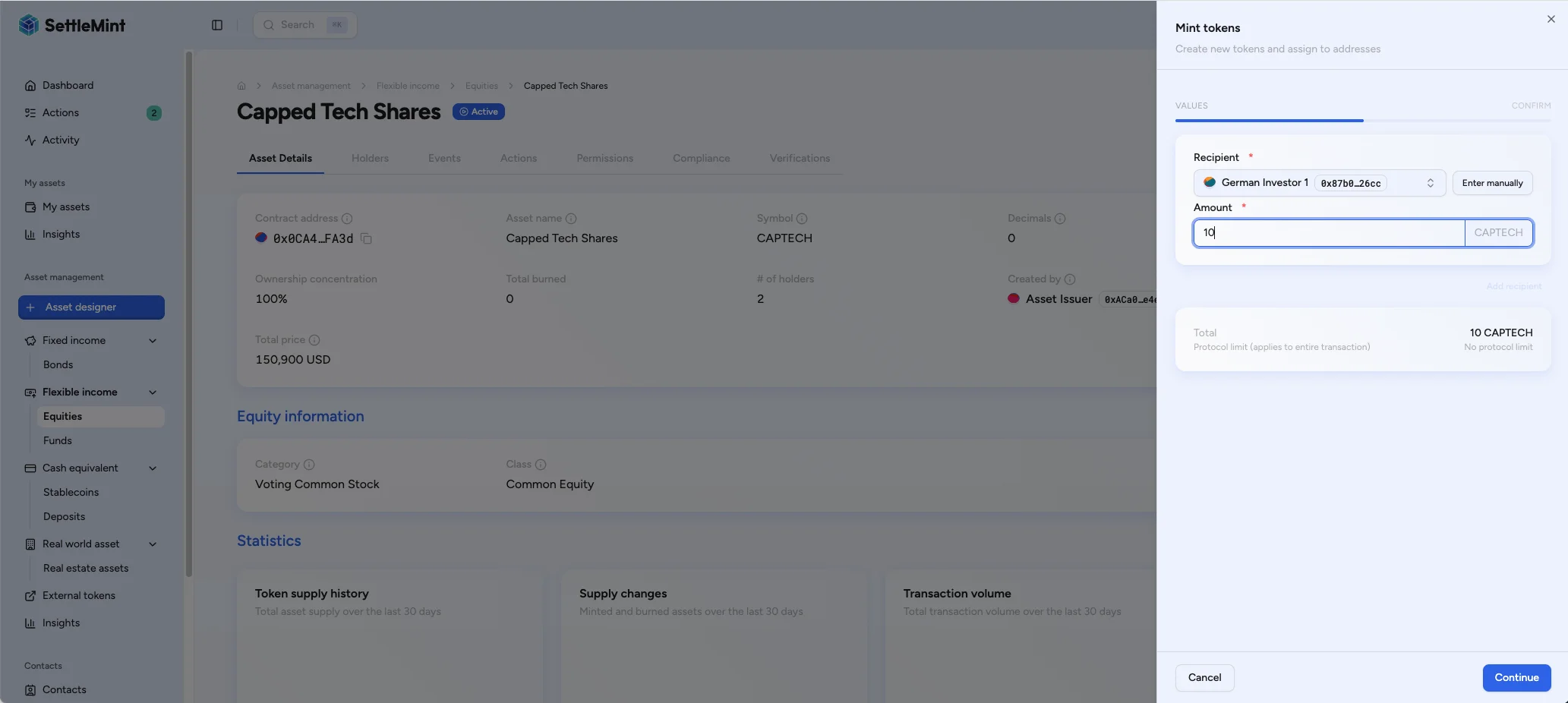
Before the console lets you continue, each row must have a valid EVM recipient address and a positive amount. The form totals all rows, compares the request with the active protocol limit when a positive remaining limit is available, and shows the projected supply change on the confirmation step.
When the console reports a positive protocol limit, that limit reflects the most restrictive active mint boundary for the asset. For a capped asset, the value is the remaining cap. For an asset with collateral controls, the value is the remaining collateral-backed mintable supply. If both apply, the lower value wins. If no positive protocol limit is shown, verify cap and collateral headroom before submitting the mint.
The console can also show the mint fee and the net amount each recipient receives when the asset has a mint transaction fee. For self-mints, the form checks the connected wallet's fee-token balance and allowance before submission. For third-party recipients, confirm their fee-token readiness before you submit.
Steps
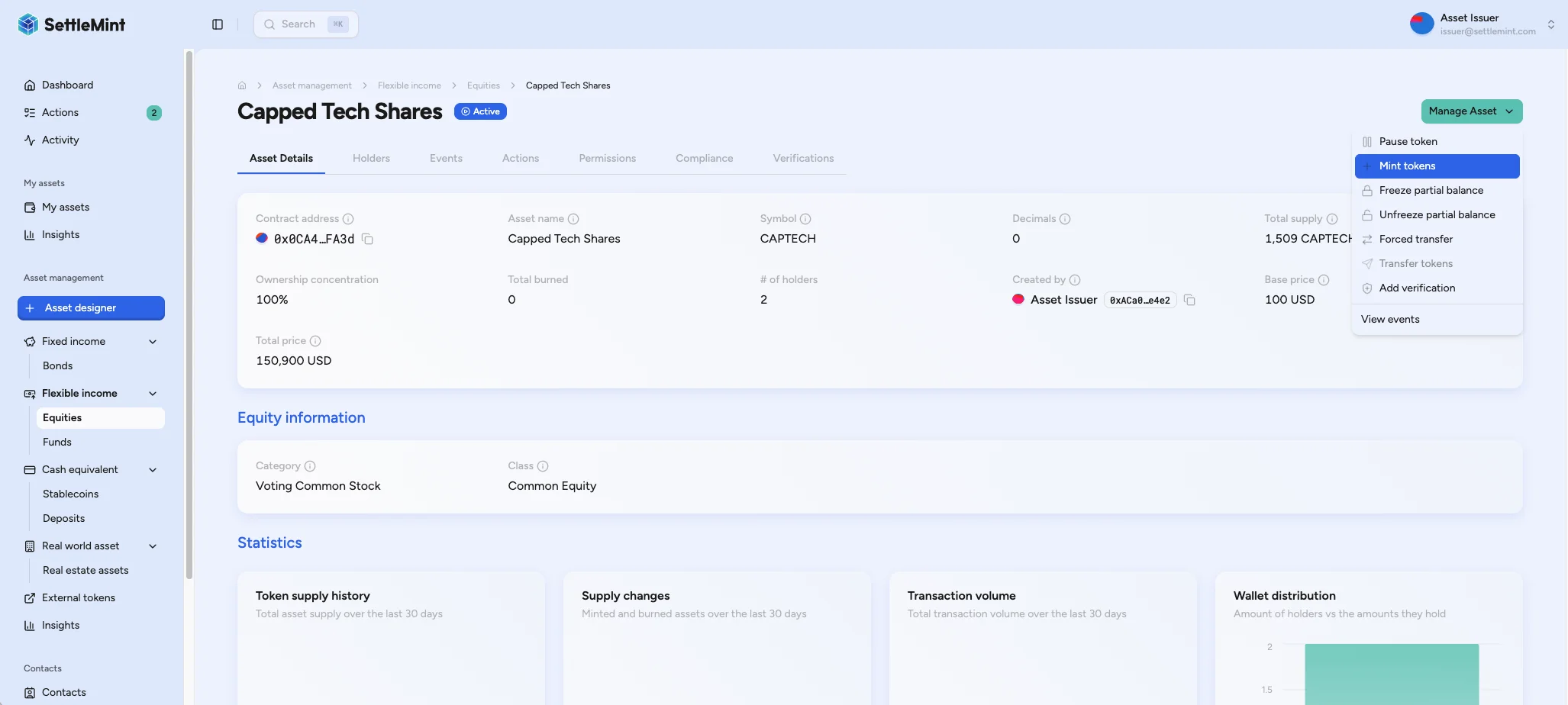
Enter recipient rows
Select a recipient address and enter a positive mint amount. Add one row per recipient when the issuance should credit multiple wallets in one submission.
Confirm and submit
Review the recipients, total mint amount, projected total supply, fee preview, and wallet verification challenge. Submit only when the recipient setup, protocol limit, and fee readiness match the intended issuance.
If you mint to your connected wallet and the asset charges an external transaction fee, the confirmation screen checks your fee-token balance and allowance before you submit. If the balance is sufficient but the allowance is too low, use Approve fee allowance from the confirmation screen, then return to the mint confirmation.
If you mint to another wallet, confirm that recipient's fee-token balance and allowance before submitting because third-party wallets are not checked in the confirmation screen.
Troubleshooting
| Issue | Solution |
|---|---|
| Mint button disabled | Verify SUPPLY_MANAGEMENT_ROLE assignment and confirm collateral backing for collateralized assets |
| Recipient not eligible | Check that the recipient wallet is registered to an OnchainID, has the required verification claims, and received those claims from trusted issuers |
| No claim fallback | For assets with a capital-raise limit, add a base-price feed for the asset or issue the configured base-price claim to the asset token identity before minting |
| Exceeds supply cap | Reduce amount or request cap increase |
| Insufficient collateral | Issue a new collateral verification with higher amount |
| External fee warning | Fund the connected wallet with the fee token, or approve the external fee feature to collect the mint fee. |